AI agent for catering managers
Final Headcount Lock and Order Adjustment Agent
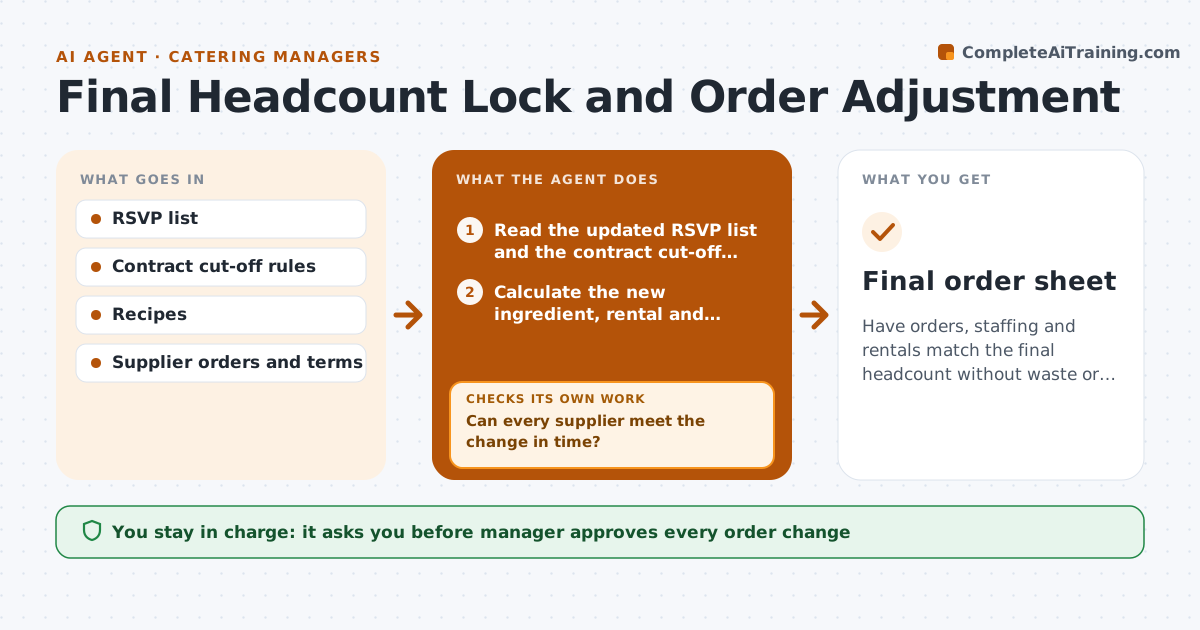
Have orders, staffing and rentals match the final headcount without waste or shortages.
What it does
RSVPs keep changing until the day before, while ingredient orders and staffing are already set. The agent tracks RSVP changes against the contract and applies the cut-off rules, such as the date by which the count can no longer go down. At each change, it recalculates ingredient quantities, rentals and staffing from the recipes and ratios. It then updates the supplier orders, and checks each supplier's reply for what can still change. If a supplier cannot meet the change, such as a special item that is already cut, it proposes alternatives from other suppliers or menu substitutions. After the cut-off, it locks the count and lists the final orders. Edge case: a count increase after the lock. The agent calculates the extra cost and asks. The manager approves the order change.
How it works
Follow the arrows from top to bottom. The orange dashed arrow is the loop: when a check fails, the agent goes back and tries again.
Read the steps as a list
- RSVP count changes
- Read the updated RSVP list and the contract cut-off rules
- Calculate the new ingredient, rental and staffing needs
- Compare with the current orders and list differences
- Draft the order changes for each supplier
- Manager approves the order changeThe agent waits here for your OK.
- Send the changes and read the supplier replies
- Can every supplier meet the change in time?If not: find alternatives from other suppliers or propose a menu substitution. Back to step 4.
- Lock the final count after the cut-off and confirm the orders
- Do the confirmed orders match the locked count?If not: recalculate and correct the differences. Back to step 3.
- Final order sheet
How it decides
Quantities follow recipe yields for the current count with a set buffer. A change after the cut-off is priced as an exception and approved by the manager.
- Apply a 5 percent buffer to perishable items
- Lock the count at the cut-off in the contract
- Price any increase after the lock as an exception
- Reduce orders only if the supplier terms allow it
Make it yours
Every agent is a starting point. You choose these settings for your own situation.
- Perishable buffer (default 5 percent)
- Cut-off date rule
- Suppliers and alternatives
- Staffing ratios
- Exception pricing
What keeps you in control
It always asks you first
- Manager approves every order change
- Manager approves exceptions after the lock
Hard limits
- Never send supplier orders without approval
- Do not change the contract terms
It stops when
- Done: final orders confirmed for the locked count
- Stop: supplier cannot supply a key item and no substitute is accepted, ask the chef
Set it up
We guide you through the set-up, step by step
Members get the full set-up guide for this agent. No technical skills needed: you copy, paste and upload.
- One set of instructions to paste into your AI, with the clicks for ChatGPT, Claude, Microsoft 365 Copilot, Gemini and Grok
- The agent then walks you through connecting your own data, one source at a time
- A downloadable copy with the flow chart, the rules and the full guide