AI agent for call center supervisors
Follow-the-Sun Support Coverage Agent
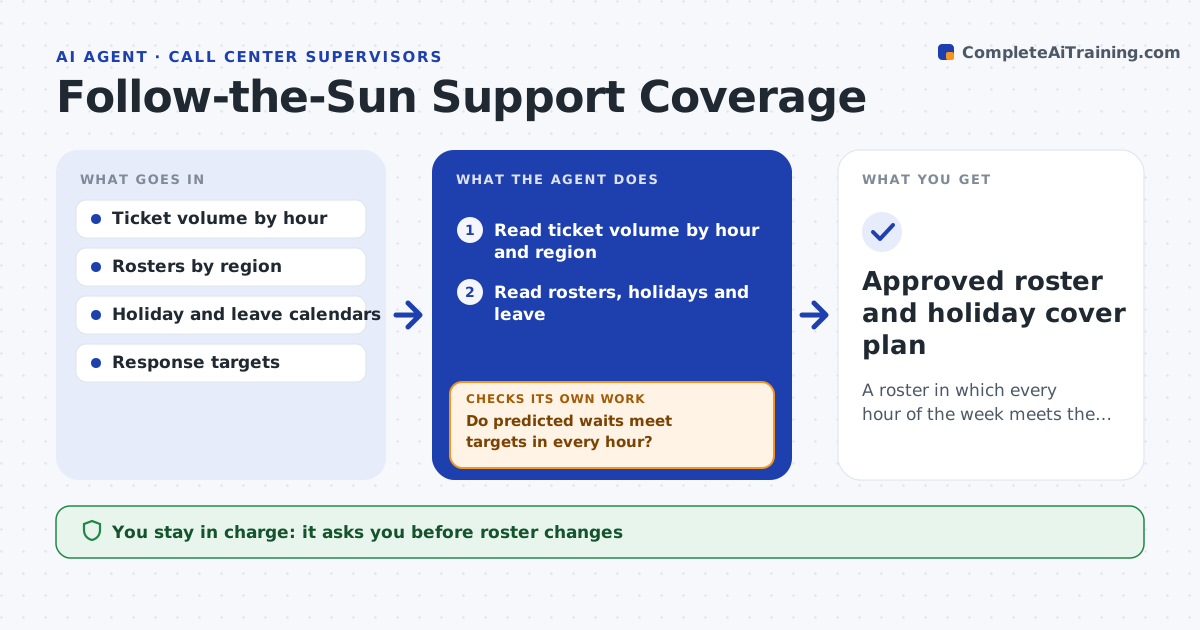
A roster in which every hour of the week meets the response target, including holidays
What it does
When the Singapore team goes home and London is still asleep, tickets wait. This agent reads ticket volumes by hour of day, the current rosters in each region and the public holidays and leave calendar. It finds the hours and days with too few people for the expected volume and simulates schedule changes, such as shifting a shift two hours or covering a holiday from another region. For each change it simulates, it checks the predicted wait times against the targets, and it keeps adjusting until every hour meets them or the options run out. It then writes a proposed roster with the trade-offs. The head of support approves roster changes. Edge case: a holiday that affects two regions at once is flagged early so cover can be arranged weeks ahead.
How it works
Follow the arrows from top to bottom. The orange dashed arrow is the loop: when a check fails, the agent goes back and tries again.
Read the steps as a list
- Monthly planning run
- Read ticket volume by hour and region
- Read rosters, holidays and leave
- Find hours and days with too little coverage
- Simulate changes such as shift moves or cross-region cover
- Do predicted waits meet targets in every hour?If not: try another combination of changes and simulate again. Back to step 4.
- Do the changes respect local working hours and rest rules?If not: drop the offending change and simulate the next option. Back to step 4.
- Write the proposed roster with trade-offs
- Head of support approves the roster changesThe agent waits here for your OK.
- Approved roster and holiday cover plan
How it decides
An hour is covered when the simulated wait time is under the target at expected volume plus a buffer. Changes that break local working hours rules are rejected.
- Plan for expected volume plus 15 percent
- Treat a wait over the target for 2 hours in a row as a gap
- Never schedule beyond local limits on hours or rest
- Flag holidays 4 weeks ahead
Make it yours
Every agent is a starting point. You choose these settings for your own situation.
- Response target per priority
- Volume buffer (default 15 percent)
- Regions and rosters in scope
- Rules on hours and rest per country
What keeps you in control
It always asks you first
- Roster changes
- Any overtime or on-call pay arrangement
Hard limits
- Never changes rosters itself
- Never schedules people beyond local labor rules
It stops when
- Done: all hours meet targets or the gap is documented
- Stop: roster or ticket data is missing for a region
Set it up
We guide you through the set-up, step by step
Members get the full set-up guide for this agent. No technical skills needed: you copy, paste and upload.
- One set of instructions to paste into your AI, with the clicks for ChatGPT, Claude, Microsoft 365 Copilot, Gemini and Grok
- The agent then walks you through connecting your own data, one source at a time
- A downloadable copy with the flow chart, the rules and the full guide