AI agent for freight brokers
Freight Claim Handling Agent
Move each cargo claim to resolution with complete documents and no missed deadlines
What it does
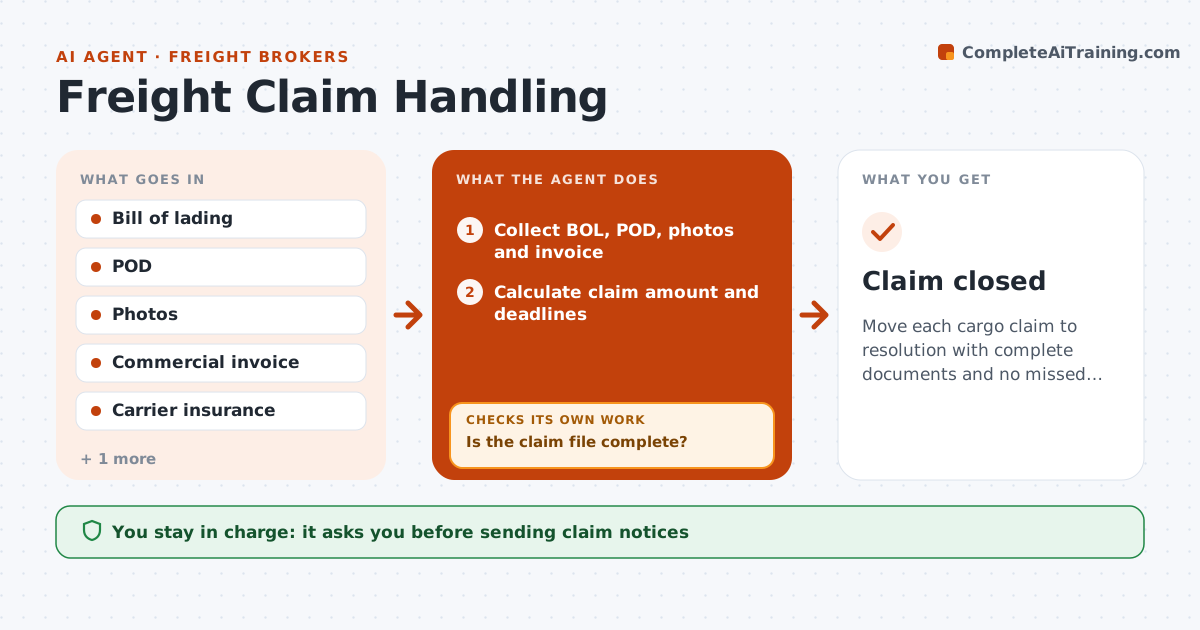
When a shipper reports damage or shortage, the broker sits between the shipper and the carrier and must move the claim quickly. This agent opens a claim file and collects the bill of lading, the POD with any exceptions, photos, the commercial invoice for the goods and the carrier's insurance details. It checks the file is complete; missing documents are requested from the shipper or carrier. It calculates the claim amount from the commercial invoice, not retail price, and works out deadlines from the contract and rules. It drafts the claim notice to the carrier and insurer for broker approval. If the carrier has not acknowledged within 30 days, it sends a follow-up and escalates to the insurer. The broker approves every notice and any settlement. Edge case: concealed damage found after a clean receipt needs an inspection request within contract time.
How it works
Follow the arrows from top to bottom. The orange dashed arrow is the loop: when a check fails, the agent goes back and tries again.
Read the steps as a list
- Shipper reports a cargo problem
- Collect BOL, POD, photos and invoice
- Is the claim file complete?If not: request missing documents from shipper or carrier. Back to step 2.
- Calculate claim amount and deadlines
- Draft the claim notice to the carrier and insurer
- Broker approves the noticeThe agent waits here for your OK.
- Has the carrier responded within 30 days?If not: send a follow-up and escalate to the insurer. Back to step 5.
- Broker approves any settlementThe agent waits here for your OK.
- Claim closed
How it decides
The claim file is complete when BOL, POD, value proof and photos are present. Deadlines come from the contract and the applicable rules.
- Concealed damage requires inspection request within contract time
- Value proof is the commercial invoice, not retail price
- Follow up at 30 days without acknowledgment
Make it yours
Every agent is a starting point. You choose these settings for your own situation.
- Claim deadline rules
- Follow-up interval (default 30 days)
- Required documents
- Settlement approval limit
What keeps you in control
It always asks you first
- Sending claim notices
- Accepting or offering a settlement
Hard limits
- Never admits liability on the broker's behalf
- Never settles without approval
It stops when
- Done: claim paid or denied with reason
- Stop: shipper withdraws
Set it up
We guide you through the set-up, step by step
Members get the full set-up guide for this agent. No technical skills needed: you copy, paste and upload.
- One set of instructions to paste into your AI, with the clicks for ChatGPT, Claude, Microsoft 365 Copilot, Gemini and Grok
- The agent then walks you through connecting your own data, one source at a time
- A downloadable copy with the flow chart, the rules and the full guide