AI agent for videographers
Gear Checklist and Equipment Reservation Agent
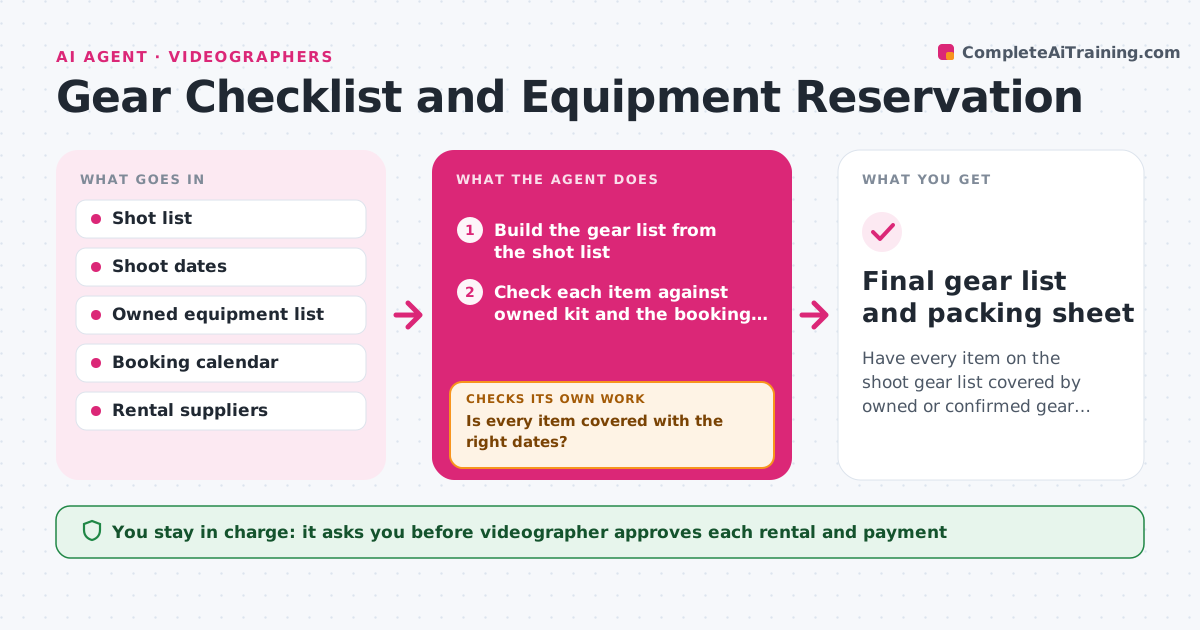
Have every item on the shoot gear list covered by owned or confirmed gear with no double bookings.
What it does
Your kit changes with every shoot, and twice this year the right lens was in a different job's case. This agent reads the shot list and builds the gear list from it, such as cameras, lenses, lights, microphones, batteries and media cards. It checks each item against your owned kit and your calendar of bookings, then against local rental houses for what is missing. It flags shortages and conflicts, for example a gimbal booked on the same day for another job. It drafts rental requests with dates and prices. After confirmations arrive, it checks the list again to make sure every item is covered by owned, reserved or confirmed gear and that pickup times fit the schedule. The videographer approves rentals and payment. Edge case: a rental is confirmed for the wrong day, so the agent flags it.
How it works
Follow the arrows from top to bottom. The orange dashed arrow is the loop: when a check fails, the agent goes back and tries again.
Read the steps as a list
- Shoot confirmed with shot list
- Build the gear list from the shot list
- Check each item against owned kit and the booking calendar
- Mark items as free, conflicting or missing
- Find rental options and prices for missing items
- Draft rental requests with dates and pickup times
- Videographer approves rentals and paymentThe agent waits here for your OK.
- Record confirmations and update the calendar
- Is every item covered with the right dates?If not: find another supplier or move the item to the next best option, then draft a new request. Back to step 4.
- Do pickup and return times fit the schedule?If not: propose a different pickup slot and redraft the request. Back to step 6.
- Final gear list and packing sheet
How it decides
It maps each shot to required gear, then marks each item as owned and free, owned but booked, or missing. Missing and booked items go to rental, cheapest within the pickup window first.
- Add a spare battery set for every camera and light
- Treat gear booked within 12 hours of the shoot as a conflict
- Choose the rental with pickup closest to the venue when prices are within 10%
- Require a backup microphone for interview shoots
Make it yours
Every agent is a starting point. You choose these settings for your own situation.
- Owned equipment list
- Preferred rental suppliers
- Spare gear rules
- Buffer before the shoot for pickups (default 12 hours)
- Packing sheet format
What keeps you in control
It always asks you first
- Videographer approves each rental and payment
Hard limits
- Never pay for or confirm a rental
- Never remove an item from the list to make it fit
It stops when
- Done: every item is covered and the packing sheet is made
- Stop: a key item cannot be found anywhere before the shoot date
Set it up
We guide you through the set-up, step by step
Members get the full set-up guide for this agent. No technical skills needed: you copy, paste and upload.
- One set of instructions to paste into your AI, with the clicks for ChatGPT, Claude, Microsoft 365 Copilot, Gemini and Grok
- The agent then walks you through connecting your own data, one source at a time
- A downloadable copy with the flow chart, the rules and the full guide