AI agent for director of its
Hardware Refresh Planning Agent
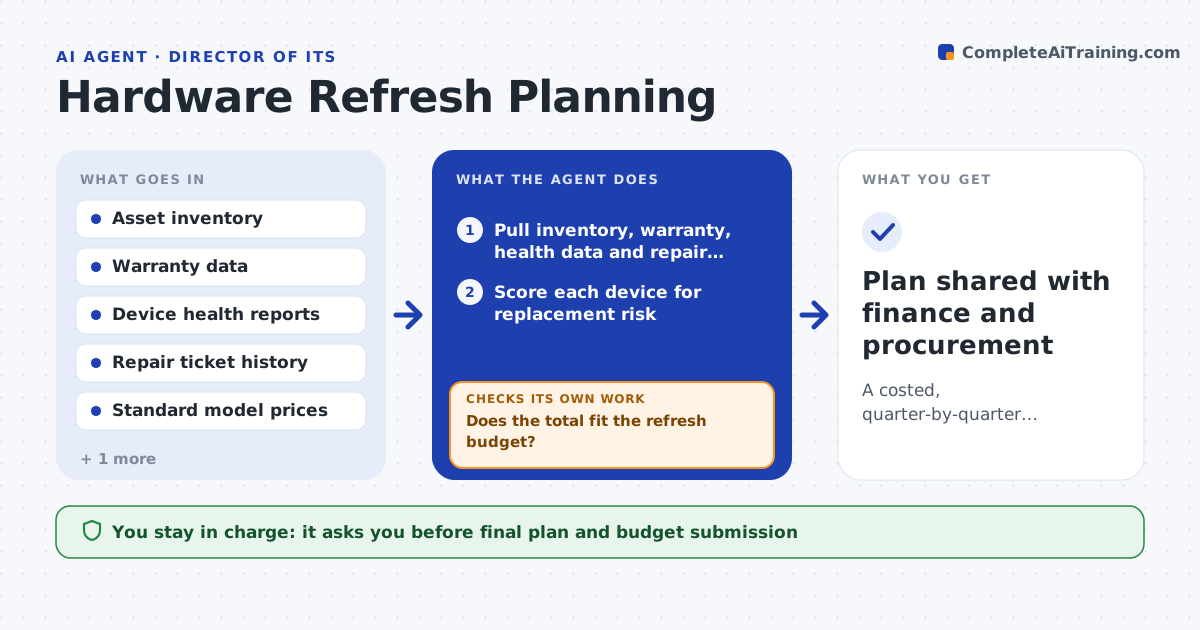
A costed, quarter-by-quarter replacement plan that fits the budget
What it does
Devices are often replaced only when they break, which surprises the budget and costs users lost work. Each year IT needs a plan for which devices to replace and when. This agent reads the asset inventory, warranty dates, age, repair tickets and health data such as battery wear and disk errors. It scores each device, picks the ones due in the next budget period and groups them by site and quarter so rollouts are manageable. It prices the list using your standard models. Then it checks the total against the budget. If the total is too high, it moves the lowest-risk devices to the next period and recalculates until it fits or gets as close as possible. You approve the plan before any orders are placed. Edge case: a device under warranty but with three repair tickets in six months is flagged anyway, because warranty does not cover lost time.
How it works
Follow the arrows from top to bottom. The orange dashed arrow is the loop: when a check fails, the agent goes back and tries again.
Read the steps as a list
- Budget planning cycle opens
- Pull inventory, warranty, health data and repair tickets
- Score each device for replacement risk
- Group devices due by site and quarter
- Price the list with standard models
- Does the total fit the refresh budget?If not: defer the lowest-scoring devices to the next period and regroup. Back to step 4.
- IT manager approves the refresh planThe agent waits here for your OK.
- Plan shared with finance and procurement
How it decides
Each device gets a risk score from age, warranty status, health readings and repair count. Highest scores are replaced first until the budget is used.
- Replace devices older than the set age unless health is good
- Always flag devices with three or more repairs in six months
- Defer lowest-risk devices first when over budget
Make it yours
Every agent is a starting point. You choose these settings for your own situation.
- Age limit for each device type (default 4 years for laptops)
- Health signals to use
- Refresh budget and periods
- Standard models and prices
What keeps you in control
It always asks you first
- Final plan and budget submission
- Placing any order
Hard limits
- Never places orders
- Does not wipe or retire devices
It stops when
- Done: plan fits budget and is approved
- Stop: inventory is missing more than 10% of devices
Set it up
We guide you through the set-up, step by step
Members get the full set-up guide for this agent. No technical skills needed: you copy, paste and upload.
- One set of instructions to paste into your AI, with the clicks for ChatGPT, Claude, Microsoft 365 Copilot, Gemini and Grok
- The agent then walks you through connecting your own data, one source at a time
- A downloadable copy with the flow chart, the rules and the full guide