AI agent for engineering managers
Hiring Plan Versus Budget Agent
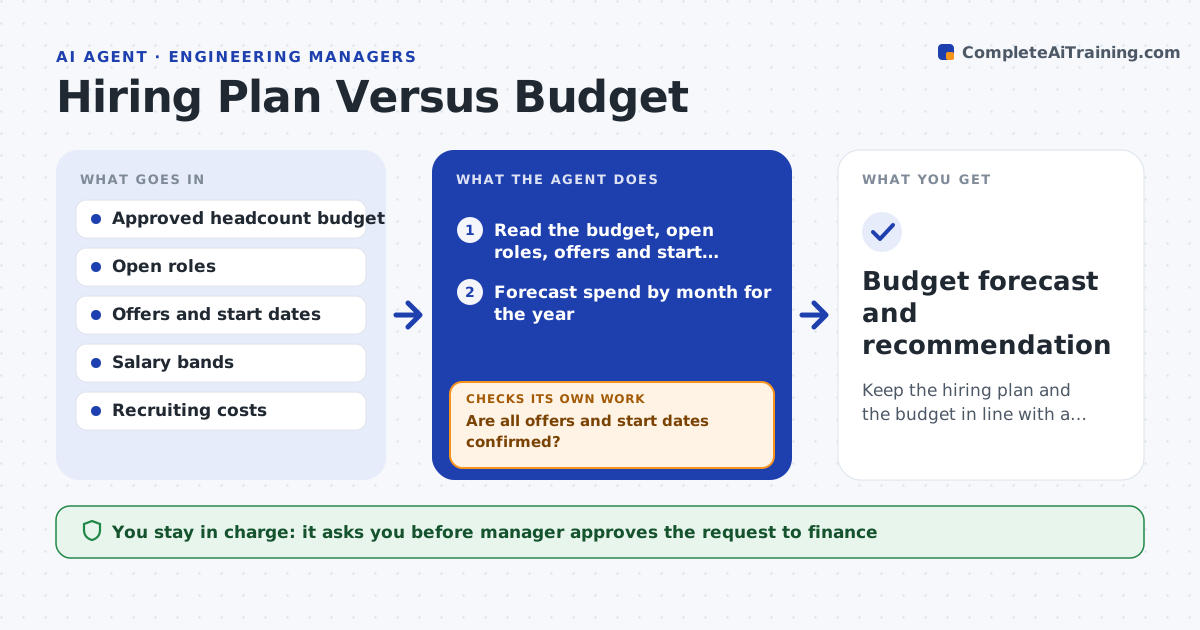
Keep the hiring plan and the budget in line with a forecast the manager can defend
What it does
Hiring slips by two months, an offer comes in above the band, and the budget forecast no longer matches reality. Each month this agent compares open roles, accepted offers and expected start dates with the approved budget. It forecasts spend for the year using salary, start date and recruiting costs, and shows variance by month. It flags overruns, such as an offer above band or two hires starting in the same month, and gaps, such as budget left unused. It then tests scenarios, such as delaying one start by two months or replacing a senior role with a mid-level one, and recomputes the forecast. The manager approves any request to finance. Edge case: an offer was accepted but the start date is unknown, so the agent uses the typical notice period and flags it.
How it works
Follow the arrows from top to bottom. The orange dashed arrow is the loop: when a check fails, the agent goes back and tries again.
Read the steps as a list
- Monthly review
- Read the budget, open roles, offers and start dates
- Forecast spend by month for the year
- Flag overruns and unused budget
- Are all offers and start dates confirmed?If not: use typical durations for unknown dates, mark them, and ask the recruiter for confirmation. Back to step 2.
- Build scenarios such as delaying a start or changing a level
- Recompute the forecast for each scenario
- Does at least one scenario bring the year within budget?If not: add scenarios or prepare a request for more budget. Back to step 6.
- Manager approves the request to financeThe agent waits here for your OK.
- Budget forecast and recommendation
How it decides
It computes the forecast from confirmed dates and uses typical durations for unknown ones, and flags months where spend is more than the set variance from budget.
- Flag a month where spend differs from budget by over 5%
- Flag any offer above the salary band
- Use a 30 day notice for unknown start dates
- Include recruiter fees and equipment in the cost
Make it yours
Every agent is a starting point. You choose these settings for your own situation.
- Variance flag (default 5%)
- Cost items included
- Default notice period
- Scenarios to test
- Report recipients
What keeps you in control
It always asks you first
- Manager approves the request to finance
- Finance partner approves budget changes
Hard limits
- Never send salary details outside the approved group
- Never commit to an offer
It stops when
- Done: the plan fits the budget or the request is sent
- Stop: the budget is frozen and hiring is paused
Set it up
We guide you through the set-up, step by step
Members get the full set-up guide for this agent. No technical skills needed: you copy, paste and upload.
- One set of instructions to paste into your AI, with the clicks for ChatGPT, Claude, Microsoft 365 Copilot, Gemini and Grok
- The agent then walks you through connecting your own data, one source at a time
- A downloadable copy with the flow chart, the rules and the full guide