AI agent for hr analysts
Hiring Stage Adverse Impact Check Agent
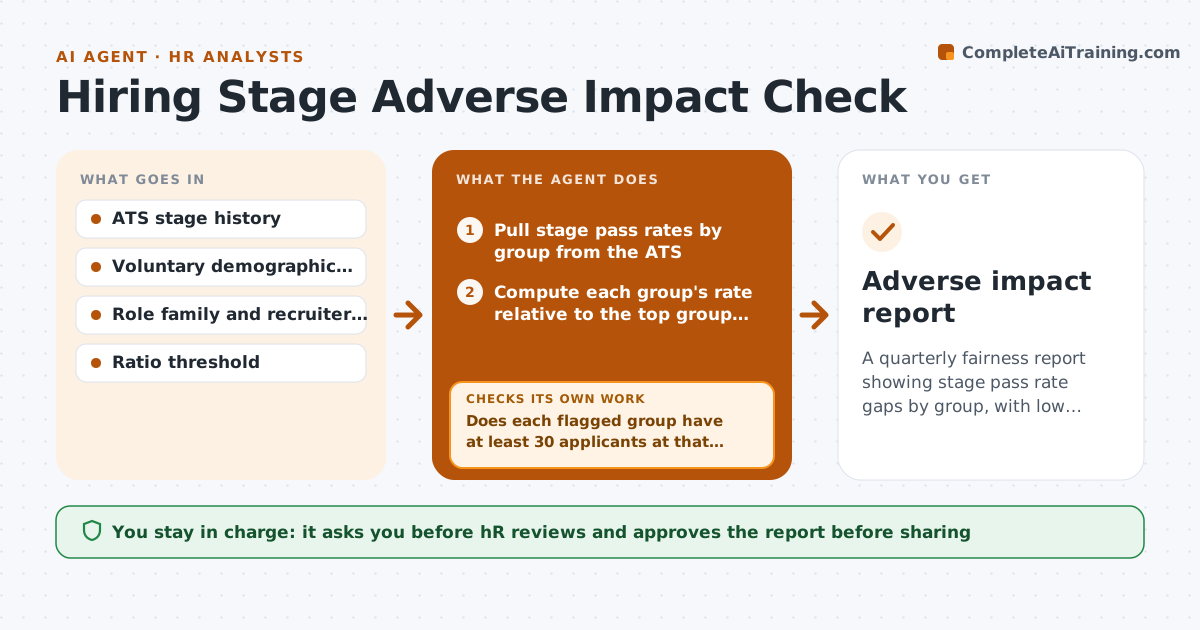
A quarterly fairness report showing stage pass rate gaps by group, with low confidence results clearly marked, ready for HR review.
What it does
You report hiring volume every quarter, but nobody checks whether some groups are screened out at higher rates. This agent runs each quarter. It pulls pass rates for every stage by voluntary demographic data where it was collected, and compares each group with the highest passing group using a ratio threshold you set. Where a stage falls below the threshold, it drills into role family and recruiter to see where the gap sits. It then rechecks sample sizes and marks small samples as low confidence. HR reviews every finding and decides what to change. Edge case: a role with 12 applicants in a group can swing the ratio by chance, so the agent adds the prior two quarters before reporting.
How it works
Follow the arrows from top to bottom. The orange dashed arrow is the loop: when a check fails, the agent goes back and tries again.
Read the steps as a list
- Quarter closes
- Pull stage pass rates by group from the ATS
- Compute each group's rate relative to the top group at each stage
- Flag stages below the ratio threshold
- Does each flagged group have at least 30 applicants at that stage?If not: Add the previous two quarters, and mark as low confidence if still small. Back to step 3.
- Drill into role family and recruiter for flagged stages
- Write plain language findings without naming candidates
- Do the drill-down numbers add up to the stage totals?If not: Rebuild the counts and rerun the comparison. Back to step 2.
- HR reviews findings and decides on any process changeThe agent waits here for your OK.
- Adverse impact report
How it decides
It flags a stage when a group's pass rate is below the threshold (default four fifths) of the top group, and only calls it reliable with enough applicants.
- Flag when ratio is below 0.80
- Mark low confidence under 30 applicants in the group at that stage
- Report counts, never individual candidates
- Use only voluntary data and exclude records with unknown group
Make it yours
Every agent is a starting point. You choose these settings for your own situation.
- Ratio threshold (default 0.80)
- Minimum group size (default 30)
- Stages to include
- Groups to compare
- Who receives the report
What keeps you in control
It always asks you first
- HR reviews and approves the report before sharing
- HR decides any process change
Hard limits
- Never name or rank individual recruiters in shared output
- Never use demographic data for anything but this audit
It stops when
- Done: report reviewed by HR
- Stop: demographic data coverage below 50% of applicants
Set it up
We guide you through the set-up, step by step
Members get the full set-up guide for this agent. No technical skills needed: you copy, paste and upload.
- One set of instructions to paste into your AI, with the clicks for ChatGPT, Claude, Microsoft 365 Copilot, Gemini and Grok
- The agent then walks you through connecting your own data, one source at a time
- A downloadable copy with the flow chart, the rules and the full guide