AI agent for urban planners
Housing Production Progress Agent
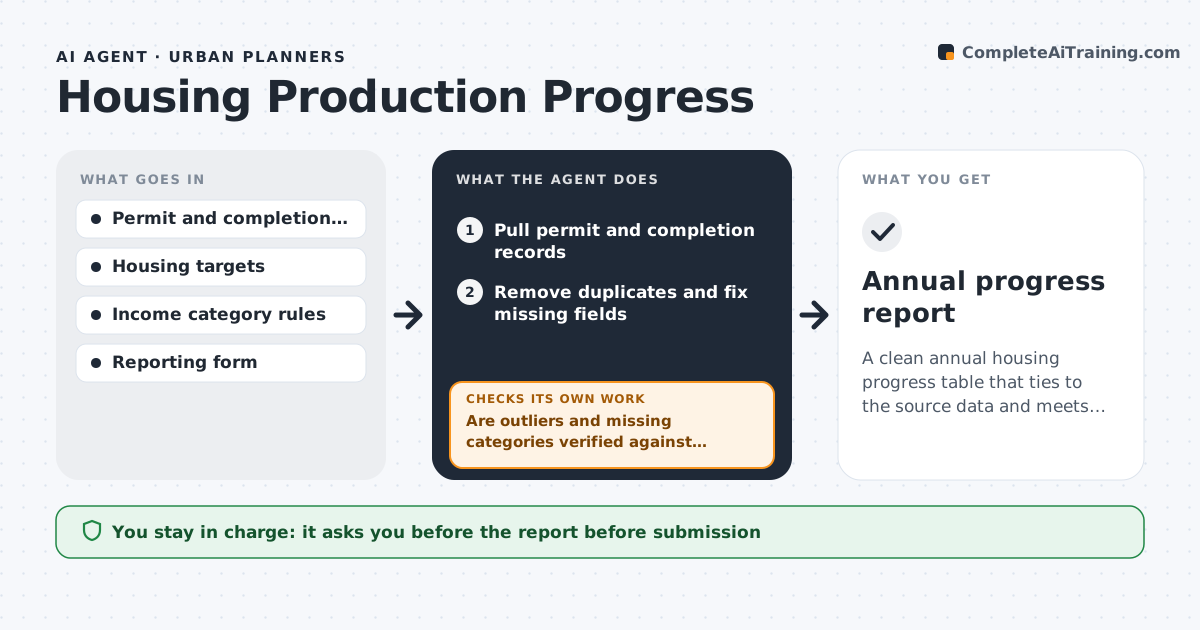
A clean annual housing progress table that ties to the source data and meets the reporting format
What it does
Annual housing reports are due to the state, but permit and completion data live in different systems and rarely agree. This agent pulls permits issued and completions from the permit system and maps them against housing targets by income category and area. It checks data quality, looking for missing income levels, duplicate addresses, wrong units and projects counted twice. It rechecks outliers, such as a project with 400 units in one record, against the source files. It then drafts the annual report table and the progress chart. It checks that the totals tie to the permit system and that every category matches the form the state requires. The planner approves. Edge case: an accessory dwelling unit with no income category is assigned using the method the state allows.
How it works
Follow the arrows from top to bottom. The orange dashed arrow is the loop: when a check fails, the agent goes back and tries again.
Read the steps as a list
- Quarterly update or annual report period
- Pull permit and completion records
- Remove duplicates and fix missing fields
- Assign each unit to an income category and area
- Are outliers and missing categories verified against source files?If not: read the source file and correct or exclude the record. Back to step 3.
- Map totals against targets by category and area
- Do totals tie to the permit system export?If not: find the difference by project and correct the table. Back to step 4.
- Draft the report table and the progress chart
- Planner approves the reportThe agent waits here for your OK.
- Annual progress report
How it decides
Each unit is counted once, by the right category and year. Outliers and records with missing fields are verified against source files before they are counted.
- Count a unit once in the year its permit or completion is issued
- Verify any record above 200 units against the source
- Use the state method for units without an income category
- Mark categories under 50% of the target as behind pace
Make it yours
Every agent is a starting point. You choose these settings for your own situation.
- Reporting form and categories
- Outlier size to verify (default 200 units)
- Data sources
- Update frequency
What keeps you in control
It always asks you first
- The report before submission
Hard limits
- Never submits the report
- Does not change records in the permit system
It stops when
- Done: the report ties out and is approved
- Stop: permit data is missing for a period
Set it up
We guide you through the set-up, step by step
Members get the full set-up guide for this agent. No technical skills needed: you copy, paste and upload.
- One set of instructions to paste into your AI, with the clicks for ChatGPT, Claude, Microsoft 365 Copilot, Gemini and Grok
- The agent then walks you through connecting your own data, one source at a time
- A downloadable copy with the flow chart, the rules and the full guide