AI agent for freelancers
Illustration Commission Tracking Agent
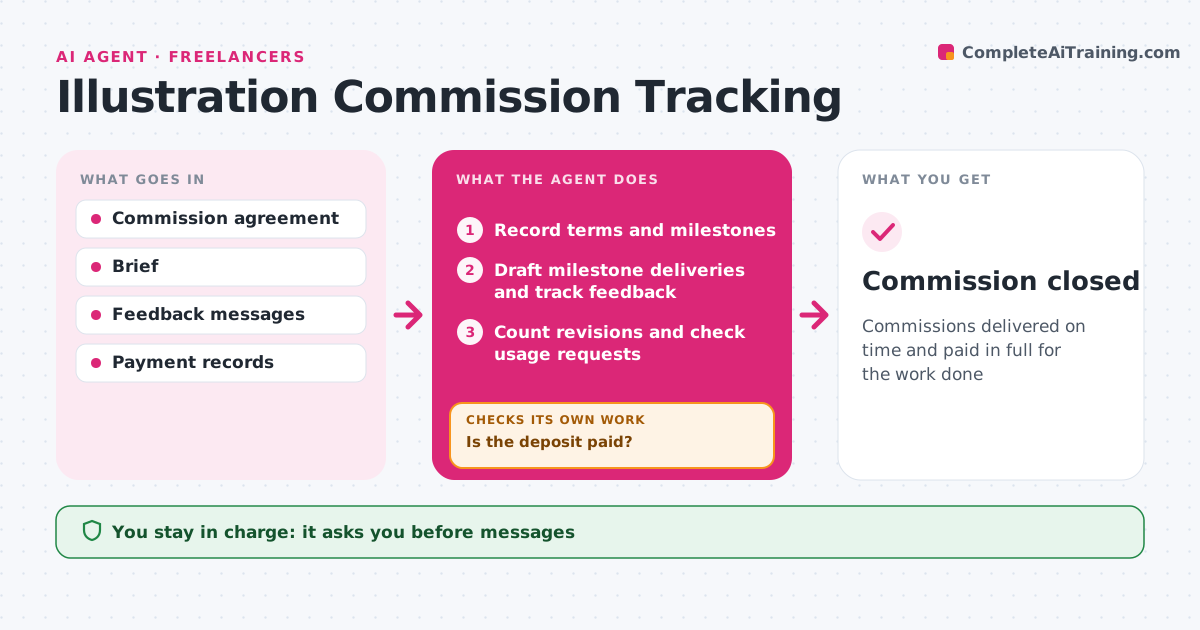
Commissions delivered on time and paid in full for the work done
What it does
Commission work slips when terms live in emails: extra revision rounds get done for free and usage creeps past what was paid for. When a commission is agreed, this agent records the brief, fee, deposit, usage rights, revision rounds and milestones such as sketch, color and final. It checks that the deposit has arrived before any work starts. If not, it drafts a friendly reminder and waits. At each milestone it drafts the delivery message, logs the client's feedback and counts revision rounds against the agreement. Requests beyond the agreed rounds or for wider usage get flagged with a quote draft instead of a quiet yes. Before closing, it checks that the final invoice matches the agreement plus any approved extras. The illustrator approves every message and invoice. Edge case: a client who wants editorial art on merchandise gets an extended license quote.
How it works
Follow the arrows from top to bottom. The orange dashed arrow is the loop: when a check fails, the agent goes back and tries again.
Read the steps as a list
- Commission agreed
- Record terms and milestones
- Is the deposit paid?If not: draft a deposit reminder and wait. Back to step 2.
- Draft milestone deliveries and track feedback
- Count revisions and check usage requests
- Illustrator approves messages and extra quotesThe agent waits here for your OK.
- Draft final invoice
- Illustrator approves the invoiceThe agent waits here for your OK.
- Commission closed
How it decides
It counts rounds and usage against the agreement and quotes for anything beyond it.
- No work before deposit
- Extra rounds and usage are quoted
- Final files after full payment
Make it yours
Every agent is a starting point. You choose these settings for your own situation.
- Default rounds
- Deposit percentage
- Extra rates
- Reminder timing
What keeps you in control
It always asks you first
- Messages
- Quotes
- Invoices
Hard limits
- Never sends without approval
- Never releases final files before payment
It stops when
- Done: paid and delivered
- Stop: client cancels, apply kill fee terms
Set it up
We guide you through the set-up, step by step
Members get the full set-up guide for this agent. No technical skills needed: you copy, paste and upload.
- One set of instructions to paste into your AI, with the clicks for ChatGPT, Claude, Microsoft 365 Copilot, Gemini and Grok
- The agent then walks you through connecting your own data, one source at a time
- A downloadable copy with the flow chart, the rules and the full guide