AI agent for surgeons
Implant and Device Recall Check Agent
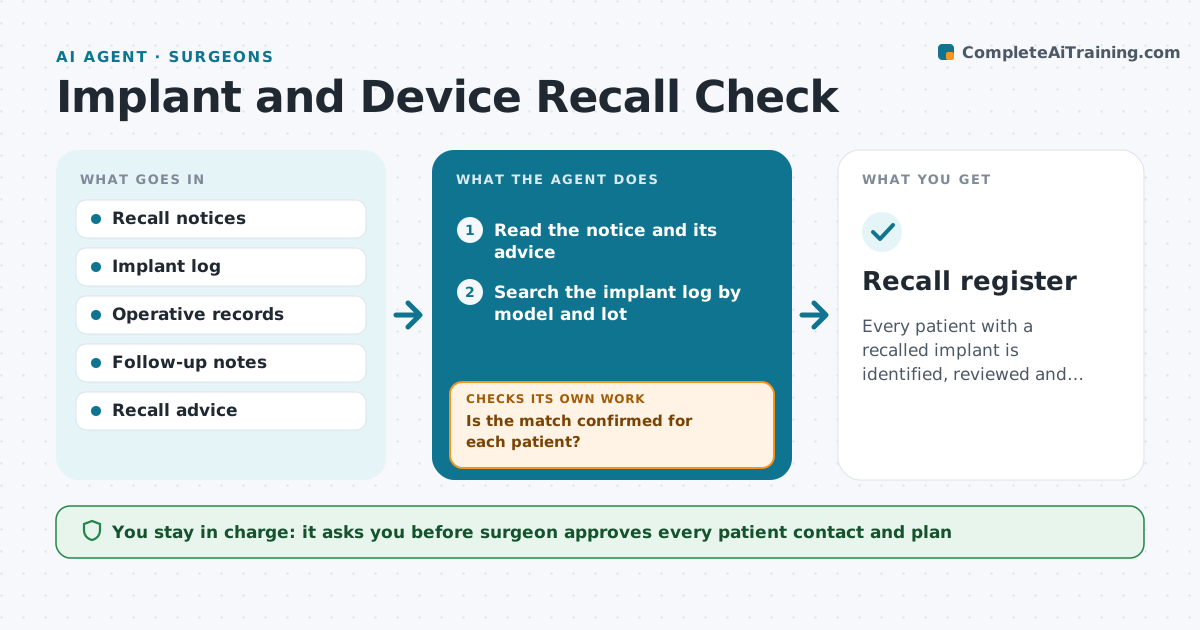
Every patient with a recalled implant is identified, reviewed and has an approved plan.
What it does
Device recalls are published often, but matching a recall to patients who have that implant takes a manual search of old records. The agent reads new recall notices, searches the implant log by model, lot and size, and lists the affected patients. It checks each patient's latest follow-up and the recall advice, and drafts a plan for each person. It rechecks the match against the operative record before anyone is contacted. The surgeon approves patient contact. Edge case: a recall that applies only to some lots, where the log has no lot recorded for an older patient.
How it works
Follow the arrows from top to bottom. The orange dashed arrow is the loop: when a check fails, the agent goes back and tries again.
Read the steps as a list
- New recall notice published
- Read the notice and its advice
- Search the implant log by model and lot
- List affected and possible patients
- Open each operative record to confirm the lot
- Is the match confirmed for each patient?If not: Mark unconfirmed ones and ask the theatre team for records. Back to step 5.
- Check the latest follow-up and draft a plan from the recall advice
- Surgeon approves patient contact and planThe agent waits here for your OK.
- Send contact and log it
- Are all affected patients contacted or scheduled?If not: Return to the list and chase the remaining patients. Back to step 3.
- Recall register
How it decides
It matches by manufacturer, model and lot, and treats a missing lot number as a possible match that needs checking in the operative record.
- Treat a missing lot as a possible match
- Check high-risk recalls the same day
- List patients lost to follow-up separately
- Keep a record for each notice
Make it yours
Every agent is a starting point. You choose these settings for your own situation.
- Recall sources
- Time to check high-risk notices
- Fields used to match
- Contact method
What keeps you in control
It always asks you first
- Surgeon approves every patient contact and plan
Hard limits
- Never contact a patient without approval
- Do not give clinical advice to a patient
It stops when
- Done: all affected patients contacted or scheduled
- Stop: the notice advises urgent action and the surgeon is called immediately
Set it up
We guide you through the set-up, step by step
Members get the full set-up guide for this agent. No technical skills needed: you copy, paste and upload.
- One set of instructions to paste into your AI, with the clicks for ChatGPT, Claude, Microsoft 365 Copilot, Gemini and Grok
- The agent then walks you through connecting your own data, one source at a time
- A downloadable copy with the flow chart, the rules and the full guide