AI agent for freight brokers
In-Transit Load Exception Agent
Catch and communicate every in-transit delay before the appointment is missed
What it does
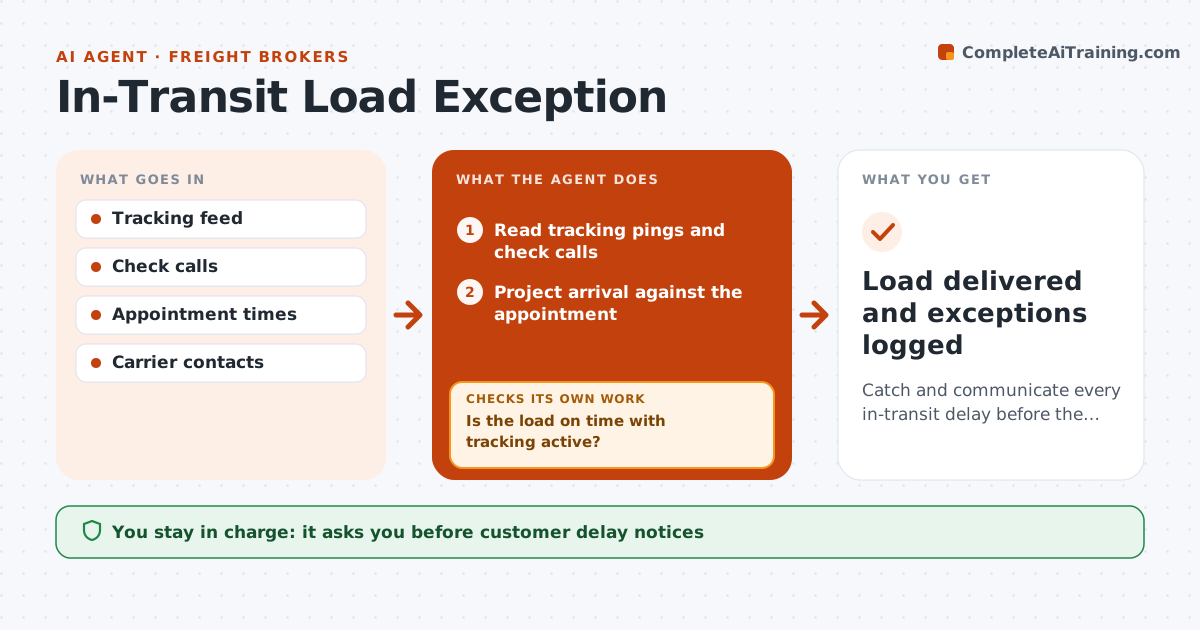
Once a load moves, brokers must know about delays before the customer does. This agent reads tracking pings and check calls for every active load and projects arrival against the appointment. Two missed pings mean tracking is silent, not delayed. If the load is behind or silent, it contacts the driver or dispatcher for an updated ETA and reason, then checks again. If the new ETA misses the appointment by more than 30 minutes, it drafts a shipper notice with options such as rescheduling. Detention or other added costs need broker approval. After delivery it checks the proof of delivery is in and logs the exception and cause. The broker approves customer messages and any accessorial charges. Edge case: a tracking device that stops reporting is treated as silent after two missed pings.
How it works
Follow the arrows from top to bottom. The orange dashed arrow is the loop: when a check fails, the agent goes back and tries again.
Read the steps as a list
- Load picked up
- Read tracking pings and check calls
- Project arrival against the appointment
- Is the load on time with tracking active?If not: contact the driver or dispatcher for an ETA and reason. Back to step 2.
- Draft a shipper notice with options when the appointment will be missed
- Broker approves customer notice and any accessorial chargesThe agent waits here for your OK.
- Is proof of delivery received after arrival?If not: request it from the carrier and keep the load open. Back to step 2.
- Log the exception and its cause
- Load delivered and exceptions logged
How it decides
It compares projected arrival with the appointment window. A projected miss or two missed pings triggers contact.
- Two missed pings means tracking is silent
- Projected arrival 30 minutes past the window triggers a shipper notice
- Detention requests need broker approval
Make it yours
Every agent is a starting point. You choose these settings for your own situation.
- Ping interval and silence threshold
- Late margin before notice (default 30 minutes)
- Contact method for drivers
- Customers needing proactive notices
What keeps you in control
It always asks you first
- Customer delay notices
- Accessorial charges
Hard limits
- Never commits to charges on the broker's behalf
- Never shares carrier rates with shippers
It stops when
- Done: proof of delivery received
- Stop: load cancelled
Set it up
We guide you through the set-up, step by step
Members get the full set-up guide for this agent. No technical skills needed: you copy, paste and upload.
- One set of instructions to paste into your AI, with the clicks for ChatGPT, Claude, Microsoft 365 Copilot, Gemini and Grok
- The agent then walks you through connecting your own data, one source at a time
- A downloadable copy with the flow chart, the rules and the full guide