AI agent for logistics planners
Incoterm Responsibility Check Agent
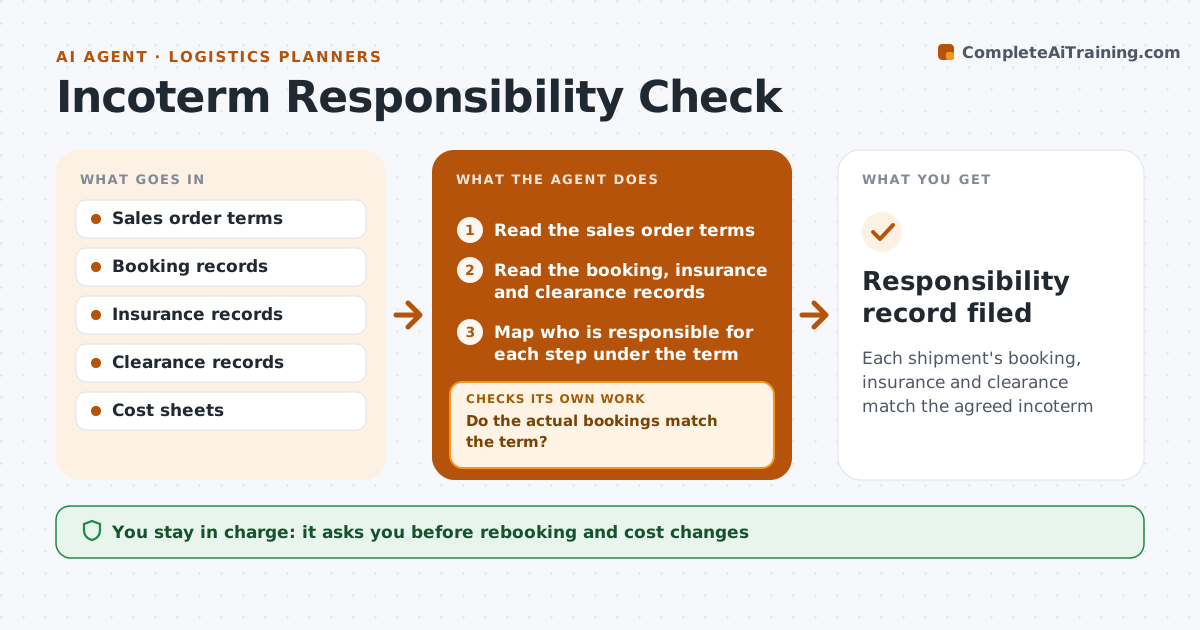
Each shipment's booking, insurance and clearance match the agreed incoterm
What it does
Costs and risk land on the wrong party when sales terms are misread. For each shipment, this agent checks the incoterm in the sales terms against who booked the freight, who insured it and who handled clearance. It finds mismatches, such as the seller booking freight under a term where the buyer should. It prepares a correction, such as a rebooking, a changed invoice or a cost transfer. After changes, it rechecks the booking and documents. The planner approves changes. Edge case: the order says FCA but the booking shows the seller paid main carriage, so the agent flags a possible cost to recharge.
How it works
Follow the arrows from top to bottom. The orange dashed arrow is the loop: when a check fails, the agent goes back and tries again.
Read the steps as a list
- A shipment is booked
- Read the sales order terms
- Read the booking, insurance and clearance records
- Map who is responsible for each step under the term
- Do the actual bookings match the term?If not: list the mismatch and the cost impact, then propose a correction. Back to step 4.
- Planner approves the correction or the rebookingThe agent waits here for your OK.
- Update the booking, the invoice or the cost transfer
- Recheck the records after the change
- Is the mismatch resolved?If not: escalate to the planner with the remaining gap. Back to step 4.
- Responsibility record filed
How it decides
A shipment passes when freight, insurance and clearance responsibilities match the term's rules. Mismatches are corrected before departure when possible.
- Flag any freight booked by the wrong party
- Flag missing insurance under terms that require it
- Estimate the cost of each mismatch
- Correct before departure when possible
Make it yours
Every agent is a starting point. You choose these settings for your own situation.
- Terms covered
- Cost threshold for review
- Records checked
- Departure cut-off
What keeps you in control
It always asks you first
- Rebooking and cost changes
Hard limits
- Never change a sales term
- Never recharge a customer without approval
It stops when
- Done: bookings match the term
- Stop: sales terms are missing
Set it up
We guide you through the set-up, step by step
Members get the full set-up guide for this agent. No technical skills needed: you copy, paste and upload.
- One set of instructions to paste into your AI, with the clicks for ChatGPT, Claude, Microsoft 365 Copilot, Gemini and Grok
- The agent then walks you through connecting your own data, one source at a time
- A downloadable copy with the flow chart, the rules and the full guide