AI agent for contract administrators
Insurance Certificate Tracker Agent
Every active vendor and tenant holds a valid certificate that meets the required limits
What it does
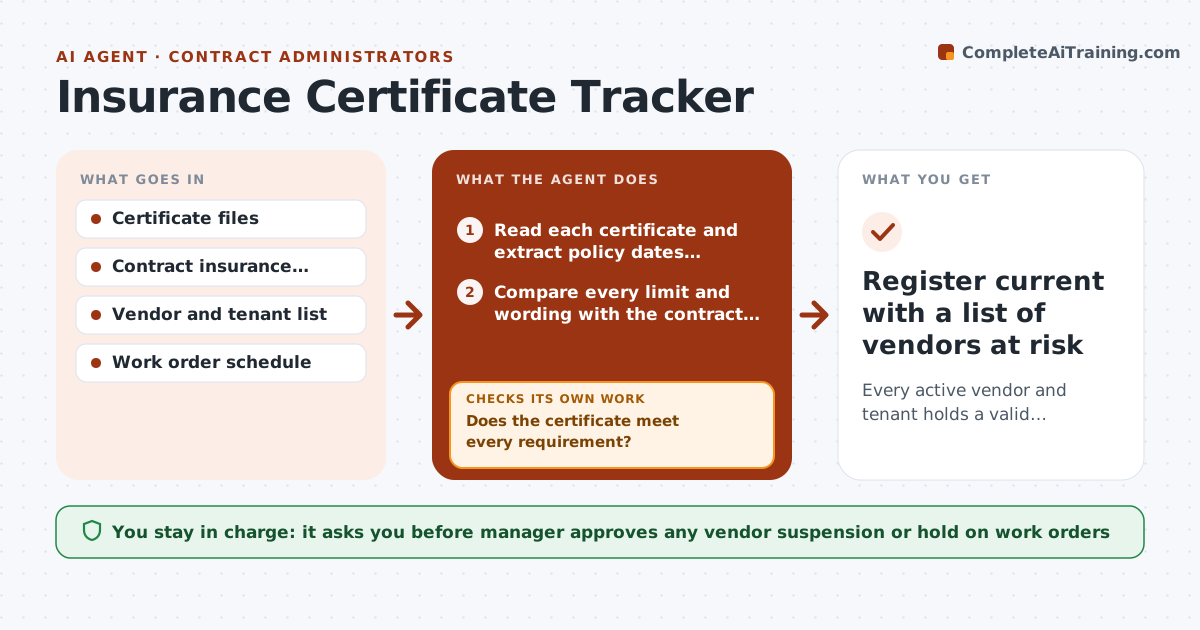
A vendor's insurance quietly lapses, and nobody finds out until a worker is injured or a pipe bursts. This agent keeps a register of insurance certificates for vendors, contractors and tenants, with expiry dates and the limits each contract requires. Every week it lists certificates expiring in 45 days and drafts renewal requests. When a new certificate arrives, it checks the policy dates, named insured, additional insured wording and each coverage limit against the requirement. If anything is short, it replies with exactly what is missing and checks again on the next version. Vendors who do not respond by the expiry date are flagged and kept off new work orders in the draft plan. Edge case: a certificate shows the right limits but names the wrong legal entity, so the agent rejects it.
How it works
Follow the arrows from top to bottom. The orange dashed arrow is the loop: when a check fails, the agent goes back and tries again.
Read the steps as a list
- Weekly review or new certificate received
- Read each certificate and extract policy dates, insured names and limits
- Compare every limit and wording with the contract requirement
- Does the certificate meet every requirement?If not: draft a request to the vendor listing exactly what is missing. Back to step 3.
- Update the register and list certificates expiring within 45 days
- Draft renewal requests for expiring certificates
- Manager approves renewal requests and any hold on a vendorThe agent waits here for your OK.
- Send requests and track replies
- Is a valid replacement certificate on file before expiry?If not: escalate to a second reminder and flag the vendor in the plan. Back to step 2.
- Register current with a list of vendors at risk
How it decides
A certificate passes only when dates, named insured and every required limit are met. A vendor is flagged when expiry passes without a valid replacement.
- Reject a certificate if the named insured differs from the contracted entity
- Request renewal at 45 days before expiry and again at 14 days
- Flag a vendor on the day after expiry with no valid replacement
- Treat a lower limit than required as a failure, not a warning
Make it yours
Every agent is a starting point. You choose these settings for your own situation.
- Days before expiry to start reminders (default 45)
- Required limits per contract type
- Reminder schedule
- Who receives escalations
What keeps you in control
It always asks you first
- Manager approves any vendor suspension or hold on work orders
- Manager approves exceptions to required limits
Hard limits
- Never suspend a vendor without manager approval
- Do not accept a certificate that cannot be read clearly
- Keep vendor documents in the register only
It stops when
- Done: all certificates valid and expiries are 45 or more days away
- Stop: a vendor is suspended or the manager grants an exception
Set it up
We guide you through the set-up, step by step
Members get the full set-up guide for this agent. No technical skills needed: you copy, paste and upload.
- One set of instructions to paste into your AI, with the clicks for ChatGPT, Claude, Microsoft 365 Copilot, Gemini and Grok
- The agent then walks you through connecting your own data, one source at a time
- A downloadable copy with the flow chart, the rules and the full guide