AI agent for project managers
Investor Update Report Agent
Accurate, consistent investor updates on schedule
What it does
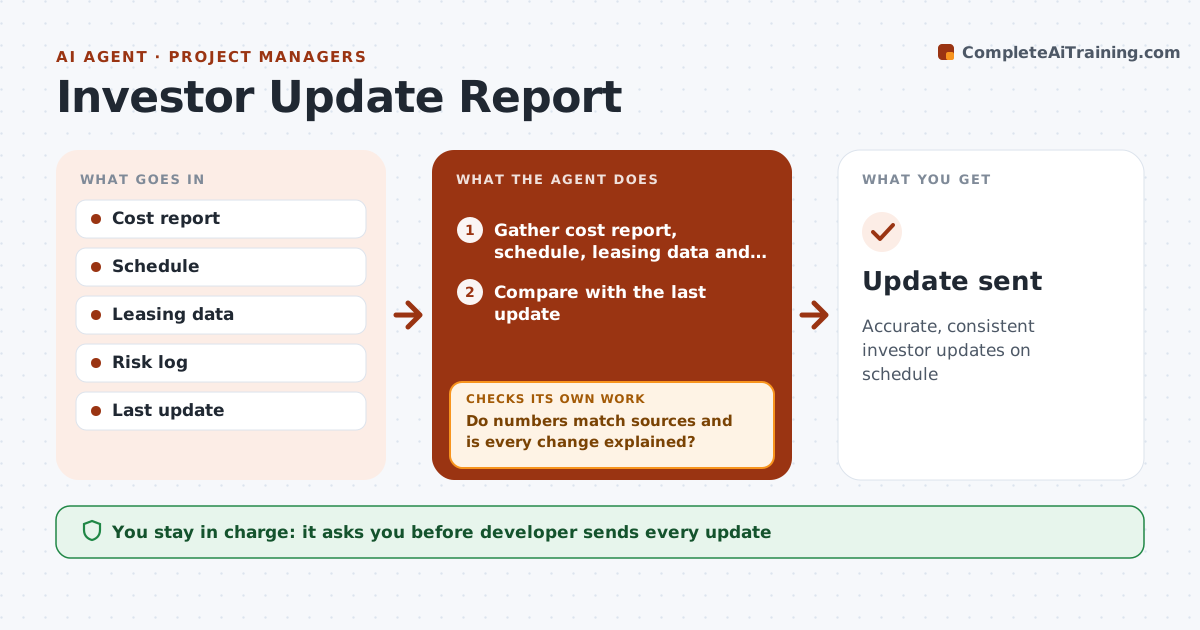
Equity investors expect regular updates on budget, schedule, leasing or sales, and risks, and a wrong number damages trust. This agent gathers the cost report, schedule, leasing or sales data and risk log, and drafts the update with every number taken from those sources. It checks that each number matches its source and the last update, and that every change in projected returns is explained. If numbers conflict, such as a budget figure that differs from the latest cost report, it asks the project team to confirm before finishing, then checks again. The developer approves and sends every update; the agent never contacts investors. Edge case: a material adverse change, such as a lost anchor tenant, is flagged for immediate notice under the operating agreement rather than waiting for the regular update.
How it works
Follow the arrows from top to bottom. The orange dashed arrow is the loop: when a check fails, the agent goes back and tries again.
Read the steps as a list
- Update due
- Gather cost report, schedule, leasing data and risk log
- Compare with the last update
- Draft the update and explain changes in projected returns
- Do numbers match sources and is every change explained?If not: ask the project team to confirm the conflicting figures. Back to step 2.
- Flag any material adverse change for immediate notice
- Developer approves and sendsThe agent waits here for your OK.
- Update sent
How it decides
Numbers must match sources. Changes from last update are explained.
- Numbers from sources
- Changes explained
- Adverse changes flagged
Make it yours
Every agent is a starting point. You choose these settings for your own situation.
- Frequency
- Template
- Metrics
- Distribution list
What keeps you in control
It always asks you first
- Developer sends every update
Hard limits
- Never sends updates
- No forward-looking promises
It stops when
- Done: update sent
- Stop: project sold
Set it up
We guide you through the set-up, step by step
Members get the full set-up guide for this agent. No technical skills needed: you copy, paste and upload.
- One set of instructions to paste into your AI, with the clicks for ChatGPT, Claude, Microsoft 365 Copilot, Gemini and Grok
- The agent then walks you through connecting your own data, one source at a time
- A downloadable copy with the flow chart, the rules and the full guide