AI agent for safety engineers
Job Hazard Analysis Review Agent
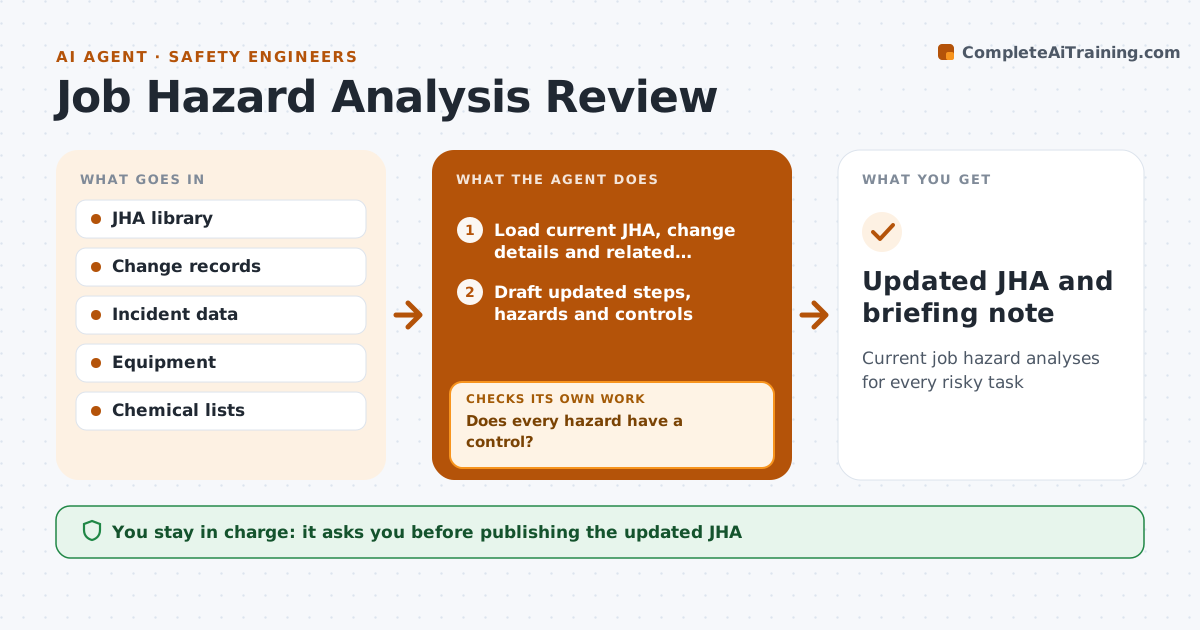
Current job hazard analyses for every risky task
What it does
Job hazard analyses go out of date after new equipment, chemicals or process changes. This agent tracks the review date of each one and watches for triggers: new equipment, changed steps, new chemicals or incidents linked to the task. When a review is due or triggered, it gathers the current JHA, the change details and recent incidents, and drafts an update with steps, hazards and controls. It checks that every hazard has a control, and drafts controls where one is missing. Then it checks each control against the hierarchy of controls and flags hazards handled only by protective equipment when better controls exist. For tasks done by contractors it asks them for input. The safety engineer approves the update and briefs workers.
How it works
Follow the arrows from top to bottom. The orange dashed arrow is the loop: when a check fails, the agent goes back and tries again.
Read the steps as a list
- Review due or change detected
- Load current JHA, change details and related incidents
- Draft updated steps, hazards and controls
- Does every hazard have a control?If not: draft controls for uncovered hazards. Back to step 3.
- Rank each control on the hierarchy of controls
- Is every hazard controlled above protective equipment where a better control exists?If not: propose an engineering or procedure control and rerank. Back to step 5.
- Request contractor input where they do the task
- Engineer approves the updated JHAThe agent waits here for your OK.
- Updated JHA and briefing note
How it decides
It opens a review when the date passes or a change touches the task, and accepts the update only when every hazard has a control.
- Prefer engineering controls over protective equipment
- Any linked incident triggers review
- Review cycle per site rules
Make it yours
Every agent is a starting point. You choose these settings for your own situation.
- Review interval
- Trigger types
- Control hierarchy rules
- Who signs off
What keeps you in control
It always asks you first
- Publishing the updated JHA
Hard limits
- Never publishes without approval
It stops when
- Done: JHA approved
- Stop: task owner cannot be reached; mark overdue
Set it up
We guide you through the set-up, step by step
Members get the full set-up guide for this agent. No technical skills needed: you copy, paste and upload.
- One set of instructions to paste into your AI, with the clicks for ChatGPT, Claude, Microsoft 365 Copilot, Gemini and Grok
- The agent then walks you through connecting your own data, one source at a time
- A downloadable copy with the flow chart, the rules and the full guide