AI agent for legal secretaries
Judgment Enforcement Status Agent
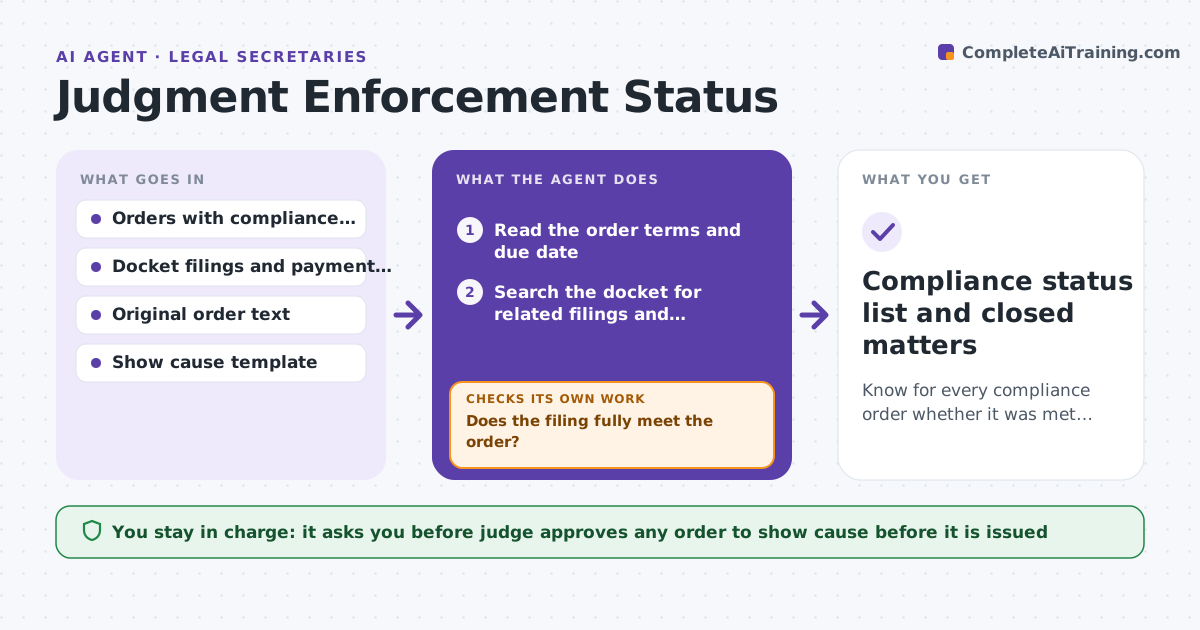
Know for every compliance order whether it was met, and prepare the next step when it was not.
What it does
A judge orders a party to pay, comply or file a report by a certain date, and then the matter slips from view. Nobody tracks whether the deadline was met. For each order with a compliance date, the agent watches the docket for filings and payments, checks the date, and sorts the matter into complied, late or silent. For late or silent ones it drafts an order to show cause using the wording of the original order and the facts from the docket. It does not issue anything. The judge reviews and approves each draft. After the party responds, the agent re-checks status. Edge case: a payment is filed on the due date but for a partial amount, so the matter is marked late with the shortfall shown.
How it works
Follow the arrows from top to bottom. The orange dashed arrow is the loop: when a check fails, the agent goes back and tries again.
Read the steps as a list
- Compliance date reached or filing arrives
- Read the order terms and due date
- Search the docket for related filings and payments
- Compare what was done with what was ordered
- Does the filing fully meet the order?If not: Record the shortfall, mark late or silent, and note what is missing. Back to step 3.
- Draft an order to show cause using the original wording
- Judge approves or rejects the draftThe agent waits here for your OK.
- Track the party's response and re-check the docket
- Has the party now complied?If not: Keep the matter open and propose the next hearing date. Back to step 4.
- Compliance status list and closed matters
How it decides
It marks a matter complied only when the filing or payment matches what was ordered. Partial or late compliance goes to late, and no activity after the date goes to silent.
- Full payment or filing on or before the date means complied
- Partial payment counts as late and shows the shortfall
- No docket activity 3 days after the date means silent
- Drafts quote the original order exactly
Make it yours
Every agent is a starting point. You choose these settings for your own situation.
- Days of silence before flagging (default 3)
- Order types tracked
- Who reviews drafts besides the judge
- Template used for show cause orders
What keeps you in control
It always asks you first
- Judge approves any order to show cause before it is issued
Hard limits
- Never issues an order or contacts a party
- Never changes the wording of the original order
It stops when
- Done: all orders complied or acted on
- Stop: judge decides to close or sanction
Set it up
We guide you through the set-up, step by step
Members get the full set-up guide for this agent. No technical skills needed: you copy, paste and upload.
- One set of instructions to paste into your AI, with the clicks for ChatGPT, Claude, Microsoft 365 Copilot, Gemini and Grok
- The agent then walks you through connecting your own data, one source at a time
- A downloadable copy with the flow chart, the rules and the full guide