
Learning path
Learning AI as a Judge
This learning path helps judges use AI safely for legal research, drafting orders, jury instructions, motions, hearings, sentencing, settlement conferences, complex case analysis, and court communication. It includes setup, connection, job skills, prompt course, and selected video courses with certifications.

Your path
Everything in the Judge AI kit, in the order that makes sense. Members tick off each step and see their progress.
Set up your AI
We guide you through each click.
Let skills do your everyday tasks
Connect your apps and pick your AI apps
Hand whole tasks to AI agents
Build your own tools
Keep growing
Everything for judges
All the courses, certifications, AI tools, MCP servers and apps for judges, most relevant first. Open any list to see more.
Take the prompt courses
A short framework course to learn how to ask, then 9 lessons with ready-to-use prompts for judges.
Start with this framework: how to talk to AI
TIDD-EC fits judging because it tells assistants what to do and avoid when drafting jury instructions with exact statutory language.
Then your prompt course for judges- 1Legal Research and Standards2 prompts
- 2Drafting Court Orders3 prompts
- 3Jury Instructions and Trial Prep3 prompts
- 4Motion and Brief Review3 prompts
- 5Hearing and Bench Preparation3 prompts
- 6Sentencing and Disposition3 prompts
- 7Mediation and Settlement Conferences3 prompts
- 8Complex Case Analysis2 prompts
- 9Court Administration and Communication2 prompts
Watch the video courses or add them to your Favorites for later
81 video courses our AI picked for judges, most useful first. Save the ones you want to watch later with the heart.
Favorites are saved to your account: sign in or get your AI kit first.
Show all 81 video courses
Get certified, or add certifications to your Favorites
Every course ends in an exam and a certificate you can add to LinkedIn. Save the certifications you are aiming for with the heart.
Favorites are saved to your account: sign in or get your AI kit first.
More certifications for judgesShow all 24 certifications
Connect your AI to the apps judges use
MCP servers let ChatGPT, Claude or Copilot look things up and get work done in other apps, like your email, calendar or bookkeeping software. These 5 fit the work of judges best, well-known apps first.

Turkish Legislation MCP Server
by aydincanLook up official, current Turkish law articles straight from mevzuat.gov.tr.
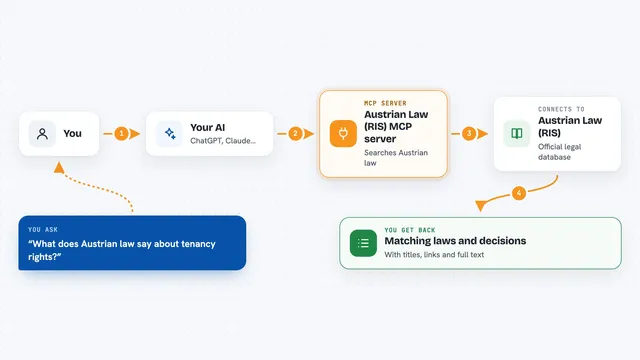
Austrian Law (RIS) MCP server
by philroxLets your AI look up Austrian federal and state laws, court decisions and legal gazettes for you.

Normativa Colombia MCP server
by AngelthebestoneConsulta leyes y sentencias colombianas desde tu asistente de IA, sin abrir el navegador.

LexAPI MCP server
by Lex-APILook up EU laws, court cases, and citations from EUR-Lex right inside your AI chat.

Lex MCP server
by SFHAJJIAsk your AI what a Luxembourg or EU law said on a specific past date, with the exact text and history.
ResearchNo install









































































About this learning path
7 topicsAI Skills for Judges, Done Carefully and Clearly
You decide cases, not a machine. This path shows where AI can help with the reading, drafting, and organizing that surrounds your rulings, while keeping your judgment at the center.
You will set up your tools, connect them to your work, and practice with prompts built for judges. Short video courses and their certifications help you go deeper when you want.
Why AI Matters for Judges Now
Courts face growing case volumes and dense filings. AI can help you find relevant standards faster, compare arguments, and produce first drafts of routine documents. It does not replace your duty to listen, weigh, and decide.
What the Path Includes
You begin with setup questions and connecting your AI. Then you build job skills inside your AI, take the judge prompt course, and choose video courses matched to your work. Each video course lists the certification it offers.
How It Saves Time
AI can turn a motion stack into a short summary, a bench memo into a set of questions, and a routine order into a clean draft. You still check every authority and every line. The time you save goes back to the courtroom and to careful thought.
How It Protects Your Career
The path teaches safe habits: keep confidential details out of public tools, verify citations, and treat AI output as a draft. You remain responsible for every ruling. Clear documentation of how you used AI can support trust and review.
How to Start
Start with the setup questions, then connect one approved AI tool. Try a low-risk task first, such as simplifying a routine order or outlining a bench memo. Move to the prompt course when you are ready.
Video Courses and Certifications
After the prompt course, pick short video courses for the parts of judging you want to strengthen. Each course names the certification you receive, so you can track your learning.
Frequently asked questions
Can AI make a ruling for me?
No. AI can summarize, draft, and organize, but the decision and the reasoning must come from you. Always verify facts, law, and procedure before you rule.Is it safe to put case details into AI?
Only use tools and settings approved by your court. Do not put confidential, sealed, or personal information into public AI tools. When in doubt, use fictional or redacted examples.Do I need to be technical?
No. The path starts with simple setup questions and plain steps for connecting your AI. You practice with prompts written for judges, not for programmers.How long does the path take?
You can work at your own pace, in short sessions around your docket. The prompt course is the core, and the video courses can be taken when a topic matters to your current cases.