AI agent for insurance claims managers
Large Loss Escalation Agent
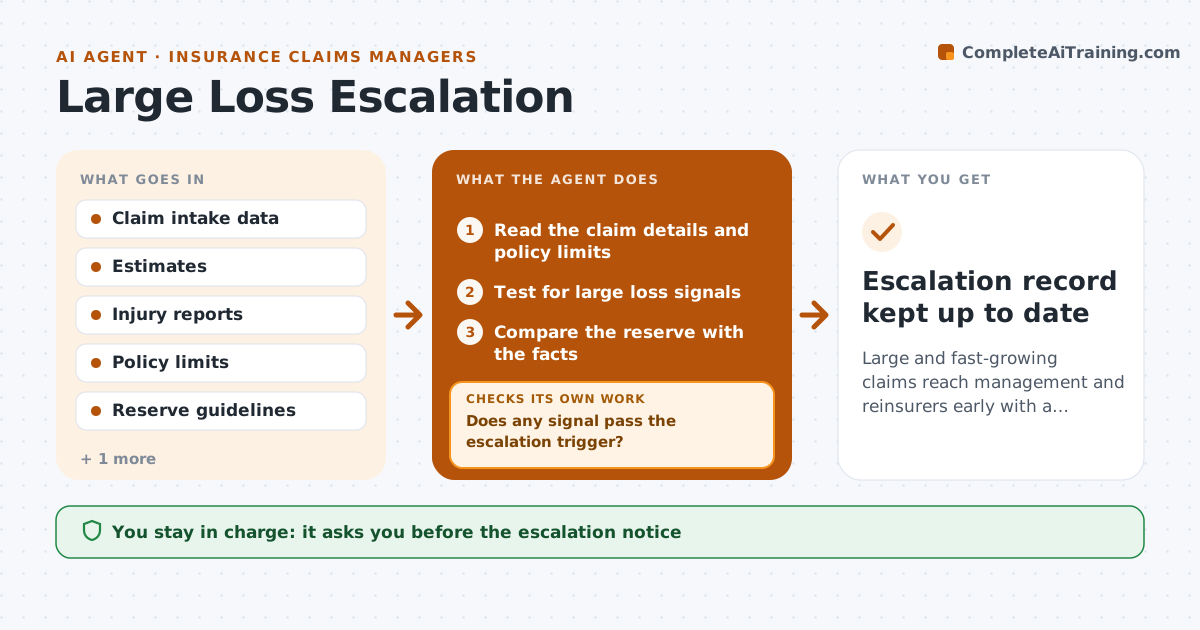
Large and fast-growing claims reach management and reinsurers early with a reserve that fits the facts
What it does
A large claim escalated late can cost far more than one escalated at the first signs. This agent monitors incoming claims for signals such as serious injury, a large damage estimate, multiple parties or policy limits at risk. It checks the reserve against the facts and prepares an early notice for management and, when required, for reinsurers. It rechecks each flagged claim every day as new information arrives. If the facts change, it raises or lowers the flag and updates the file. The claims lead approves any escalation. Edge case: a claim has a small first estimate but the photos show structural damage, so the agent flags it for a second estimate.
How it works
Follow the arrows from top to bottom. The orange dashed arrow is the loop: when a check fails, the agent goes back and tries again.
Read the steps as a list
- A new claim or an update arrives
- Read the claim details and policy limits
- Test for large loss signals
- Does any signal pass the escalation trigger?If not: hold the claim on the watch list and recheck after the next update. Back to step 2.
- Compare the reserve with the facts
- Prepare the early notice for management and reinsurers
- Claims lead approves the escalationThe agent waits here for your OK.
- Recheck the claim daily for new facts
- Do the new facts change the flag or reserve?If not: update the notice and reserve proposal and send for approval again. Back to step 5.
- Escalation record kept up to date
How it decides
A claim is flagged when injury, size, limit or treaty triggers match. It is rechecked daily and the reserve is compared with the latest facts.
- Flag any injury claim involving hospital care
- Flag estimates above 50 percent of the limit
- Check treaty notice rules on every flagged claim
- Review flagged claims every day
Make it yours
Every agent is a starting point. You choose these settings for your own situation.
- Escalation triggers and thresholds
- Recheck frequency (default daily)
- Who is notified
- Claim types covered
What keeps you in control
It always asks you first
- The escalation notice
- Reserve changes
Hard limits
- Never change reserves itself
- Never notify reinsurers without approval
It stops when
- Done: claim escalated and monitored until closed
- Stop: claim is withdrawn
Set it up
We guide you through the set-up, step by step
Members get the full set-up guide for this agent. No technical skills needed: you copy, paste and upload.
- One set of instructions to paste into your AI, with the clicks for ChatGPT, Claude, Microsoft 365 Copilot, Gemini and Grok
- The agent then walks you through connecting your own data, one source at a time
- A downloadable copy with the flow chart, the rules and the full guide