AI agent for legal operations managers
Legal Spend Accrual Agent
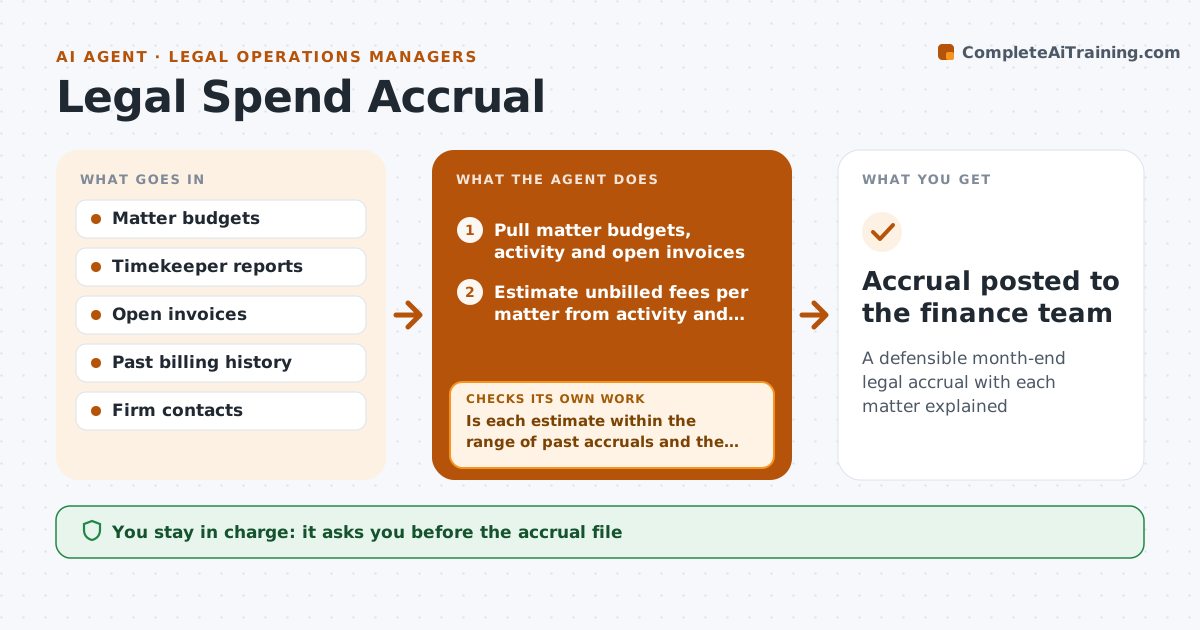
A defensible month-end legal accrual with each matter explained
What it does
Month-end accruals for legal work not yet billed are often guesses, and they swing the numbers. This agent pulls the matter budgets, timekeeper activity from the e-billing tool and open invoices. It estimates unbilled fees for each matter from the work done and the firm's past billing pattern. It compares the estimate with the budget and with past accruals. Matters with no update are chased with the firm for a figure. It rechecks the totals after each reply and builds the accrual file. The manager approves the accrual file. Edge case: a firm bills quarterly in arrears and has sent nothing, so the agent carries a three-month estimate and flags it.
How it works
Follow the arrows from top to bottom. The orange dashed arrow is the loop: when a check fails, the agent goes back and tries again.
Read the steps as a list
- Month-end accrual window opens
- Pull matter budgets, activity and open invoices
- Estimate unbilled fees per matter from activity and billing lag
- Is each estimate within the range of past accruals and the budget?If not: mark outliers and recalculate with a different lag, then keep for follow-up. Back to step 3.
- List matters with no update and ask the firms for figures
- Have the firms answered for all flagged matters?If not: send a reminder and use the estimate with a note until the deadline. Back to step 5.
- Build the accrual file with notes
- Compare the total with last month and the budget
- Manager approves the accrual fileThe agent waits here for your OK.
- Accrual posted to the finance team
How it decides
Unbilled fees are estimated from activity and the firm's lag between work and invoice. Estimates far from the past pattern are queried with the firm.
- Use a three month estimate for quarterly billers with no invoice
- Query matters where the estimate differs from the past pattern by over 25 percent
- Reserve on budget if there is no activity data
- Chase firms only once before the cut-off
Make it yours
Every agent is a starting point. You choose these settings for your own situation.
- Outlier limit (default 25 percent)
- Billing lag by firm
- Cut-off day
- Matters included
What keeps you in control
It always asks you first
- The accrual file
- Messages to firms
Hard limits
- Never contact a firm without approval
- Never post to the ledger
It stops when
- Done: accrual file approved
- Stop: e-billing data is missing
Set it up
We guide you through the set-up, step by step
Members get the full set-up guide for this agent. No technical skills needed: you copy, paste and upload.
- One set of instructions to paste into your AI, with the clicks for ChatGPT, Claude, Microsoft 365 Copilot, Gemini and Grok
- The agent then walks you through connecting your own data, one source at a time
- A downloadable copy with the flow chart, the rules and the full guide