AI agent for plumbers
License and Continuing Education Tracking Agent
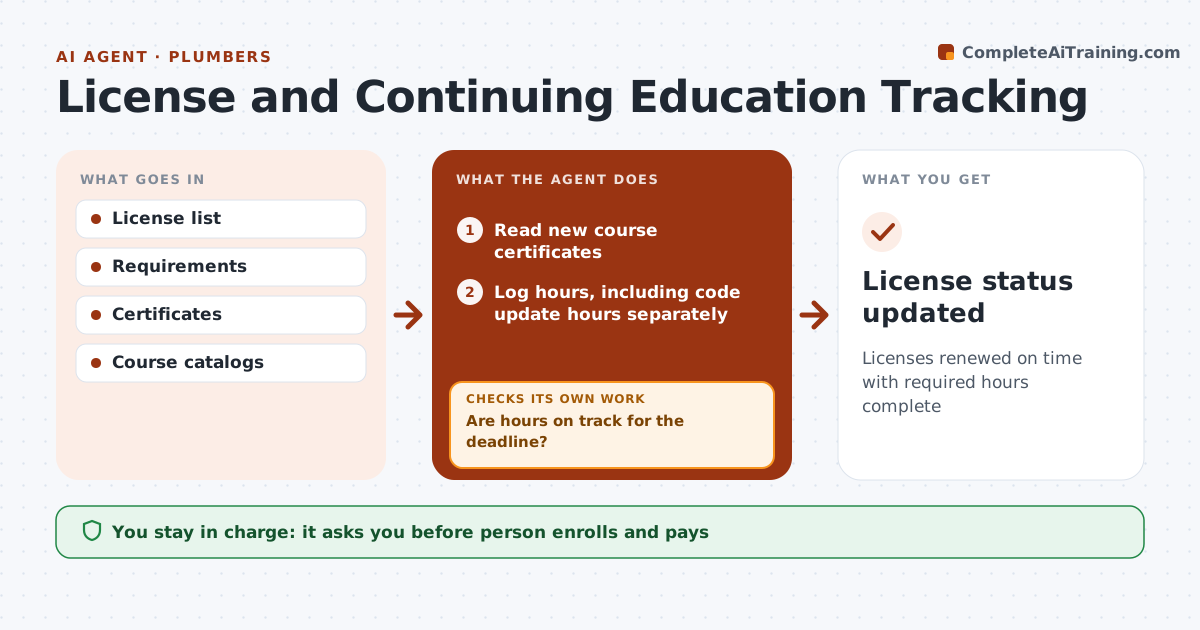
Licenses renewed on time with required hours complete
What it does
Electricians and plumbers must renew licenses and complete continuing education hours by deadlines that vary by state and city, and a lapsed license can stop work. This agent keeps each license, its renewal date and the required hours. It logs completed courses from certificates and checks progress against the requirement. Code update courses required by some states are tracked separately. From 90 days before a deadline, if hours are short, it alerts the person and finds approved courses that fit around booked jobs, then checks again as courses are completed. It only suggests approved providers. The person decides which courses to take, enrolls and pays, and submits the renewal. Edge case: a state requires a separate code update course on top of general hours, so the agent tracks it on its own line.
How it works
Follow the arrows from top to bottom. The orange dashed arrow is the loop: when a check fails, the agent goes back and tries again.
Read the steps as a list
- Monthly check
- Read new course certificates
- Log hours, including code update hours separately
- Compare with state and city requirements and renewal dates
- Are hours on track for the deadline?If not: find approved courses that fit around booked jobs and alert the person. Back to step 3.
- Person enrolls in coursesThe agent waits here for your OK.
- Person approves the renewal filingThe agent waits here for your OK.
- License status updated
How it decides
Hours short within 90 days of deadline trigger an alert.
- Alert at 90 days
- Code courses separate
- Approved providers only
Make it yours
Every agent is a starting point. You choose these settings for your own situation.
- States and licenses
- Alert window
- Course providers
- Reminder frequency
What keeps you in control
It always asks you first
- Person enrolls and pays
Hard limits
- Never pays fees
- Never submits renewals
It stops when
- Done: renewed
- Stop: license retired
Set it up
We guide you through the set-up, step by step
Members get the full set-up guide for this agent. No technical skills needed: you copy, paste and upload.
- One set of instructions to paste into your AI, with the clicks for ChatGPT, Claude, Microsoft 365 Copilot, Gemini and Grok
- The agent then walks you through connecting your own data, one source at a time
- A downloadable copy with the flow chart, the rules and the full guide