AI agent for freight brokers
Load Carrier Matching Agent
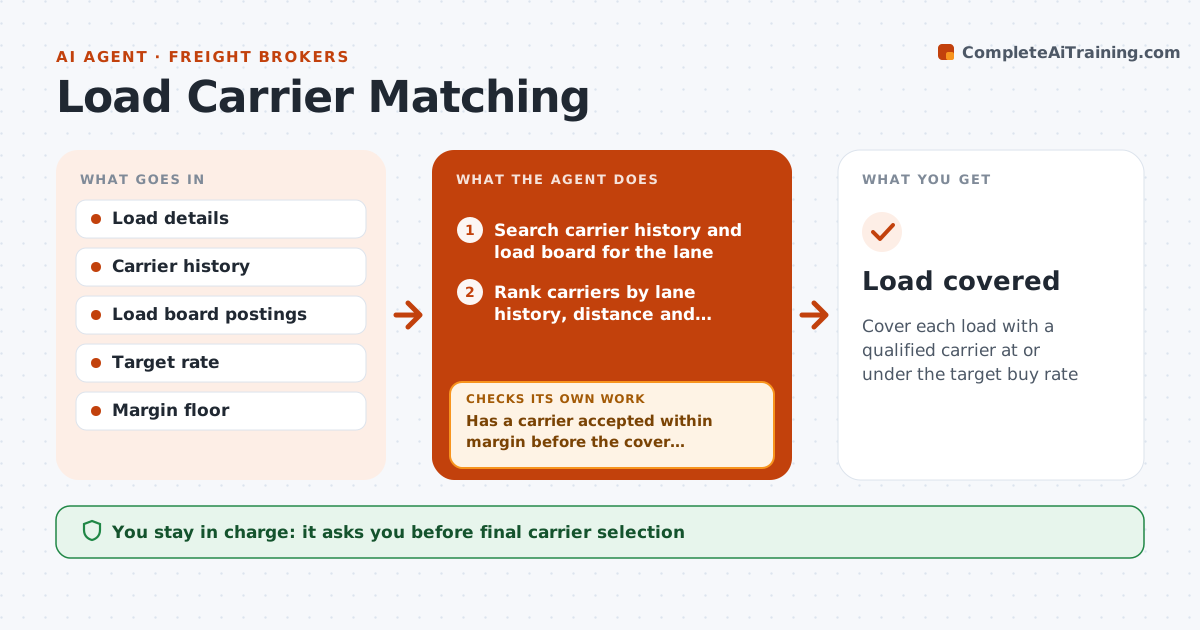
Cover each load with a qualified carrier at or under the target buy rate
What it does
Covering loads is the broker's main daily task, and a slow cover means a missed pickup or a thin margin. For each new load this agent searches carrier history and the load board for carriers with recent runs on the lane, matching equipment and good on-time records. Only approved carriers are offered loads, and hazmat loads go only to carriers with the endorsement on file. It ranks candidates by lane history, distance to pickup and on-time rate, and sends offers at the target rate. It reads replies and tracks counteroffers against the margin floor. If no carrier accepts within margin before the cover deadline, it widens the search radius or proposes a rate step for approval. The broker confirms the final carrier and rate. Edge case: hazmat loads are offered only to endorsed carriers.
How it works
Follow the arrows from top to bottom. The orange dashed arrow is the loop: when a check fails, the agent goes back and tries again.
Read the steps as a list
- New load entered
- Search carrier history and load board for the lane
- Rank carriers by lane history, distance and on-time rate
- Send offers at the target rate
- Has a carrier accepted within margin before the cover deadline?If not: widen the radius or propose a rate step for approval. Back to step 2.
- Broker confirms carrier and rateThe agent waits here for your OK.
- Send the rate confirmation
- Load covered
How it decides
Candidates are ranked by lane history, distance to pickup and on-time rate. Any rate that drops margin below the floor needs approval.
- Only approved carriers are offered loads
- Hazmat loads require endorsement on file
- Rate steps above the margin floor need approval
Make it yours
Every agent is a starting point. You choose these settings for your own situation.
- Margin floor per customer
- Cover window before pickup
- Search radius steps
- Carrier ranking weights
What keeps you in control
It always asks you first
- Final carrier selection
- Any rate below margin floor
Hard limits
- Never confirms a load without broker approval
- Never offers to unapproved carriers
It stops when
- Done: rate confirmation signed
- Stop: shipper cancels the load
Set it up
We guide you through the set-up, step by step
Members get the full set-up guide for this agent. No technical skills needed: you copy, paste and upload.
- One set of instructions to paste into your AI, with the clicks for ChatGPT, Claude, Microsoft 365 Copilot, Gemini and Grok
- The agent then walks you through connecting your own data, one source at a time
- A downloadable copy with the flow chart, the rules and the full guide