AI agent for videographers
Location Scouting and Permit Agent
Choose a location that passes permit, access, light and weather checks, and prepare the paperwork.
What it does
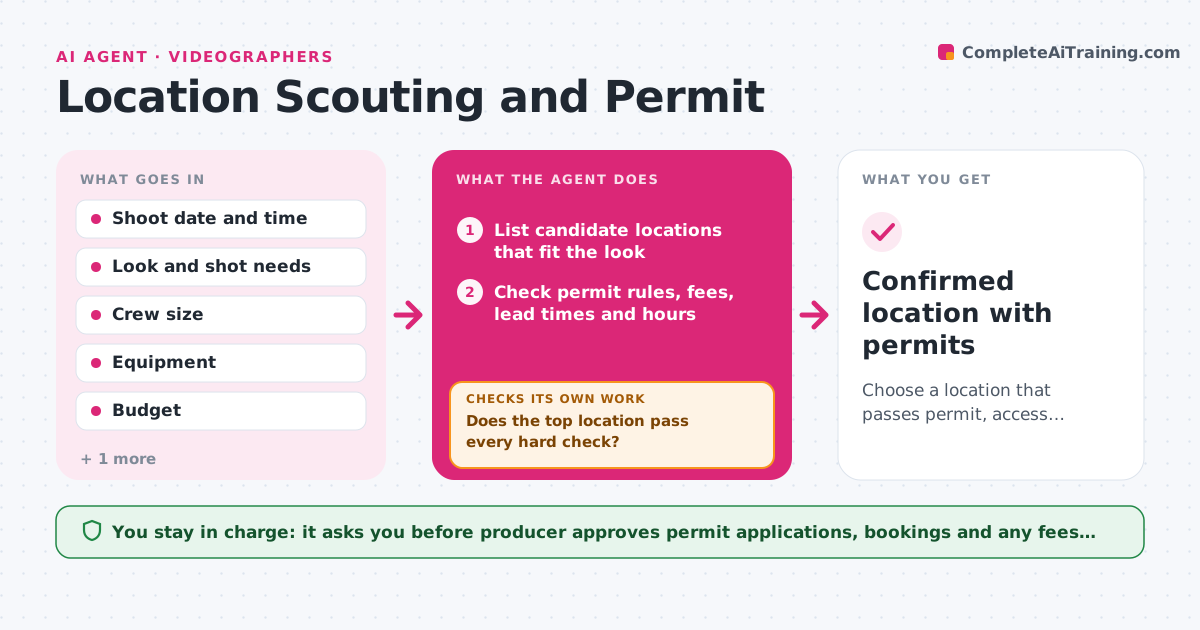
You pick a beautiful park for a Saturday shoot and learn on Friday that it needs a permit filed two weeks ahead. This agent starts from your shoot date and the look you want. It lists candidate locations and, for each one, checks permit rules and fees, opening hours, sun position at your shoot time, the weather forecast, access and parking. It scores each location and ranks them. If the top choice fails a check, such as a permit lead time that is too long, it moves to the next one and checks again. When a location passes, it drafts the permit application and a booking request. After the producer approves, it rechecks the forecast closer to the date. Edge case: the forecast turns to rain, so the agent proposes the indoor backup.
How it works
Follow the arrows from top to bottom. The orange dashed arrow is the loop: when a check fails, the agent goes back and tries again.
Read the steps as a list
- Shoot date and look confirmed
- List candidate locations that fit the look
- Check permit rules, fees, lead times and hours
- Check sun position, forecast, access and parking
- Does the top location pass every hard check?If not: drop it and test the next candidate on the list. Back to step 2.
- Rank the passing locations and pick a backup
- Draft the permit application and booking request
- Producer approves applications, bookings and feesThe agent waits here for your OK.
- Recheck the forecast two days before the shoot
- Is the weather still within the shoot limits?If not: switch to the backup location and draft its booking request. Back to step 6.
- Confirmed location with permits
How it decides
A location must pass hard checks first (permit possible before the date, open at the time, access for gear). Passing locations are ranked by light, weather and cost.
- Reject a location whose permit lead time is longer than the days left
- Reject any location with rain chance above 50% for outdoor-only shoots
- Prefer the location with golden hour light inside the shoot window
- Add a backup location for every outdoor shoot
Make it yours
Every agent is a starting point. You choose these settings for your own situation.
- Maximum travel distance
- Weather limits for outdoor shoots (default 50% rain)
- Budget for permits and fees
- Number of candidates to compare (default 5)
- Backup rule (indoor or second outdoor)
What keeps you in control
It always asks you first
- Producer approves permit applications, bookings and any fees before they are submitted
Hard limits
- Never submit a permit or pay a fee
- Never assume a location is public without checking the rules
It stops when
- Done: a location with a permit plan and a backup is confirmed
- Stop: no candidate passes the hard checks, so ask the producer to change the date or the look
Set it up
We guide you through the set-up, step by step
Members get the full set-up guide for this agent. No technical skills needed: you copy, paste and upload.
- One set of instructions to paste into your AI, with the clicks for ChatGPT, Claude, Microsoft 365 Copilot, Gemini and Grok
- The agent then walks you through connecting your own data, one source at a time
- A downloadable copy with the flow chart, the rules and the full guide