AI agent for headteachers
Lunch and Free Meal Eligibility Review Agent
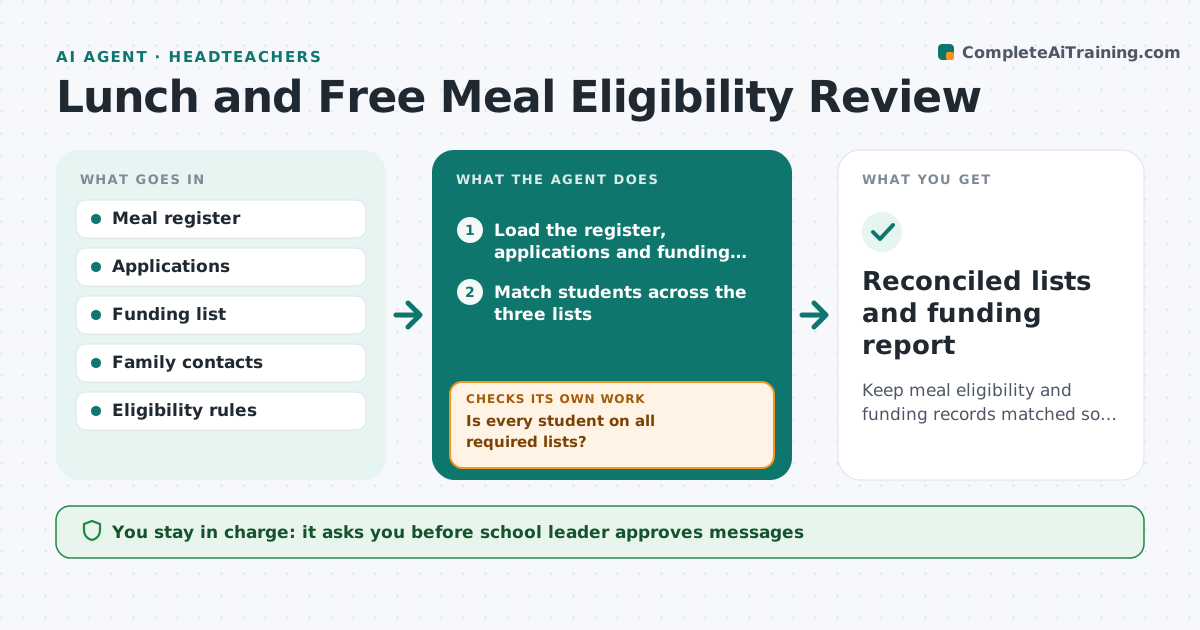
Keep meal eligibility and funding records matched so no entitled student or funding is missed.
What it does
Free meal eligibility records go stale, and a school loses funding when they do. The agent compares registers, applications and funding lists, flags students who are missing from one of them, and contacts families for updates. It re-checks after each reply. It also looks for students whose eligibility may have ended. It also looks for students whose entitlement may have ended, so funding claims stay accurate in both directions. Messages are short and kind, and each family is chased once, then the leader decides what to do. The school leader approves messages and changes. Edge case: a student appears on the funding list but not on the meal register, so the agent contacts the family to confirm.
How it works
Follow the arrows from top to bottom. The orange dashed arrow is the loop: when a check fails, the agent goes back and tries again.
Read the steps as a list
- Term starts or application arrives
- Load the register, applications and funding list
- Match students across the three lists
- Is every student on all required lists?If not: List each mismatch and the likely cause. Back to step 3.
- Draft family messages for updates
- School leader approves messages and changesThe agent waits here for your OK.
- Send messages and collect replies
- Update records after each reply
- Are all mismatches resolved?If not: Chase non-replies once, then escalate to the leader. Back to step 3.
- Reconciled lists and funding report
How it decides
A student is matched when they appear on the register, an approved application and the funding list. A mismatch is checked with the family or the office before any change.
- Students on the funding list and not the register are priority
- Families get a clear and kind message
- Chase once after 5 days
- Eligibility change only after confirmation
Make it yours
Every agent is a starting point. You choose these settings for your own situation.
- Check frequency
- Chase timing (default 5 days)
- Message language
- Funding sources compared
What keeps you in control
It always asks you first
- School leader approves messages
- School leader approves each record change
Hard limits
- Never changes eligibility without approval
- Never discloses a family's status to others
It stops when
- Done: lists match
- Stop: family does not respond after one chase, so the leader decides
Set it up
We guide you through the set-up, step by step
Members get the full set-up guide for this agent. No technical skills needed: you copy, paste and upload.
- One set of instructions to paste into your AI, with the clicks for ChatGPT, Claude, Microsoft 365 Copilot, Gemini and Grok
- The agent then walks you through connecting your own data, one source at a time
- A downloadable copy with the flow chart, the rules and the full guide