AI agent for musicians
Lyric Sheet and Release Metadata Agent
Release metadata that passes the distributor's validator and matches the audio, lyrics and splits
What it does
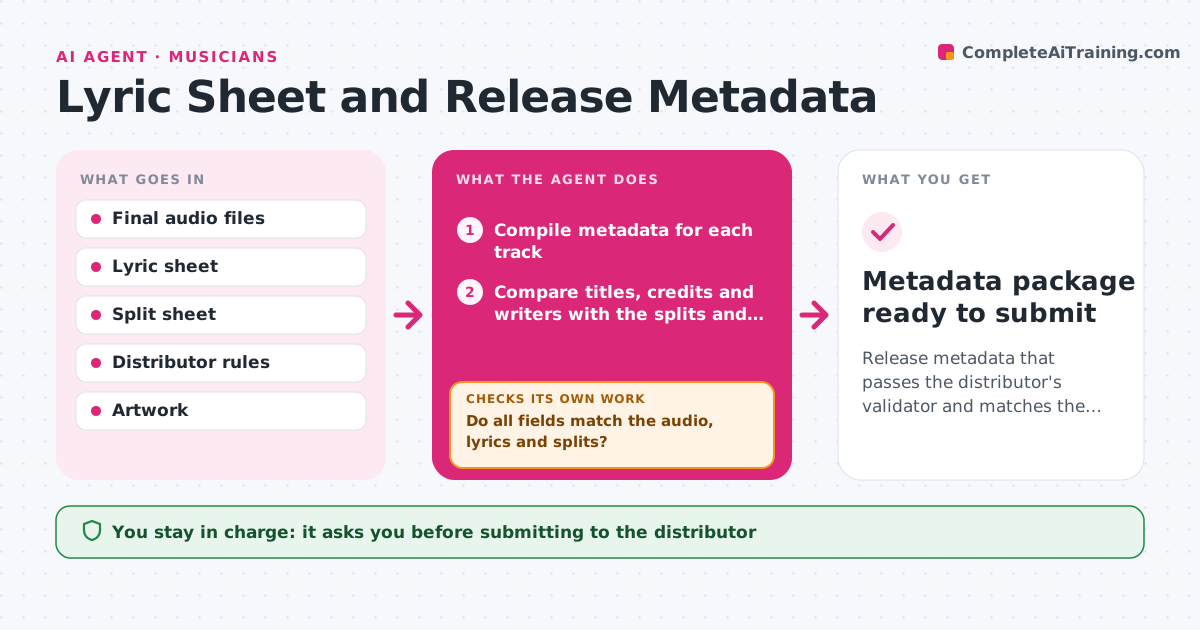
Metadata errors in titles, credits and lyrics cause rejections and wrong payouts. The agent compiles the metadata for each track: title, artists, writers, ISRC, genre, explicit flag, lyrics and credits. It compares each field with the final audio, the lyric sheet and the split sheet, and flags errors such as a title that differs between the file and the lyrics, or a writer missing from the splits. It fixes what it can and runs the distributor's validator, repeating until it passes. It also checks that lyric text matches what is sung and that the explicit tag is set where needed. The artist approves before submitting. Edge case: a featuring credit must appear in the title field only if the distributor requires it.
How it works
Follow the arrows from top to bottom. The orange dashed arrow is the loop: when a check fails, the agent goes back and tries again.
Read the steps as a list
- Final masters ready
- Compile metadata for each track
- Compare titles, credits and writers with the splits and files
- Compare the lyric sheet with the sung lyrics
- Do all fields match the audio, lyrics and splits?If not: fix the mismatched fields and compare again. Back to step 3.
- Run the distributor's validator
- Does the validator pass?If not: fix each error it lists and run it again. Back to step 3.
- Artist approves the submissionThe agent waits here for your OK.
- Metadata package ready to submit
How it decides
A field passes when it matches the audio, lyrics and splits and meets the distributor's rules. Lyrics with strong language need the explicit tag.
- Match titles exactly with the audio and artwork
- Match writers to the split sheet
- Set the explicit tag when the lyrics need it
- Follow the distributor's field rules for featuring credits
Make it yours
Every agent is a starting point. You choose these settings for your own situation.
- Distributor rules
- Fields required
- Explicit tag policy
- Lyric format
What keeps you in control
It always asks you first
- Submitting to the distributor
- Changing credits
Hard limits
- Never submits to a distributor
- Never guesses an ISRC or a writer
It stops when
- Done: validator passes and the artist approved
- Stop: the splits or audio are not final
Set it up
We guide you through the set-up, step by step
Members get the full set-up guide for this agent. No technical skills needed: you copy, paste and upload.
- One set of instructions to paste into your AI, with the clicks for ChatGPT, Claude, Microsoft 365 Copilot, Gemini and Grok
- The agent then walks you through connecting your own data, one source at a time
- A downloadable copy with the flow chart, the rules and the full guide