AI agent for vacation rental hosts
Maintenance Vendor Job Tracker Agent
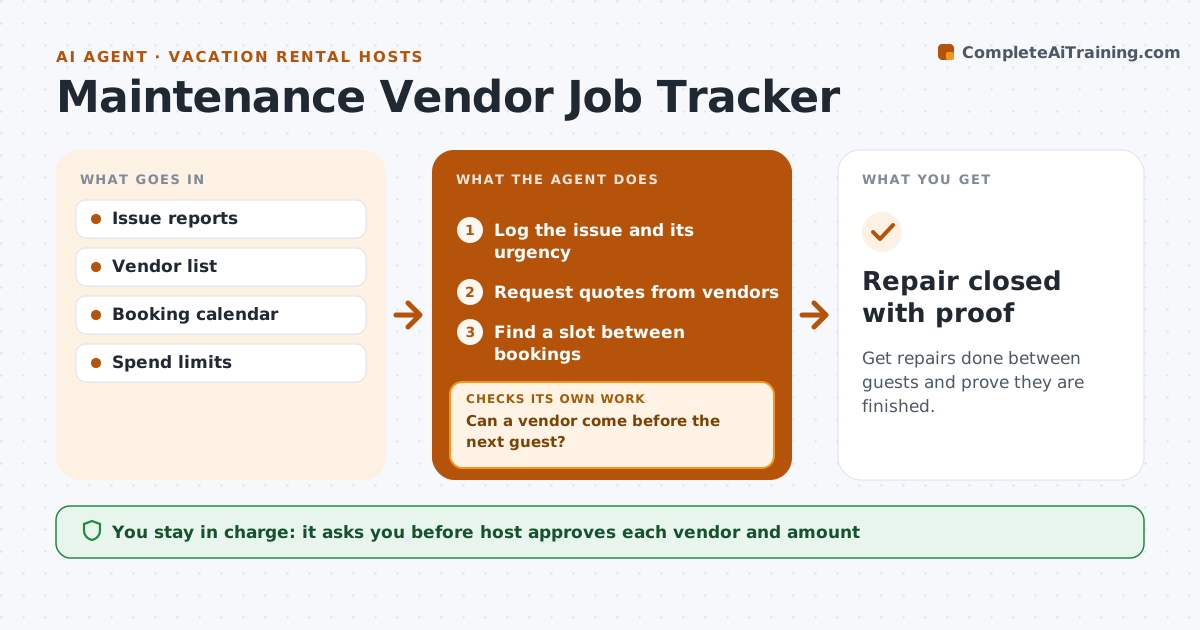
Get repairs done between guests and prove they are finished.
What it does
A repair that drags on can mean a bad review or a cancelled booking. This agent logs each issue from the guest or cleaner, requests quotes from vendors, and schedules visits around bookings. It checks completion with photos and confirmation. If a vendor cannot come before the next guest, it finds another slot or vendor and rechecks. The host approves spend. It keeps one log per property with each issue, vendor, cost and date, so recurring problems stand out. Messages to vendors are short and give the access details and the time window clearly. Edge case: an urgent issue such as no hot water goes to the first available vendor and the host is told the premium.
How it works
Follow the arrows from top to bottom. The orange dashed arrow is the loop: when a check fails, the agent goes back and tries again.
Read the steps as a list
- Issue reported
- Log the issue and its urgency
- Request quotes from vendors
- Find a slot between bookings
- Can a vendor come before the next guest?If not: Find another slot or vendor. Back to step 3.
- Host approves the vendor and the spendThe agent waits here for your OK.
- Schedule the visit
- Request a photo or confirmation after the work
- Does the photo confirm the work is done?If not: Ask the vendor to return and tell the host. Back to step 8.
- Repair closed with proof
How it decides
It chooses the vendor and slot that fit before the next arrival and checks the work with a photo.
- Urgent issues are handled within 24 hours
- Get two quotes above $200
- Keep visits away from guest stays
- Require a photo to close
Make it yours
Every agent is a starting point. You choose these settings for your own situation.
- Spend limit that needs approval
- Quote rule (default 2 above $200)
- Preferred vendors
- Urgent issue rule
What keeps you in control
It always asks you first
- Host approves each vendor and amount
Hard limits
- Never approve spend
- Never close a repair without proof
It stops when
- Done: the repair is done and confirmed
- Stop: no vendor is available and the host decides on moving the guest
Set it up
We guide you through the set-up, step by step
Members get the full set-up guide for this agent. No technical skills needed: you copy, paste and upload.
- One set of instructions to paste into your AI, with the clicks for ChatGPT, Claude, Microsoft 365 Copilot, Gemini and Grok
- The agent then walks you through connecting your own data, one source at a time
- A downloadable copy with the flow chart, the rules and the full guide