AI agent for aerospace engineers
Mass Budget Tracking Agent
Early warning of mass growth before margins are lost
What it does
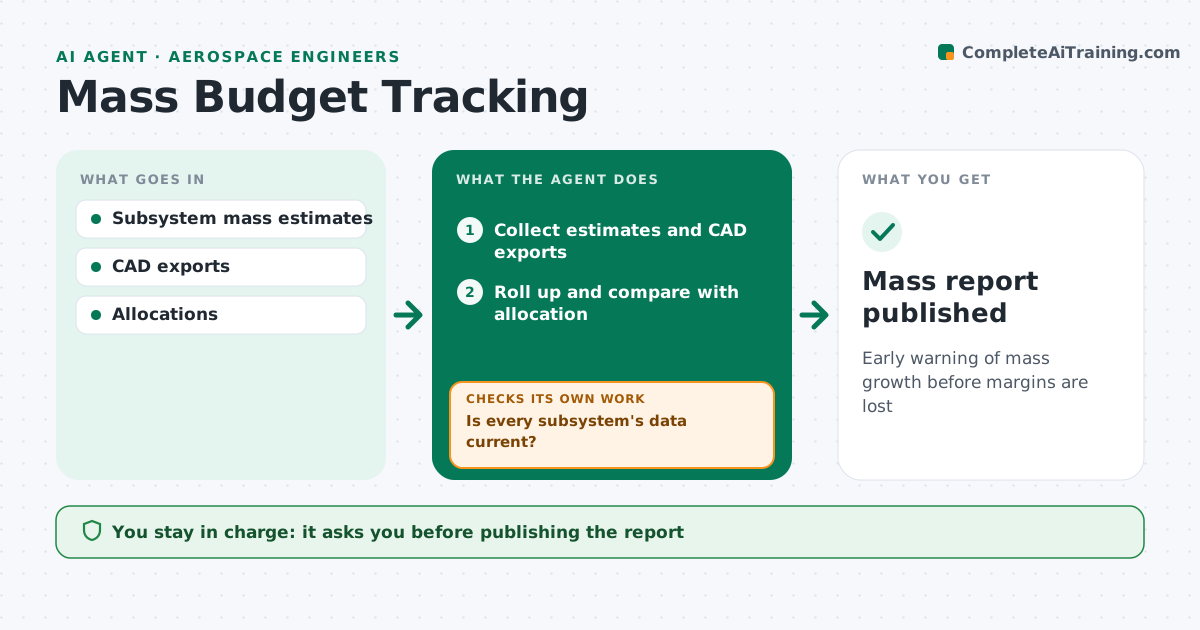
Mass growth is a common problem in aerospace programs, and it often shows up too late to fix cheaply. Each week this agent collects current mass estimates from subsystem teams and CAD exports. It first checks that every subsystem's data is current; if any is missing or older than the set age, it asks the owner and waits. It then rolls up the total and compares it with the allocation and margin. It tracks growth by subsystem and flags any that grow faster than planned or jump when moving from estimate to actual weight. The chief engineer approves the weekly report and any reallocation of mass between subsystems. The agent never changes allocations itself. Edge case: a subsystem reporting less mass with no design change is flagged for checking, since it often means a part was left out.
How it works
Follow the arrows from top to bottom. The orange dashed arrow is the loop: when a check fails, the agent goes back and tries again.
Read the steps as a list
- Weekly roll-up
- Collect estimates and CAD exports
- Is every subsystem's data current?If not: ask owners for updates. Back to step 2.
- Roll up and compare with allocation
- Flag growth and margin risks
- Chief engineer approves the reportThe agent waits here for your OK.
- Mass report published
How it decides
It flags subsystems with growth above the set rate and totals that eat into the margin.
- Flag growth above the set rate
- Flag drops without design change
- Request data older than the age limit
Make it yours
Every agent is a starting point. You choose these settings for your own situation.
- Growth threshold
- Data age limit (default 2 weeks)
- Report format
- Subsystem owners
What keeps you in control
It always asks you first
- Publishing the report
- Reallocating mass
Hard limits
- Never changes allocations itself
It stops when
- Done: report published
- Stop: most data missing
Set it up
We guide you through the set-up, step by step
Members get the full set-up guide for this agent. No technical skills needed: you copy, paste and upload.
- One set of instructions to paste into your AI, with the clicks for ChatGPT, Claude, Microsoft 365 Copilot, Gemini and Grok
- The agent then walks you through connecting your own data, one source at a time
- A downloadable copy with the flow chart, the rules and the full guide