AI agent for chief digital officers
Master Data Duplicate Resolution Agent
Reduce duplicate records safely without breaking any downstream report
What it does
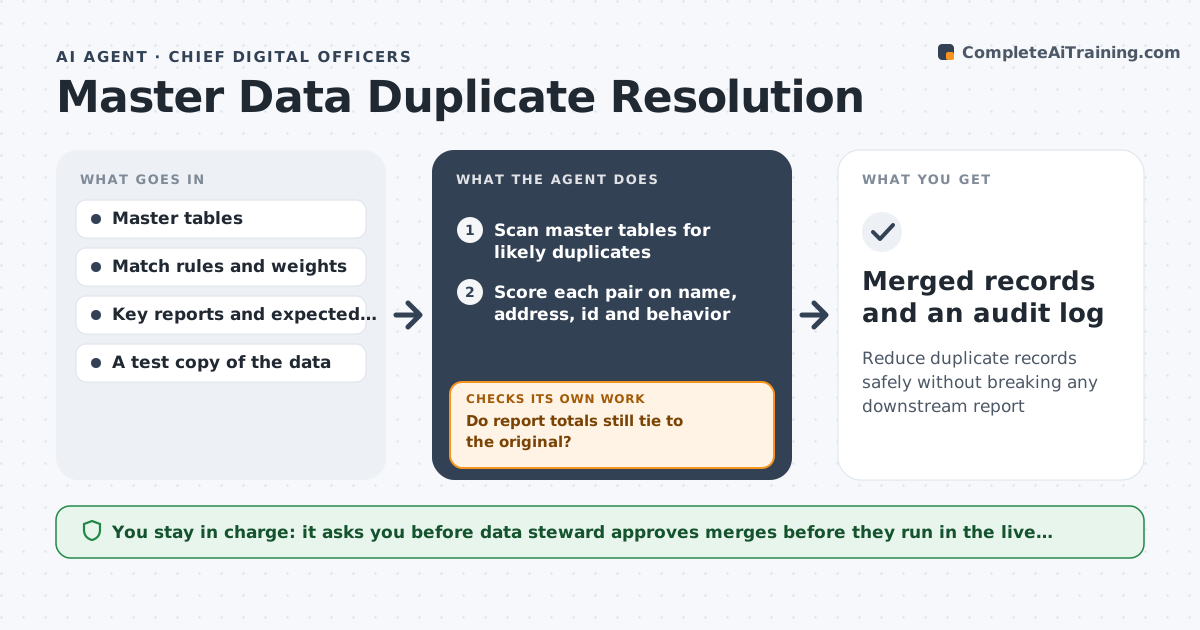
Sales sees 52,000 customers and finance sees 46,000, and the gap is mostly duplicates. This agent scans master tables for likely duplicates and scores each pair on name, address, ids and behavior such as shared orders. It groups strong matches and proposes merges with a surviving record. Before anything changes, it applies the merge to a test copy and reruns the key reports to check that totals, such as revenue and customer counts, still tie out. If a total breaks, it rejects that merge, narrows the rule and tries again. The data steward approves merges in the live system. Edge case: two clinics with the same name at different addresses score high but fail the address check, so they stay separate.
How it works
Follow the arrows from top to bottom. The orange dashed arrow is the loop: when a check fails, the agent goes back and tries again.
Read the steps as a list
- Weekly scan or bulk load completes
- Scan master tables for likely duplicates
- Score each pair on name, address, id and behavior
- Group strong matches and pick the surviving record
- Apply the merges to a test copy
- Rerun key reports on the test copy
- Do report totals still tie to the original?If not: Reject the failing merge, tighten the rule and rescore the group. Back to step 3.
- Data steward approves merges in the live systemThe agent waits here for your OK.
- Record the merge log with before and after counts
- Merged records and an audit log
How it decides
It merges only pairs scoring above the match threshold and passing the report tie-out. Pairs that fail go to manual review.
- Merge only pairs scoring above 0.9 on the match scale
- Send pairs scoring 0.7 to 0.9 to manual review
- Reject any merge that changes revenue totals
- Keep the record with the most complete history as the survivor
Make it yours
Every agent is a starting point. You choose these settings for your own situation.
- Match threshold (default 0.9)
- Manual review band (default 0.7 to 0.9)
- Reports used in tie-out (default revenue and customer count)
- Scan frequency (default weekly)
What keeps you in control
It always asks you first
- Data steward approves merges before they run in the live system
Hard limits
- Never merge records in the live system without approval
- Never delete original records, only mark them merged
- Test every merge before approval
It stops when
- Done: Approved merges applied and logged
- Stop: Tie-out fails repeatedly, so hand the group to the data steward
Set it up
We guide you through the set-up, step by step
Members get the full set-up guide for this agent. No technical skills needed: you copy, paste and upload.
- One set of instructions to paste into your AI, with the clicks for ChatGPT, Claude, Microsoft 365 Copilot, Gemini and Grok
- The agent then walks you through connecting your own data, one source at a time
- A downloadable copy with the flow chart, the rules and the full guide