AI agent for industrial designers
Material and Process Selection Agent
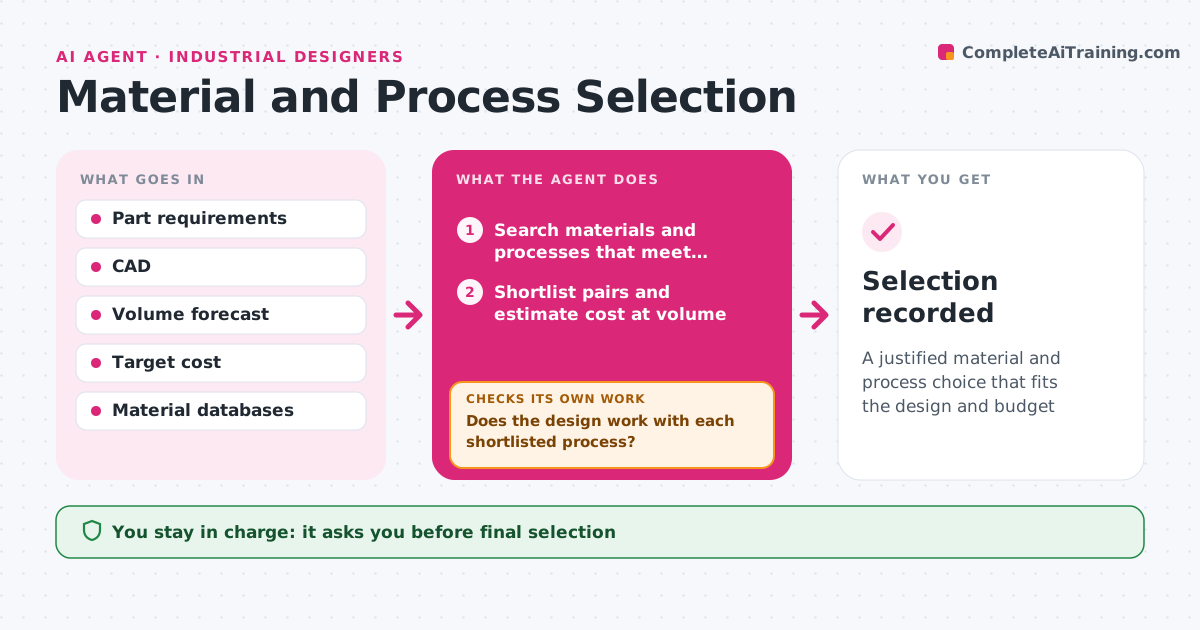
A justified material and process choice that fits the design and budget
What it does
Choosing the wrong material or process can lock in high costs or force a redesign late in the project. Given the part's requirements, such as strength, temperature, finish, color, volume, target cost and sustainability goals, this agent searches material databases and process guides. It shortlists material and process pairs, estimates part cost at the planned volume including tooling, and notes the design rules for each process, like draft angles and wall thickness. It checks the current design against those rules. If the design breaks a rule, it lists the changes needed or drops that option. It drafts a comparison table with trade-offs. The designer decides and confirms with suppliers. Edge case: a low-volume product may favor a process with higher part cost but no tooling cost.
How it works
Follow the arrows from top to bottom. The orange dashed arrow is the loop: when a check fails, the agent goes back and tries again.
Read the steps as a list
- Part requirements defined
- Search materials and processes that meet requirements
- Shortlist pairs and estimate cost at volume
- Check the design against each process's rules
- Does the design work with each shortlisted process?If not: list design changes needed or drop the option. Back to step 3.
- Draft comparison table with trade-offs
- Designer decides and confirms with suppliersThe agent waits here for your OK.
- Selection recorded
How it decides
It ranks pairs by fit with requirements and total cost at volume, including tooling.
- Include tooling cost in total cost
- Drop options that need major redesign unless they are much cheaper
- Note recycled content where required
Make it yours
Every agent is a starting point. You choose these settings for your own situation.
- Requirement weights
- Volume scenarios
- Sustainability goals
- Material databases used
What keeps you in control
It always asks you first
- Final selection
- Supplier quotes
Hard limits
- Never places orders
- Cost figures are estimates, marked as such
It stops when
- Done: selection recorded
- Stop: requirements conflict, ask designer
Set it up
We guide you through the set-up, step by step
Members get the full set-up guide for this agent. No technical skills needed: you copy, paste and upload.
- One set of instructions to paste into your AI, with the clicks for ChatGPT, Claude, Microsoft 365 Copilot, Gemini and Grok
- The agent then walks you through connecting your own data, one source at a time
- A downloadable copy with the flow chart, the rules and the full guide