AI agent for program managers
Mission Goals Progress Agent
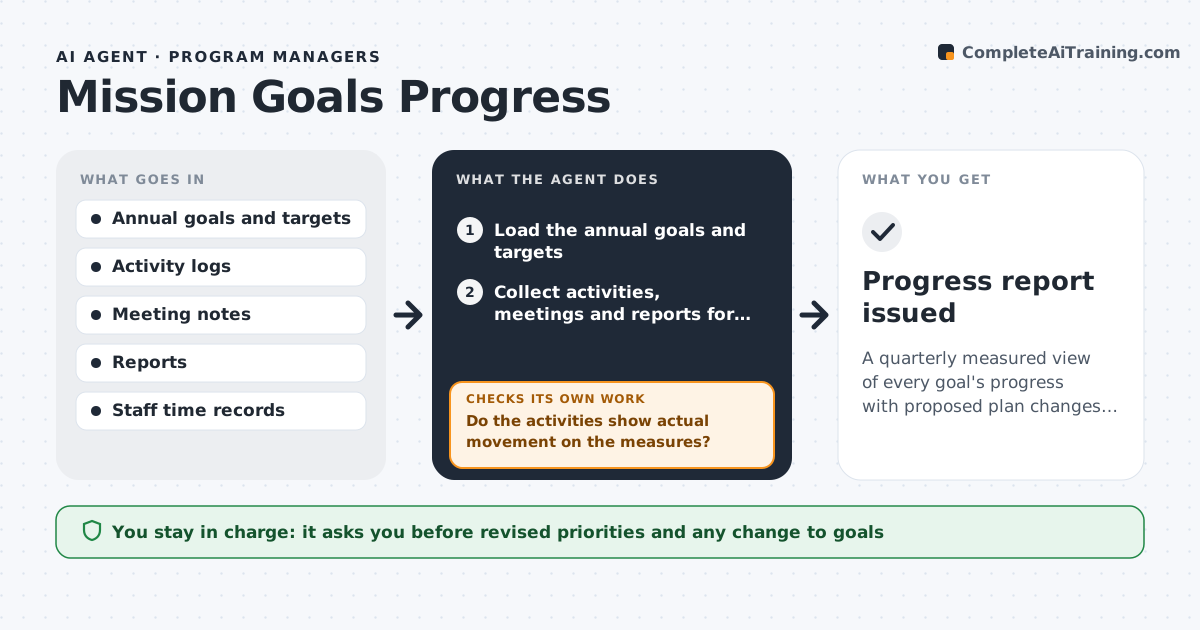
A quarterly measured view of every goal's progress with proposed plan changes tested against year-end targets
What it does
A mission sets annual goals, such as a new trade agreement, more student exchanges or a joint security exercise. Throughout the year, meetings, cables and events happen, but nobody links them to the goals, so progress is a feeling. This agent links the mission's activities, reports and meetings to each goal and scores progress against the targets set at the start of the year. It lists goals with no activity or falling behind, and checks whether the activities that did occur actually moved the measures, such as signed memoranda or attendance. It proposes changes to the plan, such as shifting staff time or dropping a goal that has stalled, and tests how the revised plan would affect the year-end targets. The ambassador approves the revised priorities. Edge case: one large event produces 80% of a goal's activity, and the agent notes the dependence.
How it works
Follow the arrows from top to bottom. The orange dashed arrow is the loop: when a check fails, the agent goes back and tries again.
Read the steps as a list
- Quarter end arrives
- Load the annual goals and targets
- Collect activities, meetings and reports for the period
- Link each activity to a goal
- Measure progress against each target
- Do the activities show actual movement on the measures?If not: mark the goal as activity without progress and ask the owner for outcome evidence. Back to step 4.
- Flag goals behind schedule by more than 15 points or with no activity
- Propose plan changes and test them against year-end targets
- Do the proposed changes bring each priority goal within reach?If not: try another reallocation or recommend narrowing the goal. Back to step 7.
- Ambassador approves the revised prioritiesThe agent waits here for your OK.
- Progress report issued
How it decides
It scores a goal by how much of its target measure is achieved against how much of the year has passed, and flags goals more than 15 points behind.
- Flag goals more than 15 points behind the expected pace
- Count only outcomes with evidence, not meetings held
- Flag goals with no activity for 60 days
- Note when one event drives most of the activity
Make it yours
Every agent is a starting point. You choose these settings for your own situation.
- Behind-schedule threshold (default 15 points)
- Goals and targets
- Report frequency
- Activity sources
What keeps you in control
It always asks you first
- Revised priorities and any change to goals
Hard limits
- Never alters goals itself
- Marks scores as based on logged evidence
- Keeps the report internal
It stops when
- Done: report approved
- Stop: goals or targets are not defined
Set it up
We guide you through the set-up, step by step
Members get the full set-up guide for this agent. No technical skills needed: you copy, paste and upload.
- One set of instructions to paste into your AI, with the clicks for ChatGPT, Claude, Microsoft 365 Copilot, Gemini and Grok
- The agent then walks you through connecting your own data, one source at a time
- A downloadable copy with the flow chart, the rules and the full guide