AI agent for newsletter writers
Newsletter Engagement Diagnosis Agent
Explain why an issue under- or over-performed and propose tests for the next one
What it does
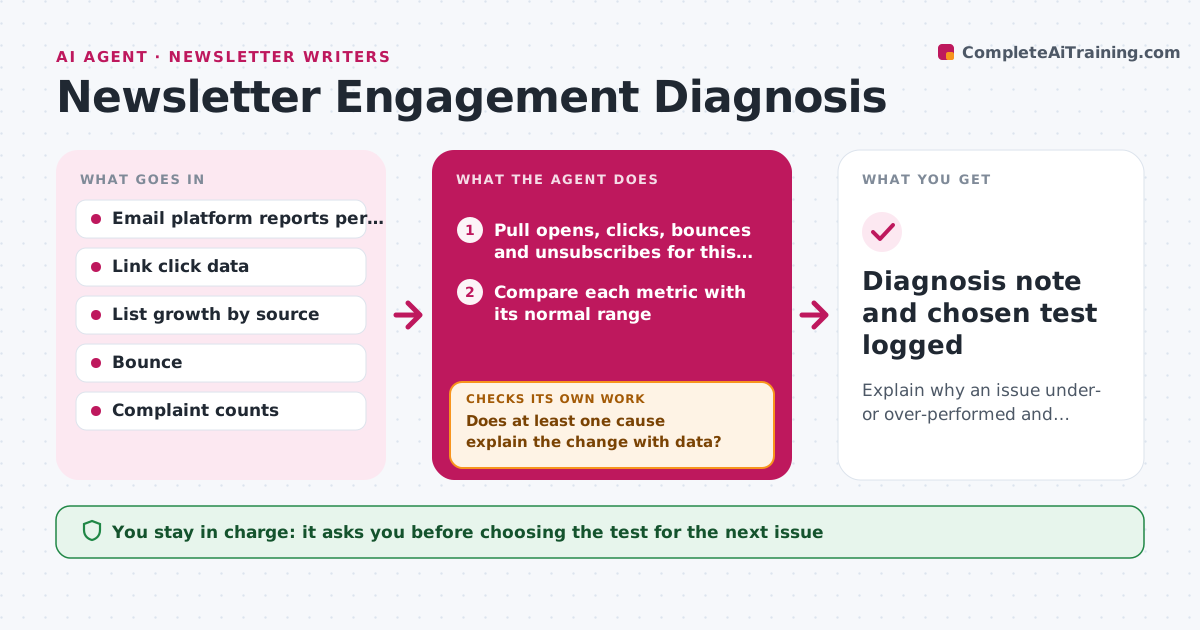
Newsletter writers see a bad open or click rate but rarely know why, so they change the wrong thing. Forty-eight hours after each send, this agent pulls opens, clicks, bounces and unsubscribes for the issue and the last eight. It compares each metric with its normal range and treats a change as real only if it is outside that range. It then tests candidate causes: subject line, send time, link order, new subscribers from one source, or one mailbox provider dropping. When privacy opens exceed half of opens, it leans on clicks. If no cause explains the change, it splits results by segment and signup source and tests again. It flags deliverability if bounces or complaints double. It drafts a note with the likely cause and two tests. The writer picks which test to run. Edge case: privacy-inflated opens lead the agent to rely on clicks.
How it works
Follow the arrows from top to bottom. The orange dashed arrow is the loop: when a check fails, the agent goes back and tries again.
Read the steps as a list
- Issue reaches 48 hours after send
- Pull opens, clicks, bounces and unsubscribes for this issue and the last eight
- Compare each metric with its normal range
- Test candidate causes: subject, send time, link order, new subscribers, mailbox provider
- Does at least one cause explain the change with data?If not: split results by segment and signup source, then test causes again. Back to step 4.
- Draft a diagnosis note with two tests for the next issue
- Writer picks which test to runThe agent waits here for your OK.
- Diagnosis note and chosen test logged
How it decides
It only names a cause when the numbers for that cause moved more than the normal week-to-week range; otherwise it says the change is noise.
- Treat a change as real only if it is outside the last eight issues' range
- Prefer click rate over open rate when privacy opens exceed half of opens
- Flag deliverability if bounces or spam complaints double
Make it yours
Every agent is a starting point. You choose these settings for your own situation.
- Number of past issues used as baseline (default 8)
- Metric to trust most (clicks or opens)
- Hours after send to run (default 48)
- Where the note is saved
What keeps you in control
It always asks you first
- Choosing the test for the next issue
Hard limits
- Never changes list settings or sends anything
- Does not delete subscribers
It stops when
- Done: diagnosis note saved with a chosen test
- Stop: fewer than four past issues to compare
Set it up
We guide you through the set-up, step by step
Members get the full set-up guide for this agent. No technical skills needed: you copy, paste and upload.
- One set of instructions to paste into your AI, with the clicks for ChatGPT, Claude, Microsoft 365 Copilot, Gemini and Grok
- The agent then walks you through connecting your own data, one source at a time
- A downloadable copy with the flow chart, the rules and the full guide