AI agent for bloggers
Newsletter Sponsor Placement Agent
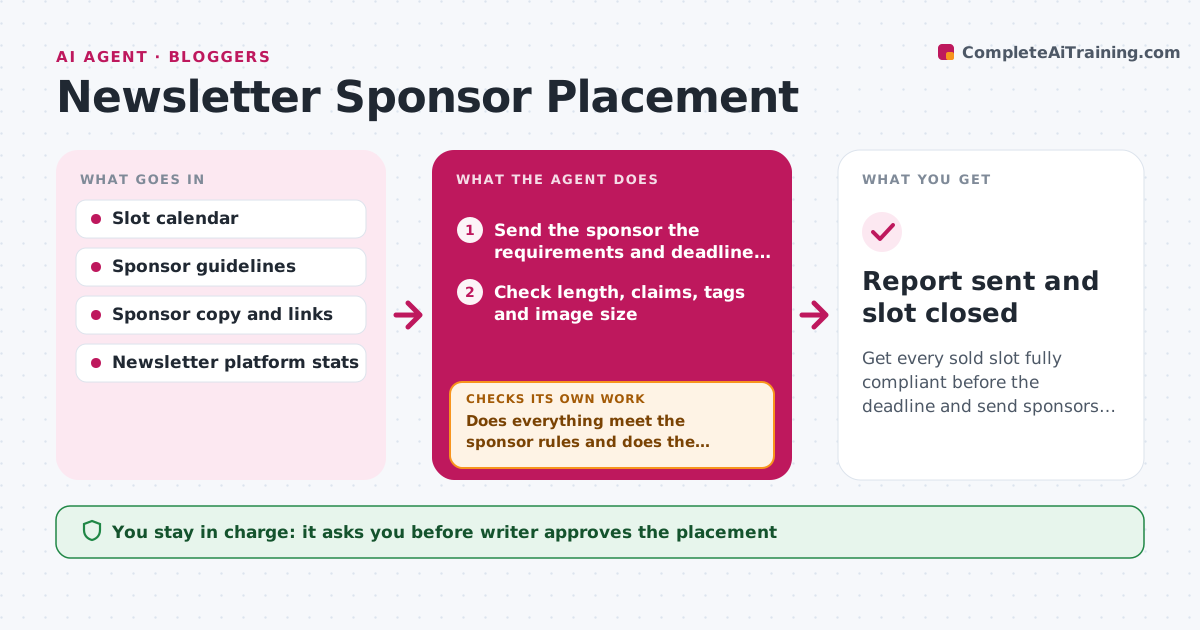
Get every sold slot fully compliant before the deadline and send sponsors a clear results report.
What it does
Selling a sponsor slot is the easy part. Then comes the chase for copy, logos and links, and later the results report. The agent keeps a table of open slots by issue date and sponsor status. When a slot is sold, it asks the sponsor for copy, a link and any images, and checks them against the sponsor guidelines: character limits, no banned claims, working links, correct tracking tags. Missing or non-compliant items go back to the sponsor with exact fixes, and the agent loops until the requirements are met. It schedules the placement in the issue and, after sending, builds a results report with opens and clicks. Edge case: a sponsor sends a link that redirects through three trackers. The agent tests it. The writer approves the placement and the report.
How it works
Follow the arrows from top to bottom. The orange dashed arrow is the loop: when a check fails, the agent goes back and tries again.
Read the steps as a list
- A sponsor slot is sold
- Send the sponsor the requirements and deadline, then receive copy, link and images
- Check length, claims, tags and image size
- Open the link and check it works and tracks correctly
- Does everything meet the sponsor rules and does the link work?If not: send the sponsor an exact list of fixes and wait for a new version. Back to step 2.
- Writer approves the placementThe agent waits here for your OK.
- Schedule the placement in the issue
- After sending, pull opens and clicks for the placement
- Build the sponsor results report
- Writer approves the report before it is sentThe agent waits here for your OK.
- Report sent and slot closed
How it decides
Copy is ready when it meets length, claims, link and tag rules. A placement is scheduled only when all assets are approved and the link tests clean.
- Ask for assets 7 days before the send date
- Reject copy over the character limit or with claims on the banned list
- Send a reminder after 2 days of no reply
- Move a slot to the next issue if assets arrive less than 24 hours before send
Make it yours
Every agent is a starting point. You choose these settings for your own situation.
- Copy limits and banned claims
- Asset deadline (default 7 days before)
- Reminder timing
- Report metrics
- Slot calendar and platform
What keeps you in control
It always asks you first
- Writer approves the placement
- Writer approves the report sent to the sponsor
Hard limits
- Never publish copy that fails the sponsor rules
- Do not invent results
It stops when
- Done: placement sent and report delivered
- Stop: sponsor never delivers assets, release the slot and tell the writer
Set it up
We guide you through the set-up, step by step
Members get the full set-up guide for this agent. No technical skills needed: you copy, paste and upload.
- One set of instructions to paste into your AI, with the clicks for ChatGPT, Claude, Microsoft 365 Copilot, Gemini and Grok
- The agent then walks you through connecting your own data, one source at a time
- A downloadable copy with the flow chart, the rules and the full guide