AI agent for no-code developers
No-Code App QA Agent
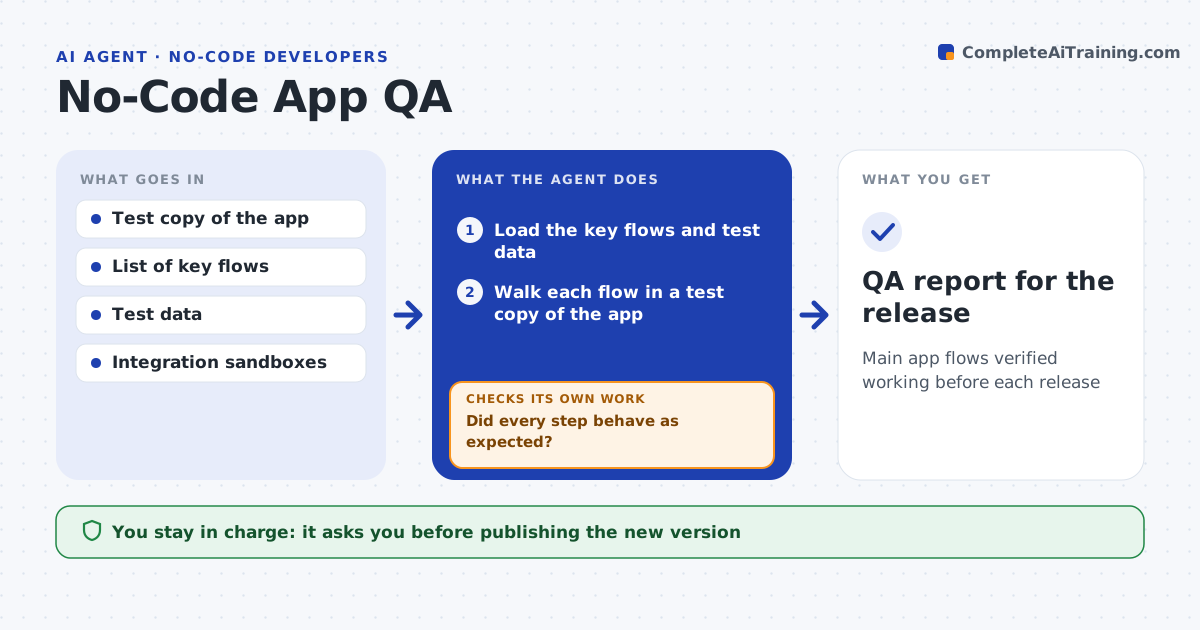
Main app flows verified working before each release
What it does
No-code platforms hide logic, so broken automations, bad data and dead buttons only show up when a real user hits them. Before each release this agent walks the main user flows in a test copy of the app, such as sign up, create a record and run the key automation. At each step it checks that the automation fired, the data saved correctly and any integration returned data. When a step fails, it records the screen, the input and the result, and retries once to rule out a timing issue. If it fails again, it drafts a fix note for the builder pointing at the exact automation or field. After the fix it reruns the flow. You approve publishing. Edge case: an automation that emails clients is tested with a safe test address, never a real client.
How it works
Follow the arrows from top to bottom. The orange dashed arrow is the loop: when a check fails, the agent goes back and tries again.
Read the steps as a list
- Release candidate ready
- Load the key flows and test data
- Walk each flow in a test copy of the app
- Check saved data, automations and integration results
- Did every step behave as expected?If not: record the screen and input, retry once, then draft a fix note. Back to step 3.
- Summarize passed and failed flows
- Builder approves publishingThe agent waits here for your OK.
- QA report for the release
How it decides
A flow passes only when every step produces the expected data, automation and integration result, confirmed on a retry.
- Retry a failed step once before failing it
- Use test addresses for any outbound message
- Block release if a core flow fails
Make it yours
Every agent is a starting point. You choose these settings for your own situation.
- Core flows to test
- Test data and addresses
- Retry count
- What blocks a release
What keeps you in control
It always asks you first
- Publishing the new version
- Any step that would message real clients
Hard limits
- Never messages real clients during testing
- Does not publish without approval
It stops when
- Done: all core flows pass or fixes noted
- Stop: no test copy of the app exists
Set it up
We guide you through the set-up, step by step
Members get the full set-up guide for this agent. No technical skills needed: you copy, paste and upload.
- One set of instructions to paste into your AI, with the clicks for ChatGPT, Claude, Microsoft 365 Copilot, Gemini and Grok
- The agent then walks you through connecting your own data, one source at a time
- A downloadable copy with the flow chart, the rules and the full guide