AI agent for ux/ui designers
Heuristic Evaluation Sweep Agent
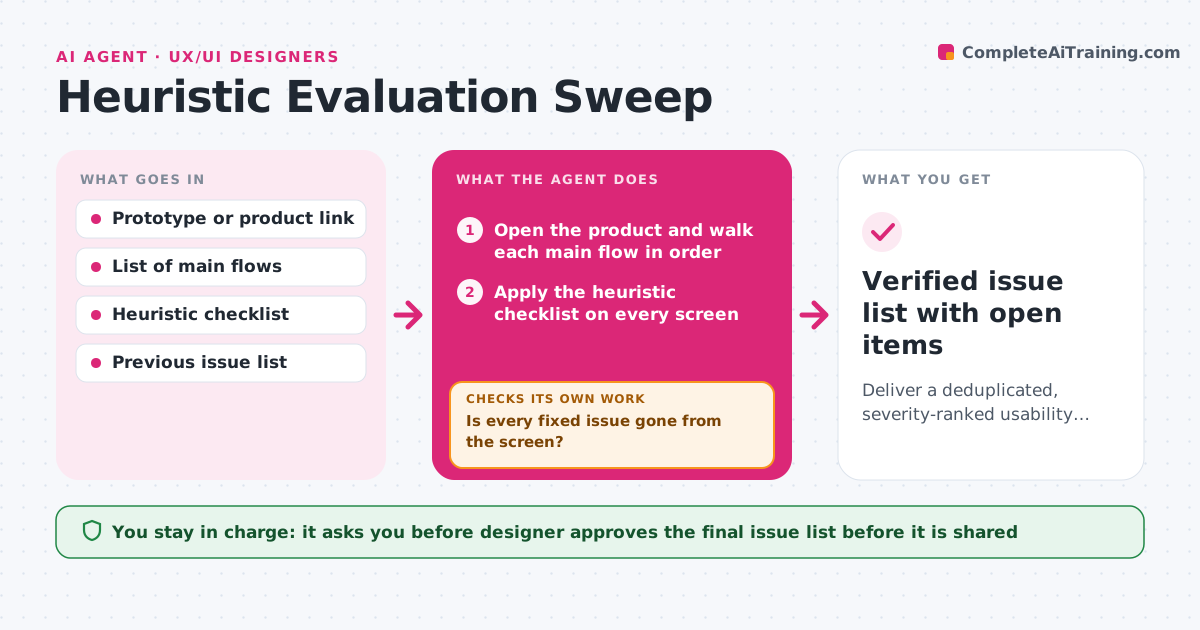
Deliver a deduplicated, severity-ranked usability issue list that is verified after fixes.
What it does
A review before launch usually catches whatever the reviewer happens to click on. This agent walks through the main flows of a prototype or live product in a set order, such as sign-up, search and checkout. At each screen it applies a heuristic checklist, covering visibility of status, error messages, consistency, recovery from mistakes and clarity of labels. It records each issue with the screen, a screenshot, a severity from 1 to 4 and the heuristic broken. It then groups duplicates so the same bad label on ten screens becomes one issue. After the team ships fixes, it walks the same flows again and checks that each fixed issue is gone and that no new issue appeared. The designer approves the final issue list before it goes to the team. Edge case: a screen only fails on mobile, so the agent repeats that flow at phone width.
How it works
Follow the arrows from top to bottom. The orange dashed arrow is the loop: when a check fails, the agent goes back and tries again.
Read the steps as a list
- A flow is ready for review
- Open the product and walk each main flow in order
- Apply the heuristic checklist on every screen
- Capture screenshots and record each issue
- Group duplicates and set severity
- Designer approves the issue list for the teamThe agent waits here for your OK.
- After fixes ship, walk the same flows again
- Is every fixed issue gone from the screen?If not: reopen the issue with a new screenshot and rerun the checklist on that screen. Back to step 3.
- Did the fixes cause any new issue?If not: log the new issue and walk the nearby screens again. Back to step 3.
- Verified issue list with open items
How it decides
It marks a screen as failing a heuristic when a checklist question is answered no. It sets severity by how many users hit it and whether they can recover.
- Severity 4 if users cannot finish the task, 3 if they finish with real difficulty, 2 if minor, 1 if cosmetic
- Merge issues with the same cause on different screens into one
- Repeat any flow at phone width when the product has a mobile layout
- Reopen an issue when the fix only works in one browser
Make it yours
Every agent is a starting point. You choose these settings for your own situation.
- Heuristic set to use (default ten usability heuristics)
- Flows to walk and their order
- Severity scale and cutoffs
- Screen widths to test (default desktop and phone)
- Where the issue list is written
What keeps you in control
It always asks you first
- Designer approves the final issue list before it is shared
Hard limits
- Never change the product or submit real orders
- Never close an issue without checking the screen again
It stops when
- Done: all severity 3 and 4 issues are verified fixed
- Stop: the product needs a login the agent does not have
Set it up
We guide you through the set-up, step by step
Members get the full set-up guide for this agent. No technical skills needed: you copy, paste and upload.
- One set of instructions to paste into your AI, with the clicks for ChatGPT, Claude, Microsoft 365 Copilot, Gemini and Grok
- The agent then walks you through connecting your own data, one source at a time
- A downloadable copy with the flow chart, the rules and the full guide