AI agent for payroll administrators
Off-Cycle Check and Stop Payment Agent
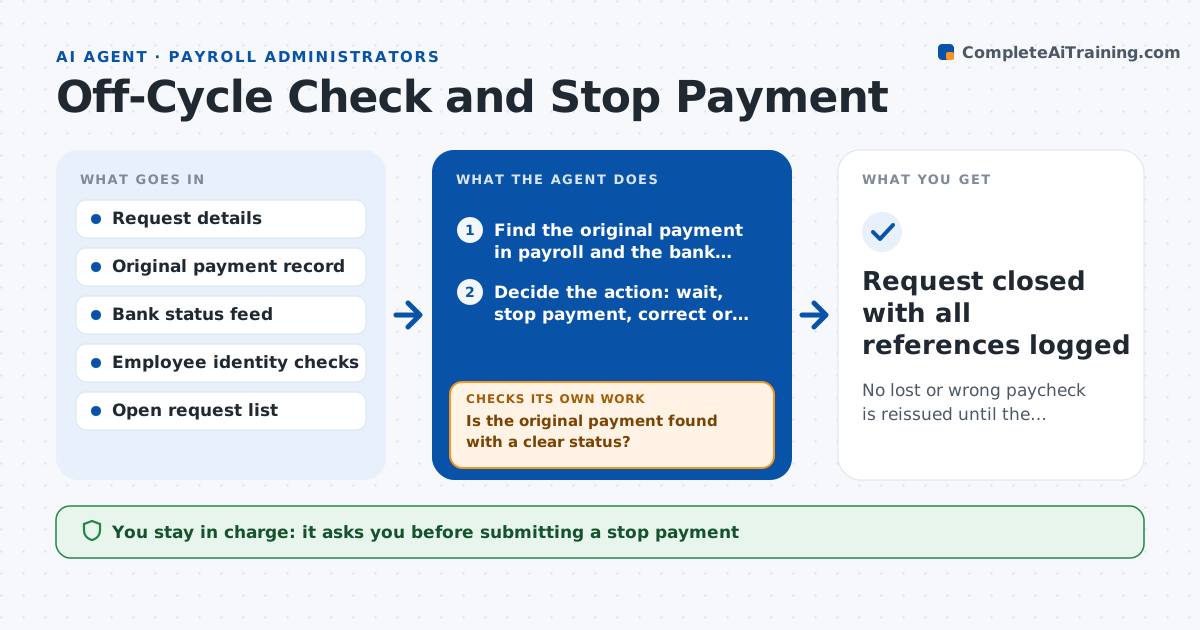
No lost or wrong paycheck is reissued until the original is confirmed stopped or never issued, and every step is recorded
What it does
When an employee says a paycheck is lost, wrong or never arrived, payroll must be sure the original payment is not cashed before paying again, or the company pays twice. The steps, bank checks and records are easy to skip under pressure. This agent reads the request and finds the original payment: amount, date, method and bank status. It checks whether a stop payment is needed, whether the check has cleared and whether a similar request is already open. It proposes the right action: wait, request a stop payment, void and reissue or correct a wrong amount in the next cycle. It then tracks the bank's confirmation of the stop and rechecks before it prepares the reissue. Payroll approves each action. Edge case: the check cleared yesterday at a different bank, so the agent opens a fraud claim instead of a reissue.
How it works
Follow the arrows from top to bottom. The orange dashed arrow is the loop: when a check fails, the agent goes back and tries again.
Read the steps as a list
- A lost or wrong check request is received
- Find the original payment in payroll and the bank, and check for duplicate requests
- Is the original payment found with a clear status?If not: search by amount and date range and ask the requester for details. Back to step 2.
- Decide the action: wait, stop payment, correct or claim
- Payroll approves the actionThe agent waits here for your OK.
- Submit the stop payment and record the bank reference
- Check the bank for confirmation that the stop is in place
- Has the bank confirmed the stop and the check has not cleared?If not: recheck every 4 hours and open a claim if the check clears. Back to step 7.
- Prepare the reissue or correction
- Payroll approves the reissueThe agent waits here for your OK.
- Request closed with all references logged
How it decides
It reissues only after the bank confirms the original is stopped or never cleared, and it routes cleared payments to a claims process instead.
- Wait 5 business days for mailed checks unless fraud is suspected
- Never reissue before the bank confirms the stop
- Open a claim if the check has cleared
- Charge any stop payment fee per policy
Make it yours
Every agent is a starting point. You choose these settings for your own situation.
- Waiting period for mailed checks (default 5 business days)
- Recheck interval (default 4 hours)
- Stop payment fee policy
- Bank used
What keeps you in control
It always asks you first
- Submitting a stop payment
- Issuing the replacement
Hard limits
- Never issues a payment without approval
- Verifies identity before action
- Records every bank reference
It stops when
- Done: replacement is issued and logged
- Stop: the original cannot be found or the employee cannot be verified
Set it up
We guide you through the set-up, step by step
Members get the full set-up guide for this agent. No technical skills needed: you copy, paste and upload.
- One set of instructions to paste into your AI, with the clicks for ChatGPT, Claude, Microsoft 365 Copilot, Gemini and Grok
- The agent then walks you through connecting your own data, one source at a time
- A downloadable copy with the flow chart, the rules and the full guide