AI agent for engineering managers
On-Call Load Balancing Agent
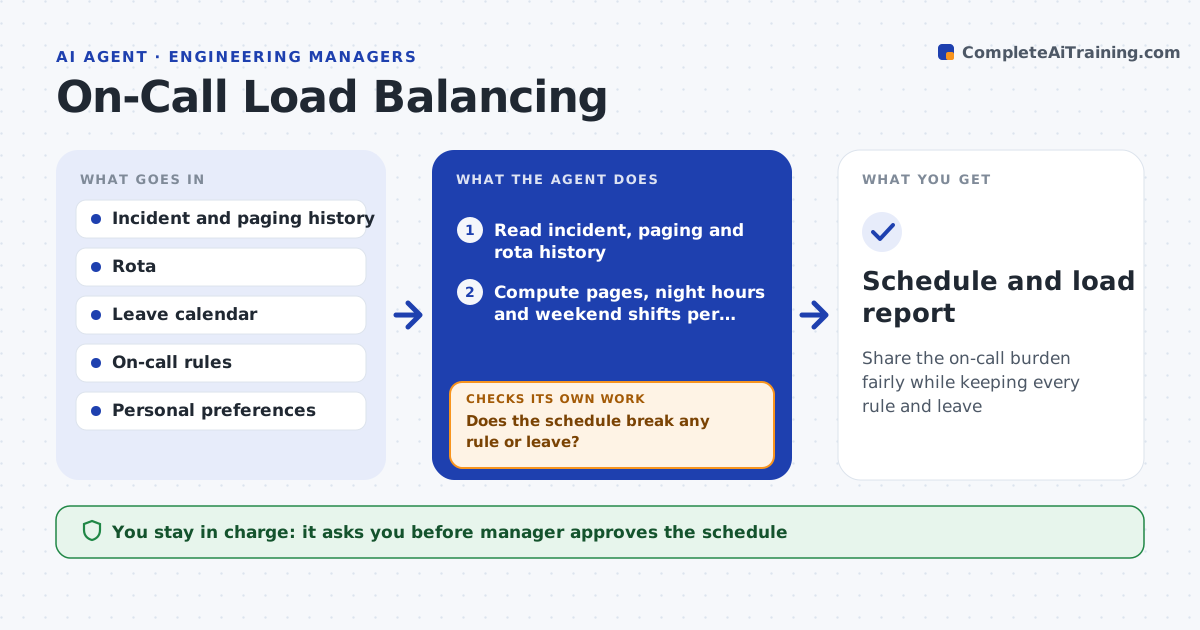
Share the on-call burden fairly while keeping every rule and leave
What it does
The same three engineers get paged at night while others rarely do, and the schedule ignores leave and holidays. This agent reads the incident and rota history and computes pages, night hours and weekend shifts per person. It spots uneven load and proposes swaps for the coming rotations. It checks each proposed schedule against rules such as no back-to-back weeks, a rest day after a bad night, holiday fairness and approved leave. If a rule is broken it rebuilds the schedule and checks again. It also flags noisy alerts that cause most pages. The manager approves the schedule before it is published to the team. Edge case: one engineer asked for extra shifts for pay, so the agent follows the stated preference.
How it works
Follow the arrows from top to bottom. The orange dashed arrow is the loop: when a check fails, the agent goes back and tries again.
Read the steps as a list
- Monthly planning
- Read incident, paging and rota history
- Compute pages, night hours and weekend shifts per person
- Find uneven load and noisy alerts
- Build a proposed schedule for the coming rotation
- Check the schedule against leave, holidays and rules
- Does the schedule break any rule or leave?If not: rebuild with different swaps and check again. Back to step 4.
- Is the load gap between highest and lowest under the target?If not: propose alert fixes and extra swaps. Back to step 4.
- Manager approves the scheduleThe agent waits here for your OK.
- Schedule and load report
How it decides
It scores each person's load from pages, night hours and weekends and picks swaps that reduce the gap between highest and lowest without breaking a rule.
- Count a page between 22:00 and 07:00 as 3 times a daytime page
- Never schedule back-to-back weeks
- Give a rest day after a night with 3 or more pages
- Aim for a gap under 25% between the highest and lowest load
Make it yours
Every agent is a starting point. You choose these settings for your own situation.
- Night weighting (default 3 times)
- Rules for rest and back-to-back weeks
- Fairness target (default 25%)
- Planning horizon
- Preferences allowed
What keeps you in control
It always asks you first
- Manager approves the schedule
- Manager approves publishing it to the team
Hard limits
- Never publish the schedule itself
- Never schedule anyone during approved leave
It stops when
- Done: a valid fair schedule is approved
- Stop: the team is too small to meet the rules
Set it up
We guide you through the set-up, step by step
Members get the full set-up guide for this agent. No technical skills needed: you copy, paste and upload.
- One set of instructions to paste into your AI, with the clicks for ChatGPT, Claude, Microsoft 365 Copilot, Gemini and Grok
- The agent then walks you through connecting your own data, one source at a time
- A downloadable copy with the flow chart, the rules and the full guide