AI agent for market research analysts
Open-Ended Response Coding Agent
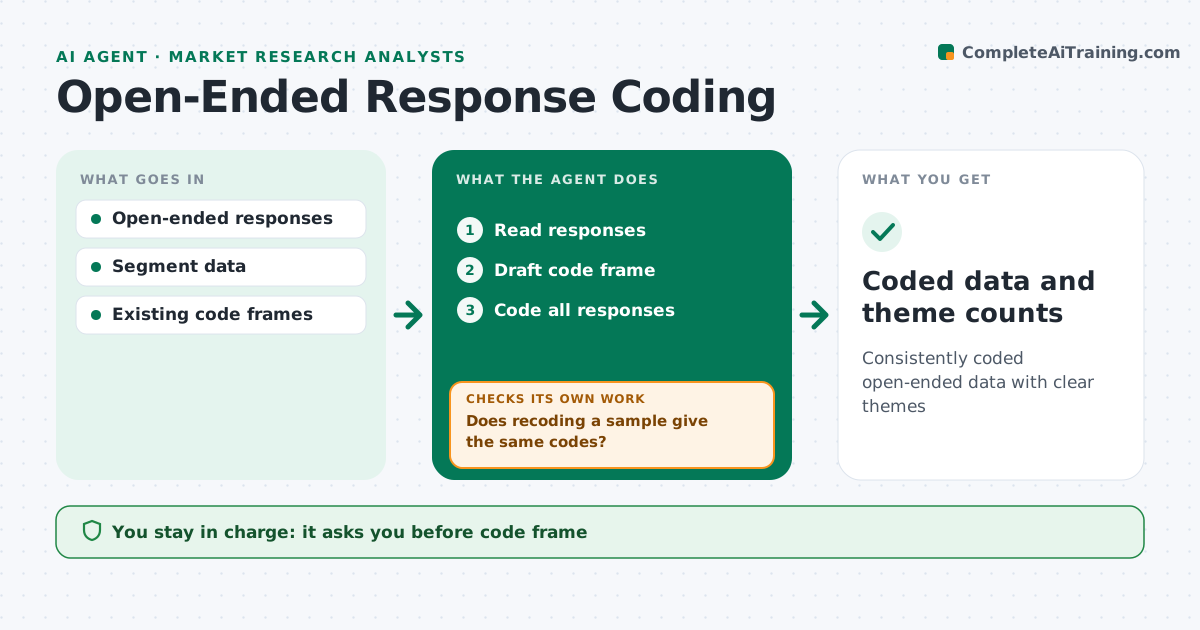
Consistently coded open-ended data with clear themes
What it does
Open-ended survey answers hold rich insight but can take days to code by hand. This agent reads all responses and drafts a code frame of themes. When the study repeats, it starts from your existing code frame so results stay comparable between waves. After you approve the frame, it codes each response. It then checks its own consistency by recoding a sample and comparing the two passes. If they disagree, it looks for codes that are vague or overlap, merges or splits them, and recodes. When the check passes, it produces counts by segment with example quotes for each theme. You review and approve the code frame, and any change to it later. Edge case: sarcastic answers, where the words say the opposite of the meaning, are flagged for human coding rather than guessed.
How it works
Follow the arrows from top to bottom. The orange dashed arrow is the loop: when a check fails, the agent goes back and tries again.
Read the steps as a list
- Fieldwork closes
- Read responses
- Draft code frame
- Analyst approves code frameThe agent waits here for your OK.
- Code all responses
- Does recoding a sample give the same codes?If not: revise unclear codes and recode. Back to step 5.
- Coded data and theme counts
How it decides
It builds themes from response content and checks consistency by recoding samples.
- Merge overlapping codes
- Flag sarcasm
- Check consistency on samples
Make it yours
Every agent is a starting point. You choose these settings for your own situation.
- Consistency target (default 90%)
- Code frame template
- Quote count
- Segments
What keeps you in control
It always asks you first
- Code frame
Hard limits
- Never alters responses
It stops when
- Done: coded data delivered
- Stop: responses too few
Set it up
We guide you through the set-up, step by step
Members get the full set-up guide for this agent. No technical skills needed: you copy, paste and upload.
- One set of instructions to paste into your AI, with the clicks for ChatGPT, Claude, Microsoft 365 Copilot, Gemini and Grok
- The agent then walks you through connecting your own data, one source at a time
- A downloadable copy with the flow chart, the rules and the full guide