AI agent for nurses
Pain Reassessment Follow-Up Agent
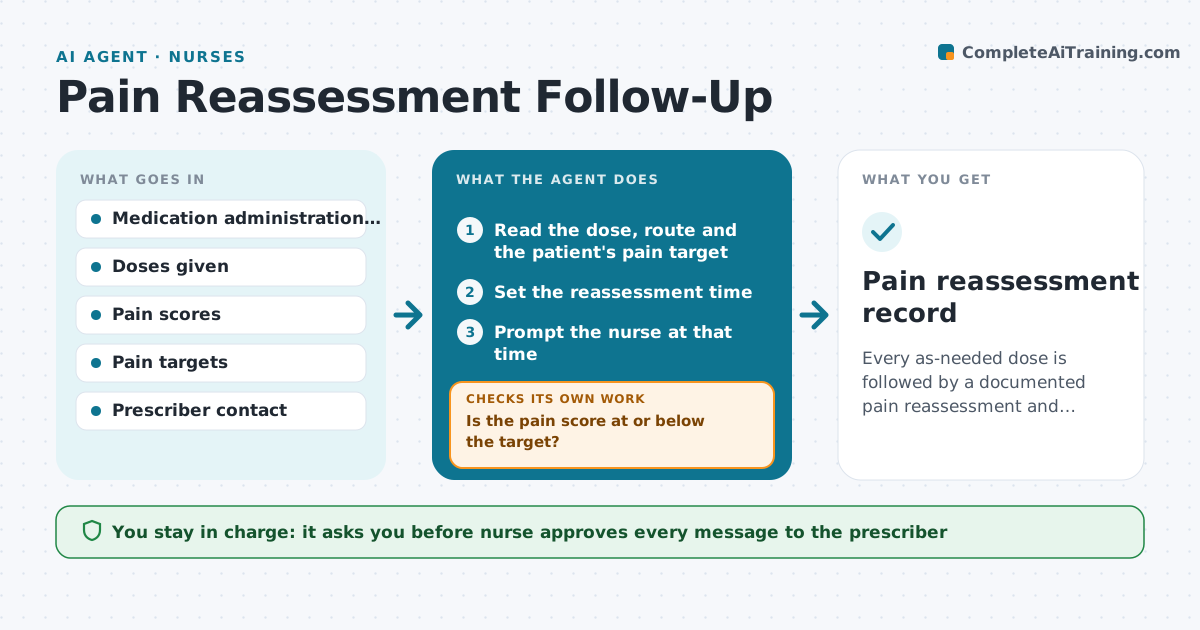
Every as-needed dose is followed by a documented pain reassessment and action when relief is not enough.
What it does
After a pain medicine, the nurse must reassess pain in the right time window, and it is easy to miss on a busy shift. The agent tracks the doses given as needed and sets a reassessment time based on the route and the type of medicine. It prompts the nurse at that time, records the new pain score and compares it with the target. If relief is not achieved, it flags the patient and prompts the nurse to notify the prescriber, with the history of doses and scores ready. After any change, it checks again at the next time. The nurse approves every message to the prescriber. Edge case: a sharp rise in pain with new symptoms, such as chest pain, is flagged for immediate nurse assessment before any other step.
How it works
Follow the arrows from top to bottom. The orange dashed arrow is the loop: when a check fails, the agent goes back and tries again.
Read the steps as a list
- As-needed dose recorded
- Read the dose, route and the patient's pain target
- Set the reassessment time
- Prompt the nurse at that time
- Read the new pain score
- Is the pain score at or below the target?If not: Draft a note to the prescriber with the doses and scores. Back to step 3.
- Nurse approves the noteThe agent waits here for your OK.
- Send the note and log it
- Check the score after any change
- Is relief now achieved?If not: Prompt the nurse to escalate to the prescriber again and review non-drug options. Back to step 3.
- Pain reassessment record
How it decides
It sets the reassessment time by route and medicine and treats a score above the target as a gap.
- Oral doses are reassessed at about 60 minutes
- Injectable doses at about 30 minutes
- Score above target after reassessment goes to the prescriber
- New symptoms go to immediate assessment
Make it yours
Every agent is a starting point. You choose these settings for your own situation.
- Reassessment times by route
- Pain target
- Escalation rule
- Message format
- Shift handover list
What keeps you in control
It always asks you first
- Nurse approves every message to the prescriber
- Nurse decides any dose or medicine change with the prescriber
Hard limits
- Never recommend a dose
- Never skip a documented reassessment
- Never send without nurse approval
It stops when
- Done: pain is at target and documented
- Stop: the patient is transferred or the order changes
Set it up
We guide you through the set-up, step by step
Members get the full set-up guide for this agent. No technical skills needed: you copy, paste and upload.
- One set of instructions to paste into your AI, with the clicks for ChatGPT, Claude, Microsoft 365 Copilot, Gemini and Grok
- The agent then walks you through connecting your own data, one source at a time
- A downloadable copy with the flow chart, the rules and the full guide