AI agent for headteachers
Parent Concern Response Tracker Agent
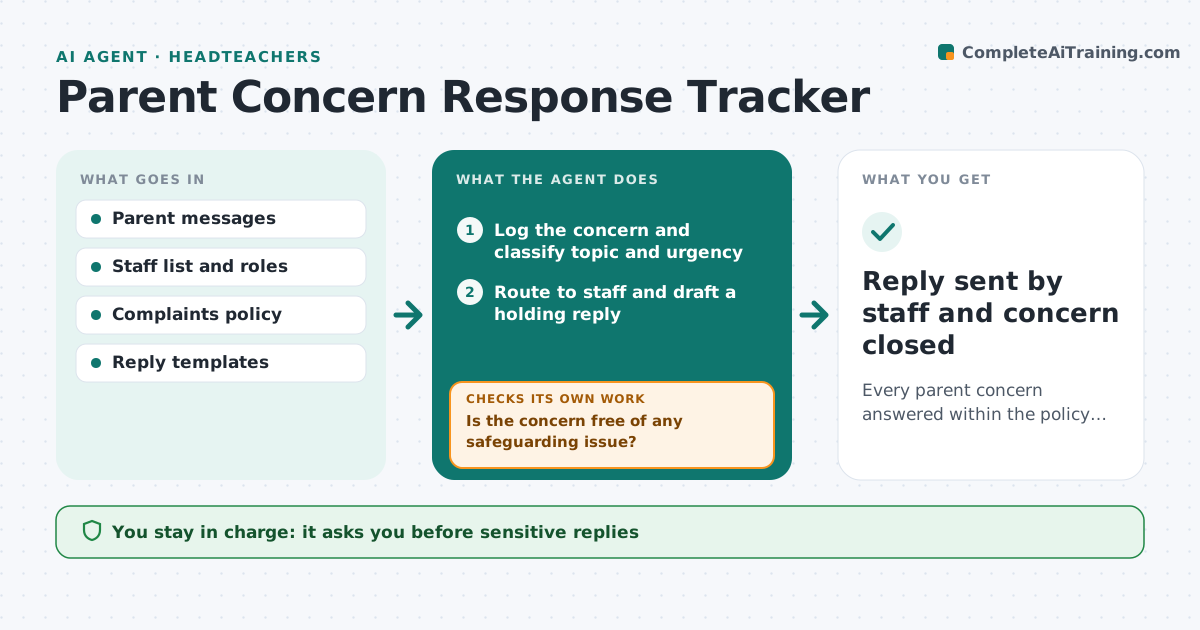
Every parent concern answered within the policy timeframe
What it does
Schools receive many parent emails and calls about learning, behavior, bullying and logistics, and some go unanswered or get half answers. This agent logs each concern, classifies its topic and urgency, and routes it to the right staff member under school policy. Anything suggesting harm to a child goes straight to the safeguarding lead with no drafted reply. For other concerns, it drafts a holding reply, then a full reply from the facts staff provide. It checks that the final reply answers every question the parent asked; if not, it asks the staff member for the missing part. It tracks a 3 school day reply deadline and flags three concerns on the same issue as a pattern. The leader approves replies on sensitive topics. Edge case: a concern mentions possible harm to a child, so it skips drafting and goes to the safeguarding lead at once.
How it works
Follow the arrows from top to bottom. The orange dashed arrow is the loop: when a check fails, the agent goes back and tries again.
Read the steps as a list
- Parent concern arrives
- Log the concern and classify topic and urgency
- Is the concern free of any safeguarding issue?If not: send it straight to the safeguarding lead and stop drafting. Back to step 2.
- Route to staff and draft a holding reply
- Collect facts from staff and draft the full reply
- Does the reply answer every question raised?If not: ask the staff member for the missing information. Back to step 5.
- Check for repeated concerns on the same topic
- Leader approves sensitive repliesThe agent waits here for your OK.
- Reply sent by staff and concern closed
How it decides
It routes by topic and urgency and checks every question in the message is answered.
- Safeguarding concerns go to the designated lead immediately
- Replies due within 3 school days
- Three concerns on one topic flagged as a pattern
Make it yours
Every agent is a starting point. You choose these settings for your own situation.
- Reply deadlines
- Topic categories
- Approval rules
- Reply tone
What keeps you in control
It always asks you first
- Sensitive replies
- Formal complaint responses
Hard limits
- Never sends replies itself
- Never handles safeguarding beyond routing
It stops when
- Done: concern closed
- Stop: formal complaint, move to complaints procedure
Set it up
We guide you through the set-up, step by step
Members get the full set-up guide for this agent. No technical skills needed: you copy, paste and upload.
- One set of instructions to paste into your AI, with the clicks for ChatGPT, Claude, Microsoft 365 Copilot, Gemini and Grok
- The agent then walks you through connecting your own data, one source at a time
- A downloadable copy with the flow chart, the rules and the full guide