AI agent for primary school teachers
Parent Conference Scheduling and Prep Agent
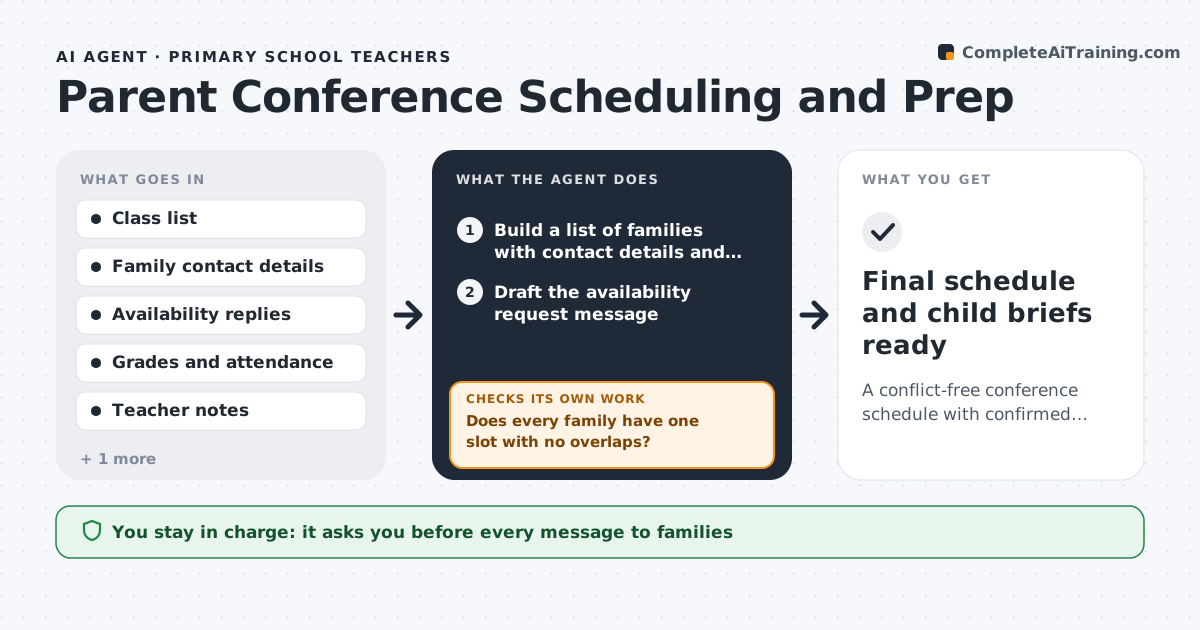
A conflict-free conference schedule with confirmed families and a prepared one-page brief per child
What it does
Before parent conferences, a teacher with 26 students has to find a time for each family, handle conflicts, pull each child's grades and notes and write what to say. It eats evenings. This agent collects each family's availability by message or form, then builds a schedule that fits the conference slots, with siblings and last-minute requests handled. It sends the proposed times for the teacher to approve and tracks confirmations. For each child it pulls grades, attendance, work samples and the teacher's notes and drafts talking points: strengths, one or two areas to work on and a question for the parent. If a conflict appears, such as a double booking or a family that cannot make any slot, it reschedules and rechecks the whole schedule. The teacher approves every message. Edge case: a parent needs an interpreter, and the agent adds time and flags it.
How it works
Follow the arrows from top to bottom. The orange dashed arrow is the loop: when a check fails, the agent goes back and tries again.
Read the steps as a list
- Conference scheduling opens
- Build a list of families with contact details and language needs
- Draft the availability request message
- Teacher approves the message before it is sentThe agent waits here for your OK.
- Collect replies and record availability
- Build the schedule with siblings together and extra time where needed
- Does every family have one slot with no overlaps?If not: move the conflicting families and propose new slots. Back to step 6.
- Pull grades, attendance, work samples and notes for each child
- Draft talking points with strengths, one or two areas to work on and a question
- Are all confirmations received two days before?If not: send a reminder and offer alternate times, then update the schedule. Back to step 6.
- Final schedule and child briefs ready
How it decides
It assigns slots by family preference, with siblings placed together, and reruns the schedule after each change until no conflicts remain.
- Place siblings in consecutive slots
- Allow 20 minutes, or 30 when an interpreter is needed
- Send reminders 3 days and 1 day before
- Show at least one strength for every child
Make it yours
Every agent is a starting point. You choose these settings for your own situation.
- Slot length (default 20 minutes)
- Languages needing interpreters
- Reminder timing
- Brief format
What keeps you in control
It always asks you first
- Every message to families
Hard limits
- Never sends messages without approval
- Keeps student data inside the school systems
- Does not compare students with each other
It stops when
- Done: all families scheduled and briefs ready
- Stop: grade or contact data is missing
Set it up
We guide you through the set-up, step by step
Members get the full set-up guide for this agent. No technical skills needed: you copy, paste and upload.
- One set of instructions to paste into your AI, with the clicks for ChatGPT, Claude, Microsoft 365 Copilot, Gemini and Grok
- The agent then walks you through connecting your own data, one source at a time
- A downloadable copy with the flow chart, the rules and the full guide