AI agent for managers
Partner Lead Handoff Quality Agent
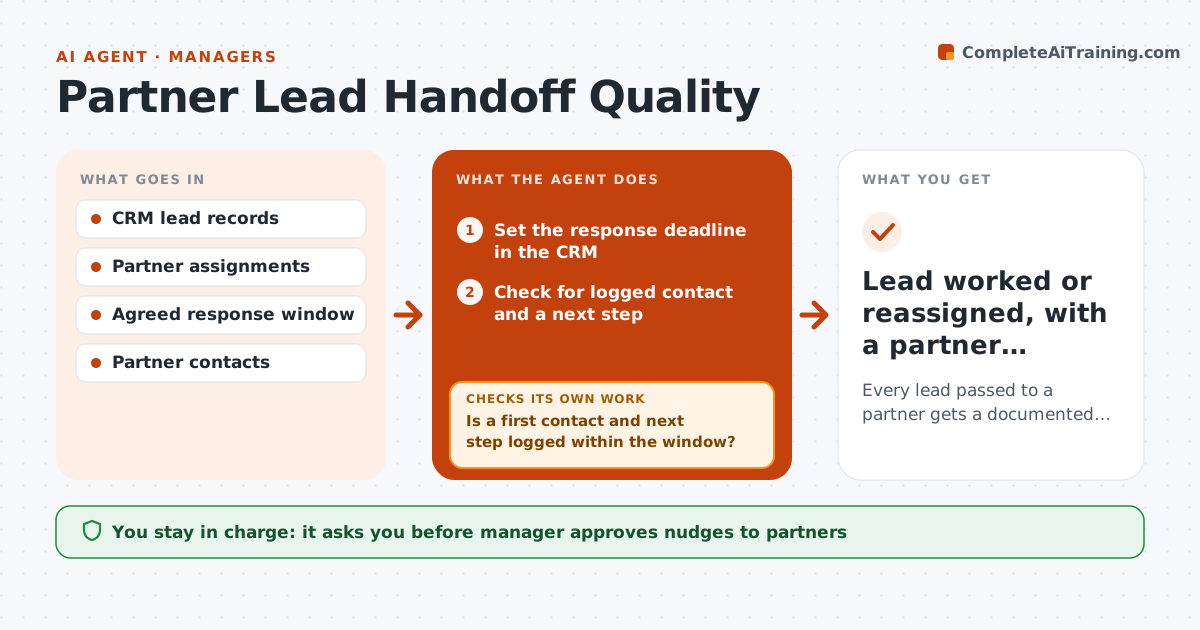
Every lead passed to a partner gets a documented first contact and next step on time
What it does
Leads handed to a partner can disappear: the partner never calls, or logs nothing, and the opportunity cools. This agent tracks every lead passed to a partner. It checks the CRM for a first contact and a next step within the agreed window, usually two business days. It flags idle leads and drafts a short nudge to the partner contact. A few days later it checks again, and if the lead is still idle it proposes reassigning it to another partner. It also reports which partners respond well so future leads go there. The manager approves the reassignment. Edge case: the partner worked the lead by phone and did not log it, so the agent asks before moving it.
How it works
Follow the arrows from top to bottom. The orange dashed arrow is the loop: when a check fails, the agent goes back and tries again.
Read the steps as a list
- Lead passed to a partner
- Set the response deadline in the CRM
- Check for logged contact and a next step
- Is a first contact and next step logged within the window?If not: draft a nudge to the partner with the lead details. Back to step 3.
- Manager approves the nudgeThe agent waits here for your OK.
- Send the nudge and note the date
- Recheck after two business days
- Did the partner act after the nudge?If not: propose reassigning the lead to another partner. Back to step 3.
- Manager approves reassignmentThe agent waits here for your OK.
- Lead worked or reassigned, with a partner response record
How it decides
A lead is idle when no contact or next step is logged within the window. It is proposed for reassignment after one nudge and two more business days without activity.
- Idle when nothing is logged in 2 business days
- Nudge once, then recheck in 2 business days
- Ask before reassigning if the partner says they worked the lead
- Rank partners by past response time for reassignment
Make it yours
Every agent is a starting point. You choose these settings for your own situation.
- Response window (default 2 business days)
- Number of nudges before reassigning
- Partner ranking method
- Message tone
What keeps you in control
It always asks you first
- Manager approves nudges to partners
- Manager approves any reassignment
Hard limits
- Never reassign a lead without approval
- Do not share lead data with unrelated partners
- Log every nudge
It stops when
- Done: lead has a documented next step or is reassigned
- Stop: the lead owner asks to recall the lead
Set it up
We guide you through the set-up, step by step
Members get the full set-up guide for this agent. No technical skills needed: you copy, paste and upload.
- One set of instructions to paste into your AI, with the clicks for ChatGPT, Claude, Microsoft 365 Copilot, Gemini and Grok
- The agent then walks you through connecting your own data, one source at a time
- A downloadable copy with the flow chart, the rules and the full guide