AI agent for real estate brokers
Past Client Anniversary and Equity Check-In Agent
Stay in touch with past clients at relevant moments and turn contacts into conversations
What it does
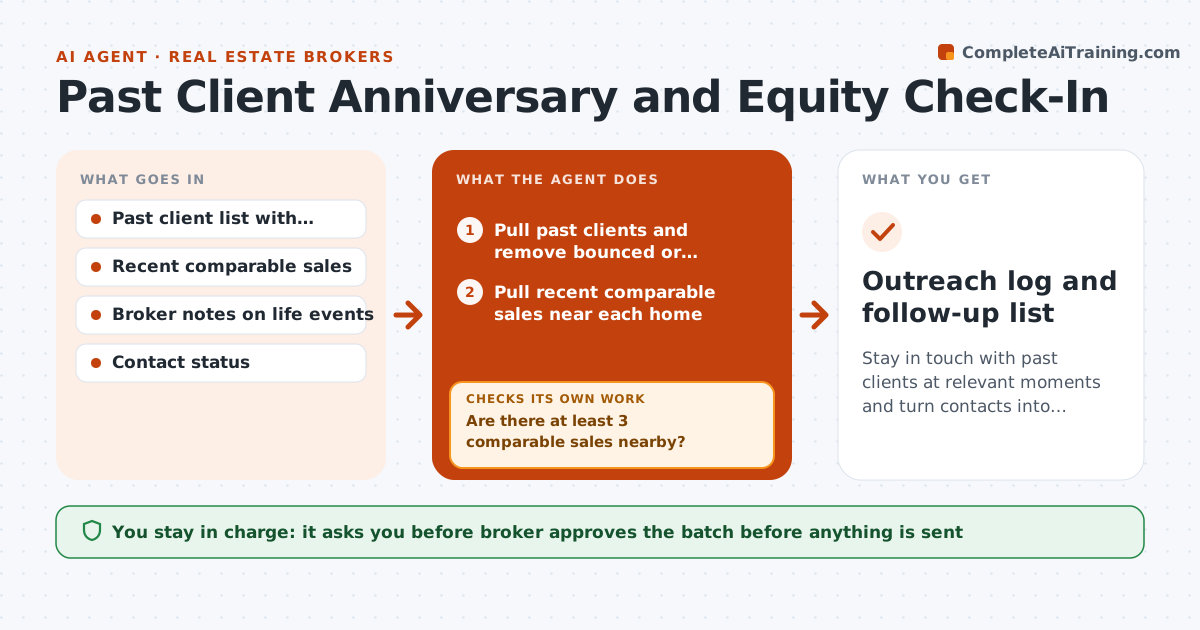
Most brokers know past clients are their best leads, but time passes and the relationship cools until another agent sends a market update. This agent keeps the contact warm. Each month it pulls the past clients, estimates the current value range from recent nearby sales, checks life-event notes the broker logged and finds anniversaries of closing. It drafts a personal check-in with a short market snapshot for that client. It drops any client with a bounced address or a do-not-contact flag, then the broker approves the batch before sending. After sending, it logs replies and sets follow-up tasks. Edge case: not enough nearby sales. The agent widens the area and says the range is rough.
How it works
Follow the arrows from top to bottom. The orange dashed arrow is the loop: when a check fails, the agent goes back and tries again.
Read the steps as a list
- Month begins
- Pull past clients and remove bounced or do-not-contact records
- Pull recent comparable sales near each home
- Estimate a value range per home
- Are there at least 3 comparable sales nearby?If not: Widen the area, label the range as rough or skip the value. Back to step 3.
- Select clients with anniversaries, big value changes or life events
- Draft a personal check-in with a market snapshot
- Broker approves the batchThe agent waits here for your OK.
- Send the messages and log them
- Record replies and create follow-up tasks
- Outreach log and follow-up list
How it decides
It selects clients with an anniversary, a notable value change or a logged life event. It uses a range, never a single figure, and checks data quality first.
- Only 3 or more nearby comparable sales support a value range
- Show a range, never a single figure
- Skip clients contacted in the last 60 days
- Remove bounced or do-not-contact records first
Make it yours
Every agent is a starting point. You choose these settings for your own situation.
- Contacts per month
- Minimum comparable sales (default 3)
- Search radius
- Message tone
- Excluded clients
What keeps you in control
It always asks you first
- Broker approves the batch before anything is sent
Hard limits
- Never presents a value range as an appraisal
- Never contacts clients flagged do-not-contact
It stops when
- Done: batch sent and replies logged
- Stop: data source unavailable, skip value snapshots
Set it up
We guide you through the set-up, step by step
Members get the full set-up guide for this agent. No technical skills needed: you copy, paste and upload.
- One set of instructions to paste into your AI, with the clicks for ChatGPT, Claude, Microsoft 365 Copilot, Gemini and Grok
- The agent then walks you through connecting your own data, one source at a time
- A downloadable copy with the flow chart, the rules and the full guide