AI agent for optometrists
Patient Recall Reactivation Agent
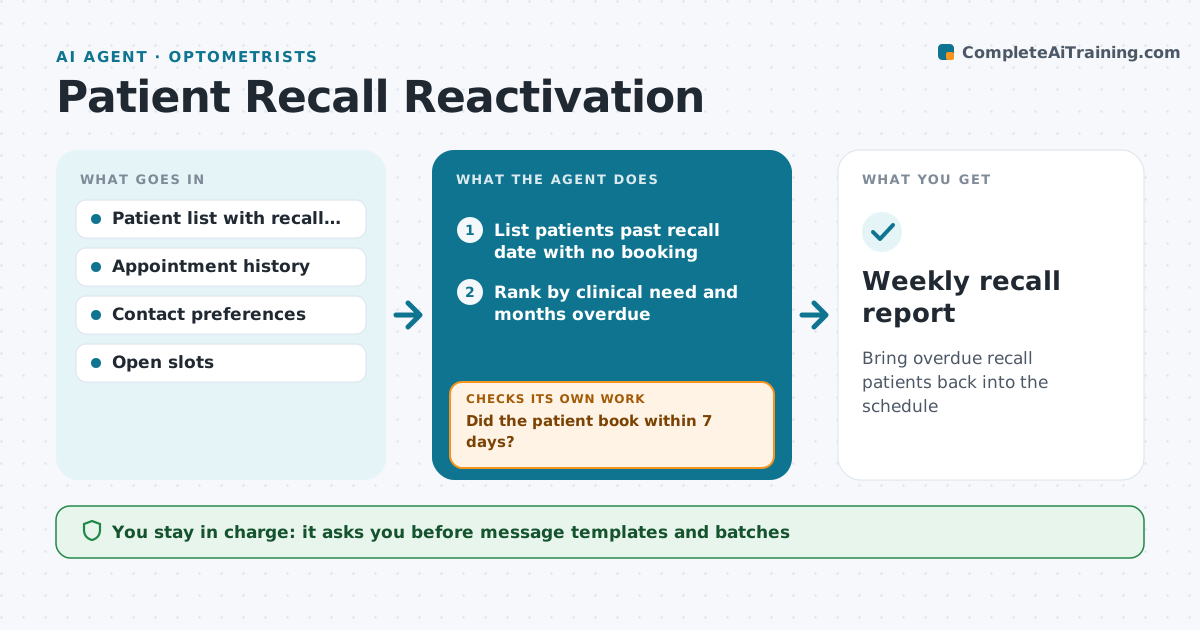
Bring overdue recall patients back into the schedule
What it does
Recall patients drift away when nobody follows up, and their care suffers along with practice income. This agent finds patients past their recall date and checks why: no appointment booked, a cancellation, or a move. It sorts them by how overdue they are and by clinical need, such as active gum disease or a glaucoma suspect. It sends reminders through each patient's preferred channel with open time slots, using the practice's approved templates. It tracks responses. If a patient has not booked within seven days, it sends a second message, then adds the patient to the front desk call list. Each week it checks who booked and who is still overdue. You approve message templates and batches, and any removal from recall. Edge case: patients marked deceased or moved are excluded and the record is flagged for the office.
How it works
Follow the arrows from top to bottom. The orange dashed arrow is the loop: when a check fails, the agent goes back and tries again.
Read the steps as a list
- Weekly recall run
- List patients past recall date with no booking
- Rank by clinical need and months overdue
- Office manager approves message batchThe agent waits here for your OK.
- Send reminders with open slots
- Did the patient book within 7 days?If not: send second reminder, then add to the call list. Back to step 5.
- Weekly recall report
How it decides
Patients are ranked by clinical need first, then months overdue. Contact moves from message to second message to phone list.
- Clinical-need patients are contacted first
- Max three contacts per patient per quarter
- Patients who opt out are never messaged
Make it yours
Every agent is a starting point. You choose these settings for your own situation.
- Contact channels and timing
- Number of reminders
- Clinical priority flags
- Message templates
What keeps you in control
It always asks you first
- Message templates and batches
- Removing a patient from recall
Hard limits
- Respect messaging consent
- No clinical advice in reminders
It stops when
- Done: all overdue patients contacted
- Stop: patient opts out
Set it up
We guide you through the set-up, step by step
Members get the full set-up guide for this agent. No technical skills needed: you copy, paste and upload.
- One set of instructions to paste into your AI, with the clicks for ChatGPT, Claude, Microsoft 365 Copilot, Gemini and Grok
- The agent then walks you through connecting your own data, one source at a time
- A downloadable copy with the flow chart, the rules and the full guide