AI agent for creative directors
Pitch Competition Conflict Check Agent
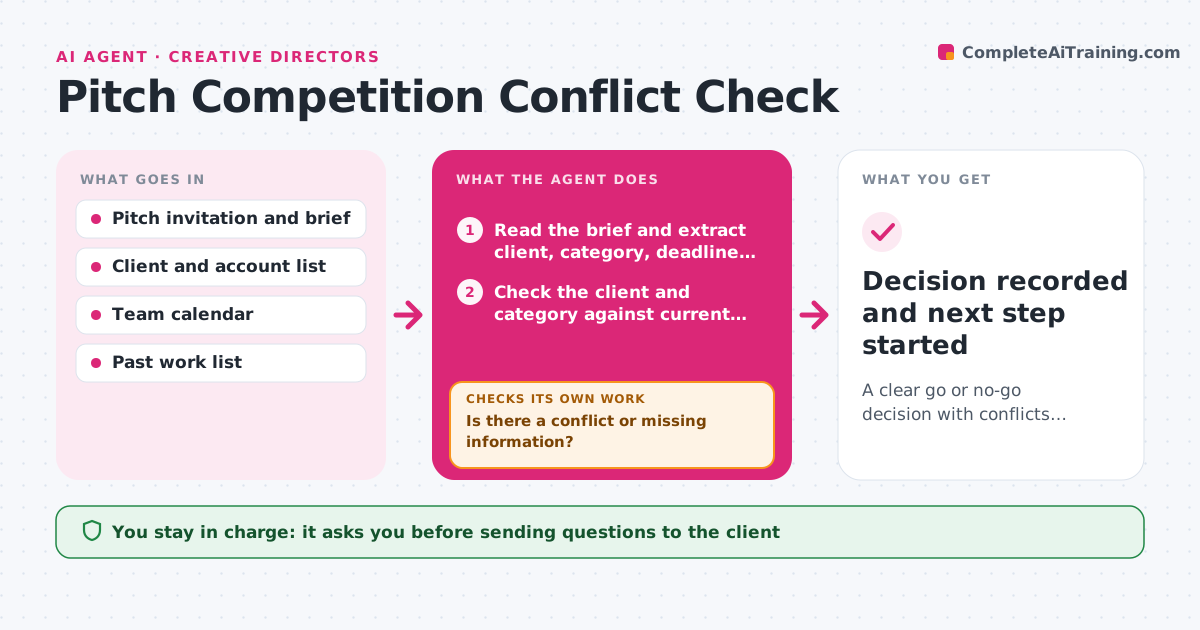
A clear go or no-go decision with conflicts, capacity and brief gaps already answered
What it does
Pitches are often started before anyone checks for client conflicts, past work or free capacity, and time is lost on pitches the agency cannot take. On a pitch invite, this agent checks the client and category against current and past accounts. It confirms that the team has capacity for the deadline and scans the brief for missing information such as budget, timeline or decision makers. If it finds a conflict or a gap, it drafts questions to the client and checks the answers when they arrive. It repeats the conflict check if new details change the picture. It summarizes the case for the creative director with a recommendation. The director decides go or no-go. Edge case: a former client in the same category is flagged, not blocked, if the contract ended over two years ago.
How it works
Follow the arrows from top to bottom. The orange dashed arrow is the loop: when a check fails, the agent goes back and tries again.
Read the steps as a list
- Pitch invitation arrives
- Read the brief and extract client, category, deadline and budget
- Check the client and category against current and past accounts
- Check team capacity against the deadline
- Is there a conflict or missing information?If not: draft questions to the client and wait for the answer. Back to step 3.
- Re-run the checks with the new answers
- Are all conflicts and gaps now resolved or noted?If not: ask the remaining questions or flag the risk. Back to step 3.
- Write a go or no-go summary with a recommendation
- Creative director decides go or no-goThe agent waits here for your OK.
- Decision recorded and next step started
How it decides
Direct conflicts with current clients are a stop. Former clients and category overlaps are flagged with a note. Capacity below the required hours is flagged.
- Stop on any conflict with a current client
- Flag a former client in the same category for 2 years
- Flag capacity under 80% of estimated hours
- Treat a missing budget as a gap to ask
Make it yours
Every agent is a starting point. You choose these settings for your own situation.
- Conflict rules and years to look back
- Capacity threshold
- Required brief fields
- Who is told of the result
What keeps you in control
It always asks you first
- Sending questions to the client
- The go or no-go decision
Hard limits
- Never contacts the client without approval
- Never decides go or no-go
It stops when
- Done: director decided with all facts present
- Stop: a direct conflict is found
Set it up
We guide you through the set-up, step by step
Members get the full set-up guide for this agent. No technical skills needed: you copy, paste and upload.
- One set of instructions to paste into your AI, with the clicks for ChatGPT, Claude, Microsoft 365 Copilot, Gemini and Grok
- The agent then walks you through connecting your own data, one source at a time
- A downloadable copy with the flow chart, the rules and the full guide