AI agent for urban planners
Planning Board Staff Report Assembly Agent
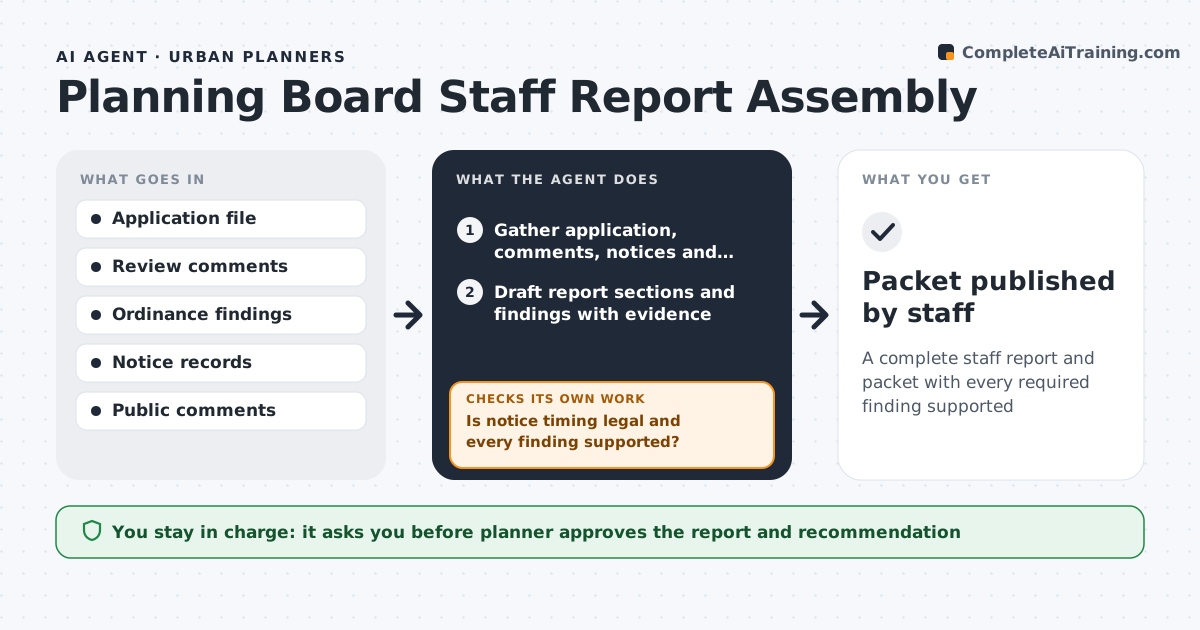
A complete staff report and packet with every required finding supported
What it does
Each case going to the planning board needs a staff report with background, analysis, required findings, public comments, conditions and exhibits, usually on a tight packet deadline. This agent gathers the latest application, review comments, notices and exhibits, then drafts each section with every required finding from the ordinance tied to evidence. It checks that notice was sent on time and that every finding is supported; it adds missing evidence or stops and alerts the planner if notice was late. It summarizes public comments by theme with counts. Before release it checks for new comments or exhibits and updates the summary. The planner writes the recommendation and approves the packet. Edge case: if mailing proof shows a date too late for the legal notice period, the agent stops so the case can be rescheduled.
How it works
Follow the arrows from top to bottom. The orange dashed arrow is the loop: when a check fails, the agent goes back and tries again.
Read the steps as a list
- Case scheduled for board meeting
- Gather application, comments, notices and exhibits
- Draft report sections and findings with evidence
- Is notice timing legal and every finding supported?If not: add missing evidence or alert the planner if notice is late. Back to step 3.
- Summarize public comments received
- Have new comments or exhibits arrived since drafting?If not: keep the summary as is. Back to step 5.
- Planner writes the recommendation and approves the packetThe agent waits here for your OK.
- Packet published by staff
How it decides
Each required finding must link to evidence in the file. Notice dates are checked against the legal minimum.
- Findings come from the ordinance list
- Late notice stops the packet
- Comments are summarized by theme with counts
Make it yours
Every agent is a starting point. You choose these settings for your own situation.
- Report template
- Required findings by case type
- Legal notice period
- Days before meeting to start (default 21)
What keeps you in control
It always asks you first
- Planner approves the report and recommendation
- Packet publication by staff
Hard limits
- Never writes the staff recommendation
- Never publishes the packet itself
It stops when
- Done: packet approved
- Stop: notice period not met
Set it up
We guide you through the set-up, step by step
Members get the full set-up guide for this agent. No technical skills needed: you copy, paste and upload.
- One set of instructions to paste into your AI, with the clicks for ChatGPT, Claude, Microsoft 365 Copilot, Gemini and Grok
- The agent then walks you through connecting your own data, one source at a time
- A downloadable copy with the flow chart, the rules and the full guide