AI agent for no-code developers
Platform Limit and Cost Watch Agent
Stay under platform limits and cost targets without breaking what the app does
What it does
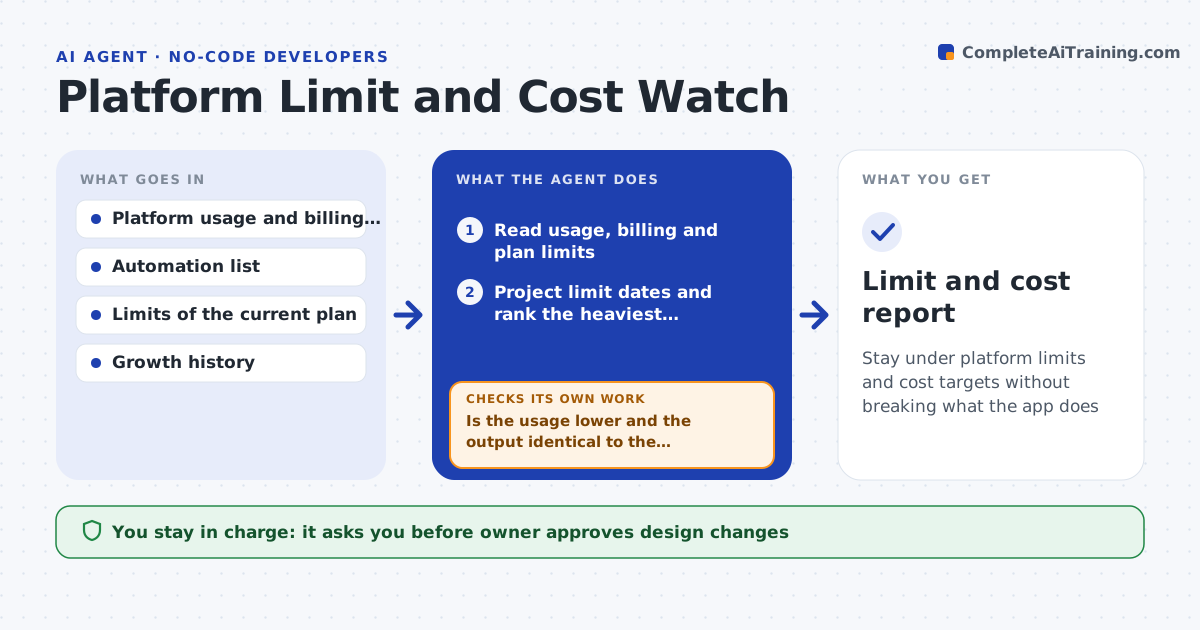
A no-code app hums along until it hits the monthly run limit, or the record cap, and the plan bill doubles. This agent reads the platform usage data each week for records, automation runs, API calls and storage. It projects when each limit will be reached at the current growth rate and lists the heaviest automations and queries. For the heaviest items it designs a lighter version, such as batching, a filter, a schedule instead of a trigger or archiving old records, and tests it in a copy to measure the saving and check the results are the same. It then compares the saving with the cost of a plan upgrade. The owner approves design changes or an upgrade. Edge case: a lighter design misses edits made between runs, so the agent changes the schedule.
How it works
Follow the arrows from top to bottom. The orange dashed arrow is the loop: when a check fails, the agent goes back and tries again.
Read the steps as a list
- Weekly usage check
- Read usage, billing and plan limits
- Project limit dates and rank the heaviest automations and queries
- Design a lighter version for the top items
- Run the lighter version in a test copy and measure usage
- Is the usage lower and the output identical to the original?If not: adjust the design, such as the schedule or filter, and test again. Back to step 4.
- Compare the saving with the cost of upgrading the plan
- Owner approves design changes or an upgradeThe agent waits here for your OK.
- Apply the change and measure usage for a week
- Did live usage fall as predicted within 15%?If not: recheck the ranking with the new usage data. Back to step 3.
- Limit and cost report
How it decides
It projects the date each limit is hit and acts first on the item with the earliest date and largest saving, keeping a lighter design only if the results match.
- Warn when a limit will be reached within 60 days
- Act first on the item with the earliest limit date
- Accept a lighter design only when outputs match on a test sample
- Recommend an upgrade when the saving is less than the upgrade cost
Make it yours
Every agent is a starting point. You choose these settings for your own situation.
- Warning horizon (default 60 days)
- Limits to watch
- Cost targets
- Test sample size
- Report recipients
What keeps you in control
It always asks you first
- Owner approves design changes
- Owner approves plan upgrades
Hard limits
- Never change live automations without approval
- Never upgrade or change billing
It stops when
- Done: projected usage stays under limits for 6 months
- Stop: no lighter design works and an upgrade is needed
Set it up
We guide you through the set-up, step by step
Members get the full set-up guide for this agent. No technical skills needed: you copy, paste and upload.
- One set of instructions to paste into your AI, with the clicks for ChatGPT, Claude, Microsoft 365 Copilot, Gemini and Grok
- The agent then walks you through connecting your own data, one source at a time
- A downloadable copy with the flow chart, the rules and the full guide