AI agent for podcasters
Podcast Listener Analytics Review Agent
A weekly review that ties audience numbers to concrete changes in the next episodes
What it does
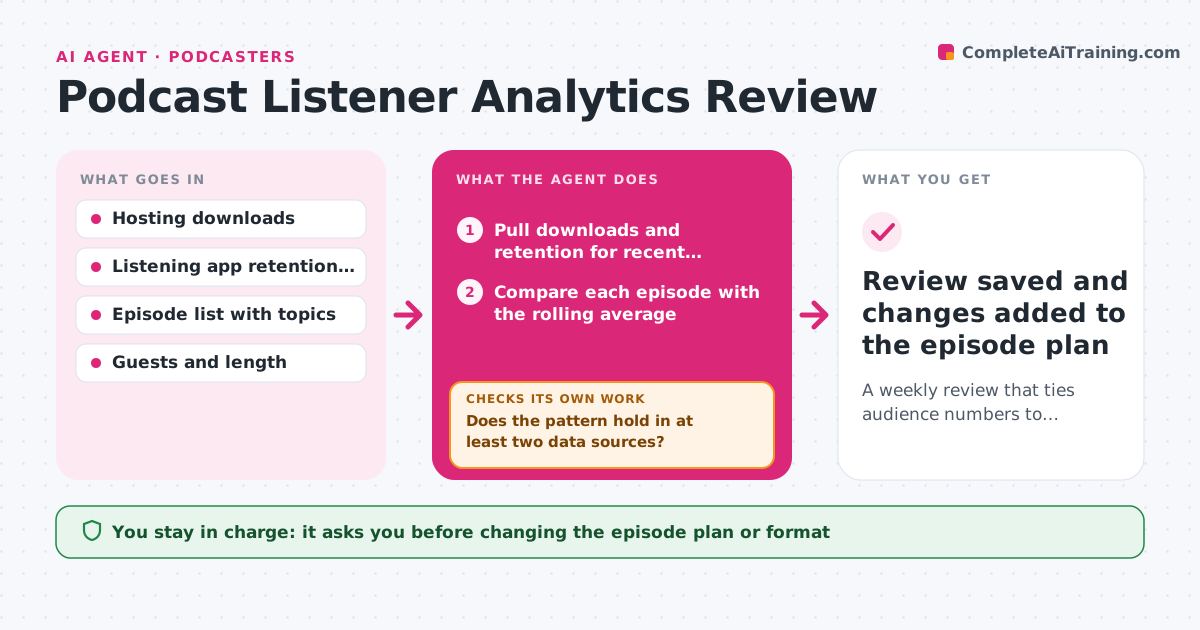
Most podcasters watch downloads but never connect them to topics, guests or episode length. Each week this agent pulls data from your hosting platform and listening apps. It compares each new episode with your recent average for 7-day downloads and listen-through rate. It finds where listeners drop off and lines that up with what was happening in the episode at that minute. Before calling something a trend, it checks that the pattern holds in at least two data sources. If it does not, it marks the pattern as unconfirmed and checks again next week with more data. It then writes a short review with at most three suggested changes for coming episodes. You decide what to try. Edge case: a spike from one external mention, like a newsletter shout-out, is labeled a one-off instead of a topic trend.
How it works
Follow the arrows from top to bottom. The orange dashed arrow is the loop: when a check fails, the agent goes back and tries again.
Read the steps as a list
- Weekly review begins
- Pull downloads and retention for recent episodes
- Compare each episode with the rolling average
- Find drop-off points and match them to transcript moments
- Does the pattern hold in at least two data sources?If not: mark it as unconfirmed and check again next week with more data. Back to step 3.
- Write review with suggested changes
- Podcaster picks which changes to tryThe agent waits here for your OK.
- Review saved and changes added to the episode plan
How it decides
It flags an episode only when it differs from the recent average by more than the set threshold and the difference holds across at least two data sources.
- Flag differences above the threshold only
- Label spikes tied to one referral source as one-offs
- Suggest at most three changes per week
Make it yours
Every agent is a starting point. You choose these settings for your own situation.
- Rolling average window (default 8 episodes)
- Threshold that counts as a real change (default 20%)
- Which apps to pull from
- Review delivery format
What keeps you in control
It always asks you first
- Changing the episode plan or format
Hard limits
- Does not change published episodes
- Uses only the show's own data
It stops when
- Done: review delivered and decisions logged
- Stop: data sources unavailable; report what is missing
Set it up
We guide you through the set-up, step by step
Members get the full set-up guide for this agent. No technical skills needed: you copy, paste and upload.
- One set of instructions to paste into your AI, with the clicks for ChatGPT, Claude, Microsoft 365 Copilot, Gemini and Grok
- The agent then walks you through connecting your own data, one source at a time
- A downloadable copy with the flow chart, the rules and the full guide