AI agent for insurance risk analysts
Policy Wording Exclusion Gap Agent
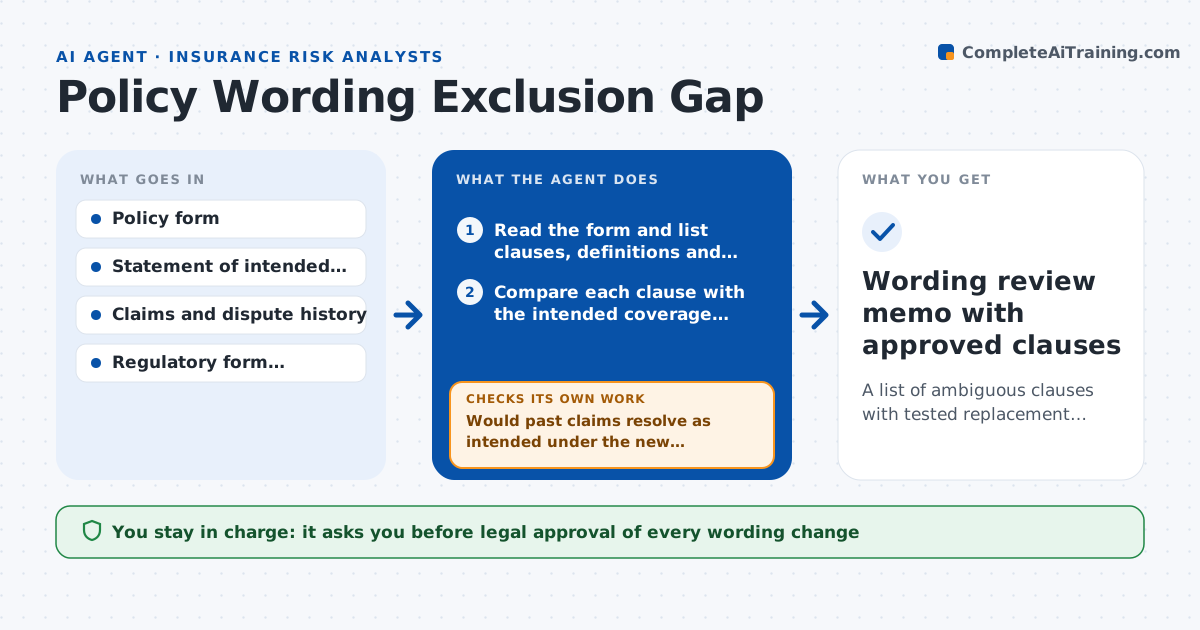
A list of ambiguous clauses with tested replacement wording ready for legal review
What it does
A small phrase in a policy form can cover something the insurer never meant to cover, and the gap is found in a dispute. This agent reads a policy form clause by clause and compares the wording with a plain statement of the intended coverage from underwriting. It also searches the claims history for disputes and denials that involved the same wording. For each ambiguous clause it flags the risk, explains the reading that would favor the policyholder and drafts alternative wording. It then tests each alternative against past disputed claims to see whether the outcome would have been the intended one. If an alternative still fails, it revises and tests again. Legal approves any wording change. Edge case: a defined term used in two sections with different meanings is flagged as a conflict.
How it works
Follow the arrows from top to bottom. The orange dashed arrow is the loop: when a check fails, the agent goes back and tries again.
Read the steps as a list
- A policy form is submitted for review
- Read the form and list clauses, definitions and exclusions
- Compare each clause with the intended coverage statement
- Search claims history for disputes involving the same wording
- Flag ambiguous or conflicting clauses with the reading that expands coverage
- Draft alternative wording for each flagged clause
- Test each alternative against past disputed claims
- Would past claims resolve as intended under the new wording?If not: revise the wording to close the gap and test again. Back to step 6.
- Does the new wording conflict with other definitions or required form language?If not: adjust the clause or the cross-reference and retest. Back to step 5.
- Legal approves any wording changeThe agent waits here for your OK.
- Wording review memo with approved clauses
How it decides
It flags a clause when the wording supports a reading wider than the intent or when past claims disputed it, and it accepts replacement wording only when past disputed claims would resolve as intended.
- Flag any clause with two plausible readings
- Flag any term defined twice or undefined
- Prioritize clauses tied to three or more past disputes
- Reject alternatives that remove coverage required by regulation
Make it yours
Every agent is a starting point. You choose these settings for your own situation.
- Lines of business to review
- Intent statement format
- Number of past disputes that raises a clause's priority (default 3)
- Where drafts are sent for legal review
What keeps you in control
It always asks you first
- Legal approval of every wording change
- Filing of a revised form
Hard limits
- Never changes or files a form itself
- Does not give legal opinions, only flags and drafts
- Marks tests as based on past claims only
It stops when
- Done: all flagged clauses are resolved or accepted by legal
- Stop: the intended coverage statement is missing
Set it up
We guide you through the set-up, step by step
Members get the full set-up guide for this agent. No technical skills needed: you copy, paste and upload.
- One set of instructions to paste into your AI, with the clicks for ChatGPT, Claude, Microsoft 365 Copilot, Gemini and Grok
- The agent then walks you through connecting your own data, one source at a time
- A downloadable copy with the flow chart, the rules and the full guide