AI agent for product owners
Post-Release Outcome Review Agent
Know whether a release met its goal, with trustworthy data
What it does
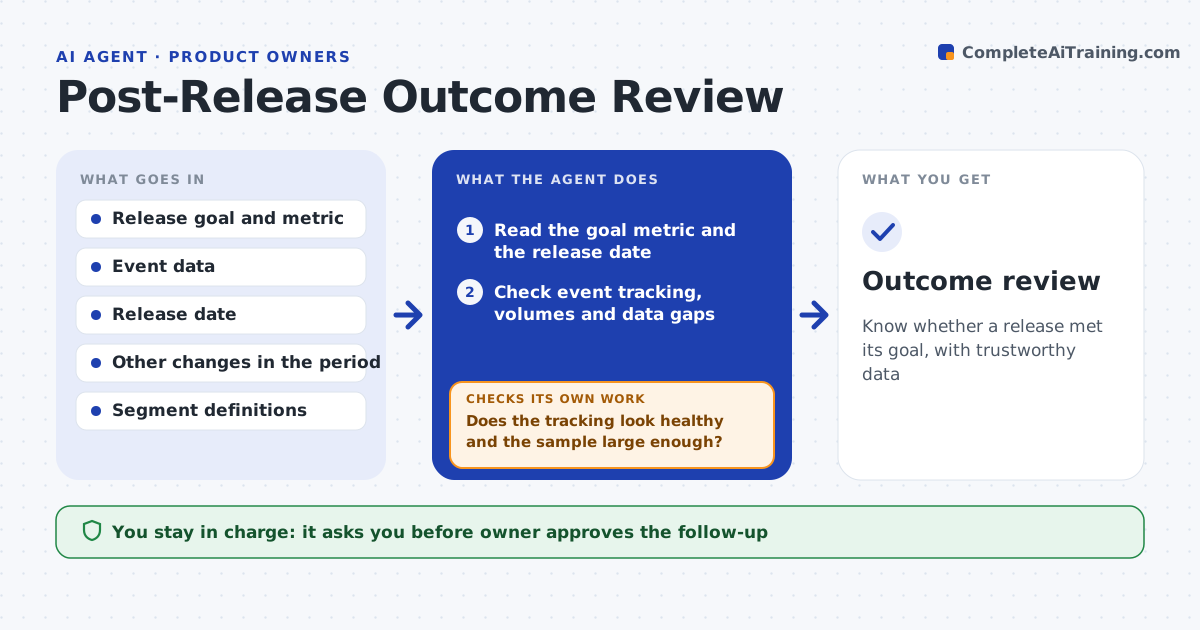
A feature shipped to raise trial conversion by 5%, and eight weeks later nobody can say whether it did. Several weeks after release, this agent reads the goal metric set before release. Before it concludes anything, it checks that tracking works: events fire, volumes look normal and the sample is large enough. It compares the metric before and after, by segment such as new users and plan type, and accounts for other changes in the period such as campaigns. If tracking looks broken, it reports that first and waits for a fix. It then proposes a follow-up: iterate, roll back, expand or stop, with reasons. The product owner approves the follow-up. Edge case: conversion rose but only because a campaign ran in the same weeks, so the agent says the result is unclear.
How it works
Follow the arrows from top to bottom. The orange dashed arrow is the loop: when a check fails, the agent goes back and tries again.
Read the steps as a list
- Review date reached
- Read the goal metric and the release date
- Check event tracking, volumes and data gaps
- Does the tracking look healthy and the sample large enough?If not: report the tracking problem and wait for a fix, then recheck. Back to step 2.
- Compare the metric before and after, by segment
- List other changes in the period such as campaigns and pricing
- Is the change larger than normal variation and not explained by other changes?If not: extend the window or call the result unclear. Back to step 5.
- Propose a follow-up with reasons
- Owner approves the follow-upThe agent waits here for your OK.
- Outcome review
How it decides
It trusts a result only when tracking checks pass, the sample is large enough and no larger confounding change overlaps, and otherwise reports it as unclear.
- Require at least 1,000 users in each period compared
- Treat a change below the normal weekly variation as no change
- Report the tracking problem before any conclusion
- Call a result unclear when a campaign overlaps
Make it yours
Every agent is a starting point. You choose these settings for your own situation.
- Review delay (default 6 weeks)
- Minimum sample size
- Segments
- Variation threshold
- Report format
What keeps you in control
It always asks you first
- Owner approves the follow-up
- Owner approves sharing the review
Hard limits
- Never conclude from data with broken tracking
- Never present a result as proven when other changes overlap
It stops when
- Done: the outcome and follow-up are recorded
- Stop: tracking cannot be fixed and the review is postponed
Set it up
We guide you through the set-up, step by step
Members get the full set-up guide for this agent. No technical skills needed: you copy, paste and upload.
- One set of instructions to paste into your AI, with the clicks for ChatGPT, Claude, Microsoft 365 Copilot, Gemini and Grok
- The agent then walks you through connecting your own data, one source at a time
- A downloadable copy with the flow chart, the rules and the full guide