AI agent for speechwriters
Pre-Speech News Watch Agent
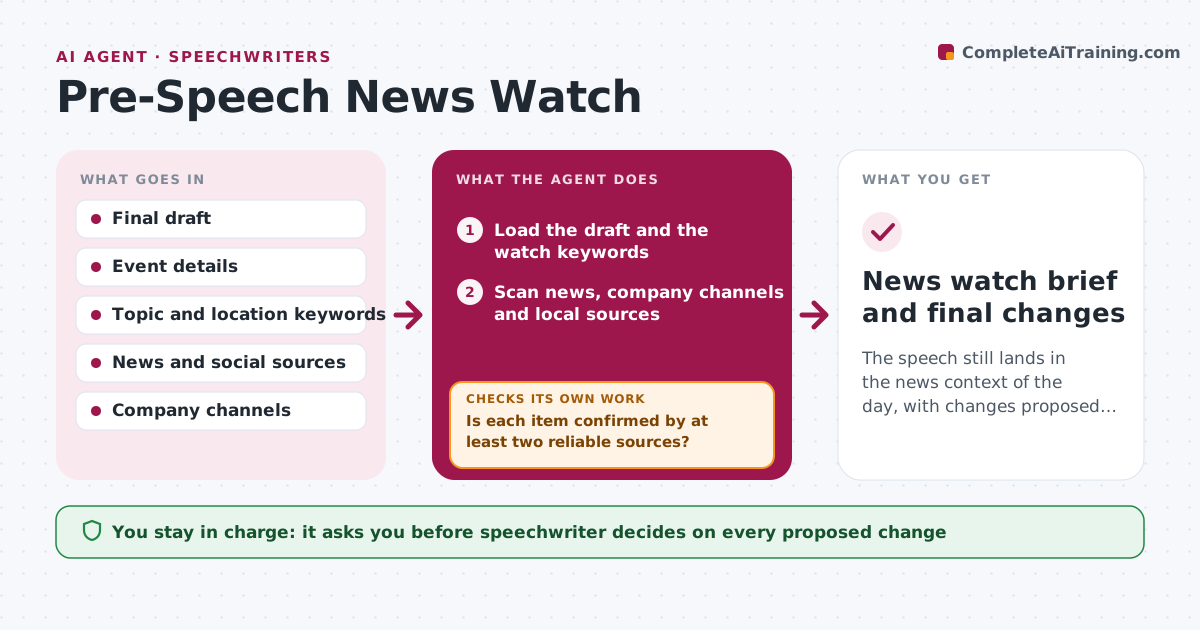
The speech still lands in the news context of the day, with changes proposed before it is delivered.
What it does
An executive is about to say 'we are all thrilled' on the day a competitor announces layoffs, or a local disaster hits the host city. This agent watches in the days before a speech. It scans news and company channels for events related to the topic, audience, location and industry. It checks each line of the draft against what it finds and proposes edits where tone clashes or facts changed. It scans again on the morning of the speech. You decide on every change. Edge case: an unconfirmed rumor on social media is reported as unverified, with the source, rather than treated as news.
How it works
Follow the arrows from top to bottom. The orange dashed arrow is the loop: when a check fails, the agent goes back and tries again.
Read the steps as a list
- Speech date within 5 days
- Load the draft and the watch keywords
- Scan news, company channels and local sources
- Select items related to topic, audience, place and company
- Is each item confirmed by at least two reliable sources?If not: Label the item as unverified and search again. Back to step 3.
- Compare each draft line against the confirmed items
- Propose edits, additions or cuts with reasons
- Speechwriter decides on each changeThe agent waits here for your OK.
- Rescan on the morning of the speech
- News watch brief and final changes
How it decides
It flags a news item when it concerns the topic, location, audience or company and conflicts with a line's tone or facts, and rates it by how much it affects the speech.
- Scan 5 days before and on the morning of the speech
- Rate impact high when a line becomes false or insensitive
- Never treat rumors as facts
- Check the venue city for emergencies
Make it yours
Every agent is a starting point. You choose these settings for your own situation.
- Watch keywords and places
- Days to watch (default 5)
- Sources
- Sensitivity rating rules
What keeps you in control
It always asks you first
- Speechwriter decides on every proposed change
Hard limits
- Never edit the speech itself
- Never present unverified news as fact
It stops when
- Done: morning scan complete and speaker briefed
- Stop: sources unavailable
Set it up
We guide you through the set-up, step by step
Members get the full set-up guide for this agent. No technical skills needed: you copy, paste and upload.
- One set of instructions to paste into your AI, with the clicks for ChatGPT, Claude, Microsoft 365 Copilot, Gemini and Grok
- The agent then walks you through connecting your own data, one source at a time
- A downloadable copy with the flow chart, the rules and the full guide