AI agent for internal communications managers
Town Hall Question Triage Agent
Give leaders a short, themed question list with sourced draft answers and clear flags.
What it does
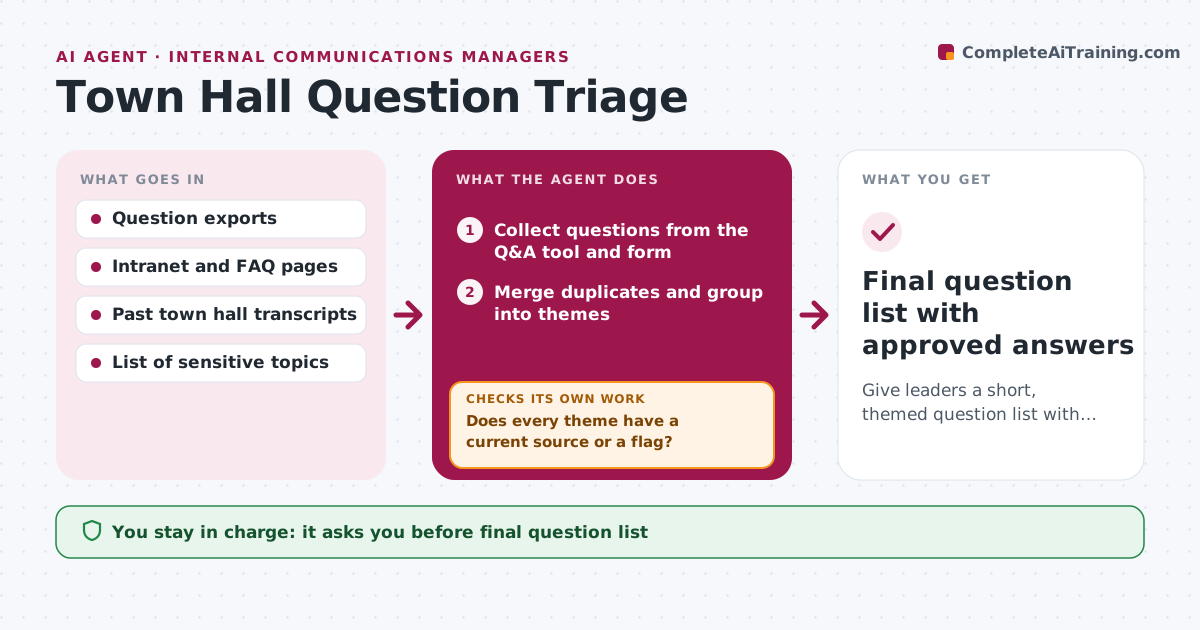
Before and during an all-hands, hundreds of questions arrive and leaders only see the top voted ones. This agent collects questions from your Q&A tool and the pre-event form, merges duplicates, and groups them into themes. For each theme it searches the intranet, FAQ and past town hall answers, then drafts a suggested answer with its source. If it finds no source, or the question is about layoffs, pay or legal matters, it flags the question for a leader instead of drafting. It rechecks the list as new questions come in live. You and the leader approve the final list and every answer. Edge case: ten people ask about the same reorg rumor in different words, and the agent shows them as one theme with the count.
How it works
Follow the arrows from top to bottom. The orange dashed arrow is the loop: when a check fails, the agent goes back and tries again.
Read the steps as a list
- Question window opens
- Collect questions from the Q&A tool and form
- Merge duplicates and group into themes
- Search intranet, FAQ and past answers for each theme
- Does every theme have a current source or a flag?If not: Search again with other keywords, then flag the theme for a leader. Back to step 3.
- Mark sensitive or unsupported questions for leader decision
- Draft suggested answers with source links
- Communications manager and leader approve the list and answersThe agent waits here for your OK.
- Add late questions during the event and rerun grouping
- Do new questions fit existing themes?If not: Create a new theme and repeat the source search. Back to step 2.
- Final question list with approved answers
How it decides
It drafts an answer only when it finds a current source. Sensitive topics and unsupported questions go to a leader. Themes are ranked by number of askers, not votes alone.
- Questions on layoffs, pay, legal or named people always go to a leader
- A theme with 5 or more askers is ranked above single questions
- Sources older than 12 months are marked possibly outdated
- Never draft an answer without a source link
Make it yours
Every agent is a starting point. You choose these settings for your own situation.
- Sensitive topic list
- Age limit for sources (default 12 months)
- Minimum askers to rank a theme (default 5)
- Number of themes shown to the leader
- Where the final list is delivered
What keeps you in control
It always asks you first
- Final question list
- Every draft answer
- Any question marked sensitive
Hard limits
- Never publishes answers
- Never shows who asked a question
- Always links its source
It stops when
- Done: all themes have an approved answer or leader owner
- Stop: event ends; unanswered themes go to a follow-up post
Set it up
We guide you through the set-up, step by step
Members get the full set-up guide for this agent. No technical skills needed: you copy, paste and upload.
- One set of instructions to paste into your AI, with the clicks for ChatGPT, Claude, Microsoft 365 Copilot, Gemini and Grok
- The agent then walks you through connecting your own data, one source at a time
- A downloadable copy with the flow chart, the rules and the full guide